Realtime
Subscribe a SPECS Lens to Snap Cloud Realtime channels: receive broadcasts, listen for database changes, and stream a cursor position to a web page.
- Snapchat: not supported
- SPECS: fully supported
- Camera Kit Web: not supported
- Camera Kit Mobile: not supported
- SnapchatNot supported
- SPECSFully supported
- Camera Kit WebNot supported
- Camera Kit MobileNot supported
Snap Cloud Realtime is a globally distributed service for low-latency messaging between clients through Broadcast, and for syncing state across clients through Presence. Clients send and receive on named channels. This guide subscribes a Lens to a channel, sends it a message from the dashboard, listens for database changes, and streams a cursor between a Lens and a web page.
For the full reference, see the Snap Cloud documentation site.
Before you start
- Finish Get Started: a Snap Cloud project, its
SupabaseProjectasset, and theSnapCloudStarterscript from Create the client and sign in. Realtime needs the client'sheartbeatIntervalMs: 2500option, which the starter sets: without it, the connection times out. - Each Realtime message is limited to 250 KB. See Limits.
Subscribe a Lens to a Realtime channel
This method subscribes to a channel named test-channel and prints every message it receives whose event is test-event. Add it to the SnapCloudStarter script and call it from onSignedIn(), so it runs after the user signs in.
- TypeScript
- JavaScript
  async onSignedIn() {
    this.testRealtime();
  }

  testRealtime() {
    let broadcastChannel = this.client.channel('test-channel');
    broadcastChannel
      .on('broadcast', { event: 'test-event' }, (msg) => {
        print('New message: ' + JSON.stringify(msg));
      })
      .subscribe(async (status) => {
        print(`Broadcast channel status: ${status}`);
        if (status === 'SUBSCRIBED') {
          print('Subscribed to channel!');
        } else if (
          status === 'CLOSED' ||
          status === 'CHANNEL_ERROR' ||
          status === 'TIMED_OUT'
        ) {
          print('Channel closed');
        }
      });
  }
// Add inside the SnapCloudStarter function, replacing this.onSignedIn:
this.onSignedIn = async function () {
  this.testRealtime();
};

this.testRealtime = function () {
  let broadcastChannel = this.client.channel('test-channel');
  broadcastChannel
    .on('broadcast', { event: 'test-event' }, function (msg) {
      print('New message: ' + JSON.stringify(msg));
    })
    .subscribe(async function (status) {
      print('Broadcast channel status: ' + status);
      if (status === 'SUBSCRIBED') {
        print('Subscribed to channel!');
      } else if (
        status === 'CLOSED' ||
        status === 'CHANNEL_ERROR' ||
        status === 'TIMED_OUT'
      ) {
        print('Channel closed');
      }
    });
};
Broadcast a test message from the Snap Cloud dashboard
To check the subscription, send a message to test-channel from the dashboard while the Lens runs.
-
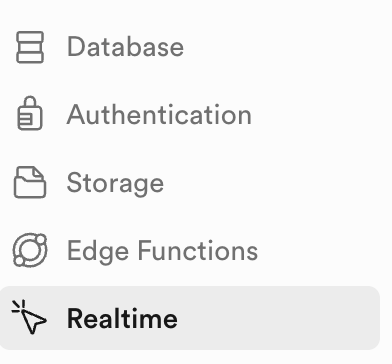
In the dashboard's left sidebar, select Realtime.
-
Select Join a channel.
-
Enter
test-channel, then select Listen to channel. The page shows the channel's incoming messages.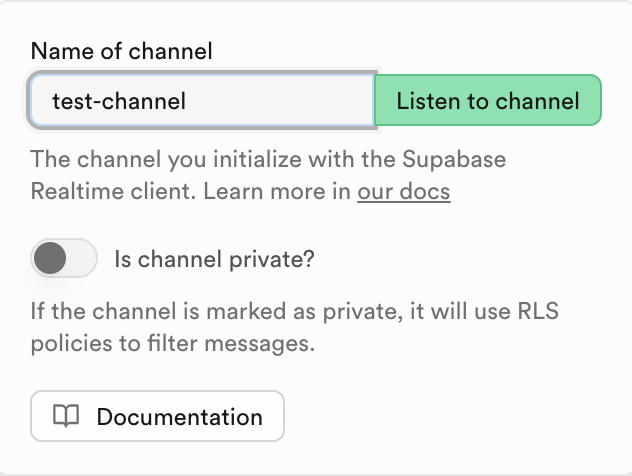
-
Select Broadcast a message.
-
Under Message name, enter
test-event, and enter any payload. -
Select Confirm.
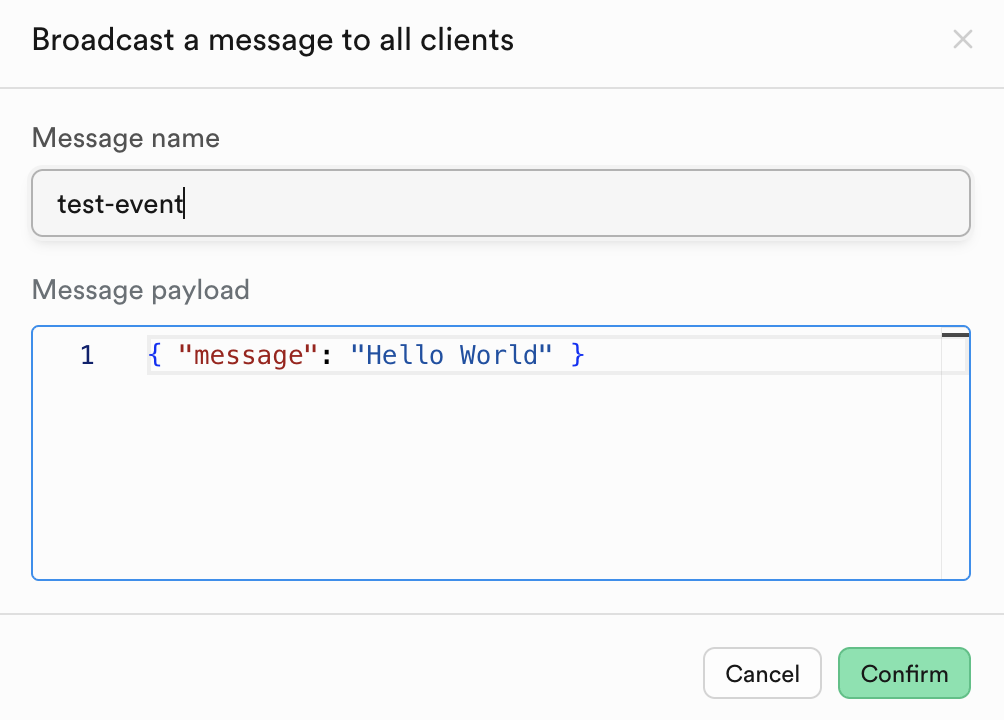
The message appears in the Lens Studio Logger.

Turn on Realtime for a Snap Cloud table
A Lens receives database changes only from tables that broadcast them. In the Table Editor, when you create or edit the table, check Broadcast changes on this table to authorized subscribers. The Lens then gets a message for every insert, update, and delete on the table. The example in the next section uses test_table from the Databases guide.
Receive database changes and broadcasts on one channel
One channel can carry both kinds of Realtime traffic:
- Database changes (
postgres_changes): a message for every INSERT, UPDATE, and DELETE on a table. - Broadcast messages (
broadcast): custom messages sent between clients.
When the channel reaches SUBSCRIBED, the script sends a broadcast, then inserts a row into the table to trigger a database change, and logs every event it receives. Add these members to the SnapCloudStarter script, replacing its empty onSignedIn(), and add RealtimeChannel to its import from SupabaseClient.lspkg/supabase-snapcloud. They use the starter's client, uid and delay members.
- TypeScript
- JavaScript
  @input
  @hint('Table name to subscribe to for realtime updates')
  tableName: string = 'test_table';

  @input
  @hint('Channel name for realtime subscription')
  channelName: string = 'db-changes';

  private channel: RealtimeChannel;

  async onSignedIn() {
    this.log('Setting up realtime subscription...');
    await this.setupRealtimeSubscription();
  }

  async setupRealtimeSubscription() {
    this.log('--- REALTIME EXAMPLE START ---');
    this.log('Setting up two types of realtime:');
    this.log('1. Database changes (postgres_changes)');
    this.log('2. Broadcast messages (broadcast)');

    this.channel = this.client
      .channel(this.channelName)
      .on(
        'postgres_changes',
        {
          event: '*',
          schema: 'public',
          table: this.tableName,
        },
        (payload) => {
          this.handleRealtimeEvent(payload);
        }
      )
      .on('broadcast', { event: 'test-event' }, (msg) => {
        this.log('--- BROADCAST MESSAGE RECEIVED ---');
        this.log('Message: ' + JSON.stringify(msg.payload));
        this.log('--- END BROADCAST ---');
      });

    this.channel.subscribe((status) => {
      this.log('Channel status: ' + status);

      if (status === 'SUBSCRIBED') {
        this.log('Realtime channel active');
        this.log('Listening for both database changes and broadcasts');

        this.testRealtimeFeatures();
      } else if (
        status === 'CLOSED' ||
        status === 'CHANNEL_ERROR' ||
        status === 'TIMED_OUT'
      ) {
        this.log('Channel closed or error');
      }
    });
  }

  async testRealtimeFeatures() {
    await this.delay(1000);
    this.log('Testing broadcast message...');
    await this.sendBroadcastMessage('Hello from Lens Studio!');

    await this.delay(2000);
    this.log('Testing database change detection...');
    await this.testRealtimeWithInsert();
  }

  async testRealtimeWithInsert() {
    await this.delay(2000);

    this.log('Inserting test record to trigger realtime event...');

    const testMessage = 'Realtime test ' + Date.now();

    const { data, error } = await this.client
      .from(this.tableName)
      .insert([
        {
          user_id: this.uid,
          message: testMessage,
        },
      ])
      .select();

    if (error) {
      this.log('Insert failed: ' + JSON.stringify(error));
    } else {
      this.log('Test record inserted - waiting for realtime event...');
    }
  }

  handleRealtimeEvent(payload: any) {
    const eventType = payload.eventType || 'UNKNOWN';
    this.log('--- REALTIME EVENT RECEIVED ---');
    this.log('Event type: ' + eventType);

    if (payload.new) {
      this.log('New data:');
      this.log('  ID: ' + (payload.new.id || 'N/A'));
      this.log('  Message: ' + (payload.new.message || 'N/A'));
      this.log('  User ID: ' + (payload.new.user_id || 'N/A'));
    }

    if (payload.old) {
      this.log('Old data:');
      this.log('  ID: ' + (payload.old.id || 'N/A'));
    }

    this.log('--- END EVENT ---');
  }

  async sendBroadcastMessage(message: string) {
    if (!this.channel) {
      this.log('Channel not initialized');
      return;
    }

    this.log('Sending broadcast: ' + message);

    this.channel.send({
      type: 'broadcast',
      event: 'test-event',
      payload: {
        message: message,
        user_id: this.uid,
        timestamp: Date.now(),
      },
    });

    this.log('Broadcast sent successfully');
  }

  private log(message: string) {
    print('[RealtimeExample] ' + message);
  }
// Add below the starter's supabaseProject input:
//@input string tableName = "test_table" {"hint":"Table name to subscribe to for realtime updates"}
//@input string channelName = "db-changes" {"hint":"Channel name for realtime subscription"}

// Add inside the SnapCloudStarter function, replacing this.onSignedIn:
this.channel = null;

this.onSignedIn = async function () {
  this.log('Setting up realtime subscription...');
  await this.setupRealtimeSubscription();
};

this.setupRealtimeSubscription = async function () {
  this.log('--- REALTIME EXAMPLE START ---');
  this.log('Setting up two types of realtime:');
  this.log('1. Database changes (postgres_changes)');
  this.log('2. Broadcast messages (broadcast)');

  this.channel = this.client
    .channel(script.channelName)
    .on(
      'postgres_changes',
      {
        event: '*',
        schema: 'public',
        table: script.tableName,
      },
      (payload) => {
        this.handleRealtimeEvent(payload);
      }
    )
    .on('broadcast', { event: 'test-event' }, (msg) => {
      this.log('--- BROADCAST MESSAGE RECEIVED ---');
      this.log('Message: ' + JSON.stringify(msg.payload));
      this.log('--- END BROADCAST ---');
    });

  this.channel.subscribe((status) => {
    this.log('Channel status: ' + status);

    if (status === 'SUBSCRIBED') {
      this.log('Realtime channel active');
      this.log('Listening for both database changes and broadcasts');

      this.testRealtimeFeatures();
    } else if (
      status === 'CLOSED' ||
      status === 'CHANNEL_ERROR' ||
      status === 'TIMED_OUT'
    ) {
      this.log('Channel closed or error');
    }
  });
};

this.testRealtimeFeatures = async function () {
  await this.delay(1000);
  this.log('Testing broadcast message...');
  await this.sendBroadcastMessage('Hello from Lens Studio!');

  await this.delay(2000);
  this.log('Testing database change detection...');
  await this.testRealtimeWithInsert();
};

this.testRealtimeWithInsert = async function () {
  await this.delay(2000);

  this.log('Inserting test record to trigger realtime event...');

  const testMessage = 'Realtime test ' + Date.now();

  const { data, error } = await this.client
    .from(script.tableName)
    .insert([
      {
        user_id: this.uid,
        message: testMessage,
      },
    ])
    .select();

  if (error) {
    this.log('Insert failed: ' + JSON.stringify(error));
  } else {
    this.log('Test record inserted - waiting for realtime event...');
  }
};

this.handleRealtimeEvent = function (payload) {
  const eventType = payload.eventType || 'UNKNOWN';
  this.log('--- REALTIME EVENT RECEIVED ---');
  this.log('Event type: ' + eventType);

  if (payload.new) {
    this.log('New data:');
    this.log('  ID: ' + (payload.new.id || 'N/A'));
    this.log('  Message: ' + (payload.new.message || 'N/A'));
    this.log('  User ID: ' + (payload.new.user_id || 'N/A'));
  }

  if (payload.old) {
    this.log('Old data:');
    this.log('  ID: ' + (payload.old.id || 'N/A'));
  }

  this.log('--- END EVENT ---');
};

this.sendBroadcastMessage = async function (message) {
  if (!this.channel) {
    this.log('Channel not initialized');
    return;
  }

  this.log('Sending broadcast: ' + message);

  this.channel.send({
    type: 'broadcast',
    event: 'test-event',
    payload: {
      message: message,
      user_id: this.uid,
      timestamp: Date.now(),
    },
  });

  this.log('Broadcast sent successfully');
};

this.log = function (message) {
  print('[RealtimeExampleJS] ' + message);
};
Run the Lens. The script:
- Subscribes to database changes on your table.
- Sends a test broadcast message.
- Inserts a test row, which triggers a database change event.
- Logs every event it receives.
Both the broadcast message and the database change event appear in the Logger. The starter's cleanup() closes the channel with removeAllChannels() when the script is destroyed.
Stream a cursor position between a Lens and a web page
The Realtime Cursor example in the Snap Cloud Examples package keeps one Realtime channel open and runs in one of two modes, toggled by a button:
- Broadcast: reads the world position of a scene object, converts it to 2D coordinates from 0 to 100, and sends it to every subscriber.
- Follow: receives positions from another client, such as a web browser, and moves a cursor object smoothly toward them.
These members add the pattern to the SnapCloudStarter script. Add RealtimeChannel to its import from SupabaseClient.lspkg/supabase-snapcloud, replace its empty onSignedIn(), and in cleanup() add if (this.broadcastTimer) this.broadcastTimer.enabled = false; before closing the channels. To set up the package's own example and its web page, see Sync a cursor with RealtimeCursor.
  @input channelName: string = 'my-cursor-channel';
  @input cursorObject: SceneObject;

  private cursorChannel: RealtimeChannel;
  private cursorUserId: string;
  private isBroadcastMode: boolean = true;
  private targetPosition: vec3 = vec3.zero();
  private broadcastTimer: DelayedCallbackEvent;

  async onSignedIn() {
    // Smooth follow interpolation runs every frame
    this.createEvent('UpdateEvent').bind(() => {
      if (!this.isBroadcastMode && this.cursorObject) {
        const current = this.cursorObject.getTransform().getLocalPosition();
        const next = vec3.lerp(current, this.targetPosition, 0.15);
        this.cursorObject.getTransform().setLocalPosition(next);
      }
    });

    this.cursorUserId = 'spectacles_' + Math.random().toString(36).substr(2, 9);

    this.cursorChannel = this.client.channel('cursor-' + this.channelName, {
      config: { broadcast: { self: false } },
    });

    // Receive cursor updates from other clients
    this.cursorChannel
      .on('broadcast', { event: 'cursor-move' }, (msg) => {
        if (!this.isBroadcastMode) {
          // Convert normalized web coordinates (0-100) to local Lens Studio space
          const x = (msg.payload.x / 100) * 100 - 50;
          const y = 25 - (msg.payload.y / 100) * 50;
          this.targetPosition = new vec3(x, y, -100);
        }
      })
      .subscribe((status) => {
        if (status === 'SUBSCRIBED') {
          print('Realtime channel active');
          this.startBroadcastLoop();
        }
      });
  }

  startBroadcastLoop() {
    this.broadcastTimer = this.createEvent('DelayedCallbackEvent');
    const tick = () => {
      if (this.isBroadcastMode && this.cursorObject) {
        const world = this.cursorObject.getTransform().getWorldPosition();
        // Convert world position to a normalized 0-100 screen percentage
        const screenX = Math.max(
          0,
          Math.min(100, ((world.x + 50) / 100) * 100)
        );
        const screenY = Math.max(
          0,
          Math.min(100, (1 - (world.y + 25) / 50) * 100)
        );

        this.cursorChannel.send({
          type: 'broadcast',
          event: 'cursor-move',
          payload: {
            user_id: this.cursorUserId,
            x: screenX,
            y: screenY,
            timestamp: Date.now(),
          },
        });
      }
      this.broadcastTimer.reset(0.1); // 10 Hz
    };
    this.broadcastTimer.bind(tick);
    tick();
  }

  // Call this from a button to toggle modes
  toggleMode() {
    this.isBroadcastMode = !this.isBroadcastMode;
    print('Mode: ' + (this.isBroadcastMode ? 'BROADCASTING' : 'FOLLOWING'));
  }
- Map coordinates for the web page. The script converts Lens Studio world space into a 0–100 percentage that a web page can use directly as CSS
leftandtopvalues. Change the range constants to match your scene's scale. - Throttle broadcasts. Sending every frame (60 Hz) wastes bandwidth and message quota. The script sends from a DelayedCallbackEvent loop at 10 Hz (every 0.1 s), which is enough for smooth cursor tracking.
Related
- Databases: create
test_table, the table the database-change example listens to. - Basic Setup: the Realtime Cursor example in the Snap Cloud Examples package and its web controller.
- Media: stream camera frames and microphone audio over Realtime to a web viewer.
- Limits: Realtime connection, message, and size limits.
- Snap Cloud documentation site: Broadcast, Presence, and database changes in full.