Persistent Storage
- Snapchat: fully supported
- SPECS: fully supported
- Camera Kit Web: fully supported
- Camera Kit Mobile: not supported
- SnapchatFully supported
- SPECSFully supported
- Camera Kit WebFully supported
- Camera Kit MobileNot supported
Overview
By default, script variables retain their value only while the Lens is active. When a user closes and reopens a Lens, all script variables are reset. The Persistent Storage system enables you to create Lenses that can selectively read and write data between Lens sessions. This is perfect for keeping track of a high score in a game, for example.
In this guide, we'll write a basic script that increments a score every time the user opens their mouth, and then saves that count.
Please visit the High Score Template Guide for a more detailed example
By default, script variables retain their value only while the Lens is active. When a user closes and reopens a Lens, all script variables are reset. The Persistent Storage system enables you to create Lenses that can selectively read and write data between Lens sessions.
When building for SPECS, use the Persistent Storage system to keep a score, a counter, or a setting the user chose between Lens sessions. In this guide, you write a basic script that increments a score every time the user pinches with their right hand, and then saves that count.
Writing Data To Persistent Storage
First, create a variable that refers to the Persistent Storage system's data store.
var store = global.persistentStorageSystem.store;
Next, create a key which you'll use to read and write the score value. In this case, we'll name our key totalScore.

var scoreKey = 'totalScore';
Using this key, we can create an integer variable in the Persistent Storage system's data store.
Since we haven’t yet placed any data in the store, the first time we retrieve totalScore its value will be the default integer value of 0.
var currentGameScore = store.getInt(scoreKey);
print('Loaded score: ' + currentGameScore);
For a full list of supported data types, please visit the GeneralDataStore API Reference.
For a full list of supported data types, see the GeneralDataStore API Reference.
Next, we'll write a function that increments the score and updates our variable in the Persistent Storage store.
function incrementScore() {
  currentGameScore += 1;
  store.putInt(scoreKey, currentGameScore);
  print('Current score: ' + currentGameScore);
}
And bind the new function incrementScore to the MouthOpenedEvent:
script.createEvent('MouthOpenedEvent').bind(incrementScore);
Now, each time the user opens their mouth, they will increment the integer value stored at the persistent key totalScore.
When building for SPECS, call incrementScore from a hand gesture. The following lines bind it to the right-hand pinch of GestureModule:
var gestureModule = require('LensStudio:GestureModule');
gestureModule
  .getPinchDownEvent(GestureModule.HandType.Right)
  .add(incrementScore);
Now, each time the user pinches with their right hand, the Lens increments the integer value stored at the persistent key totalScore.
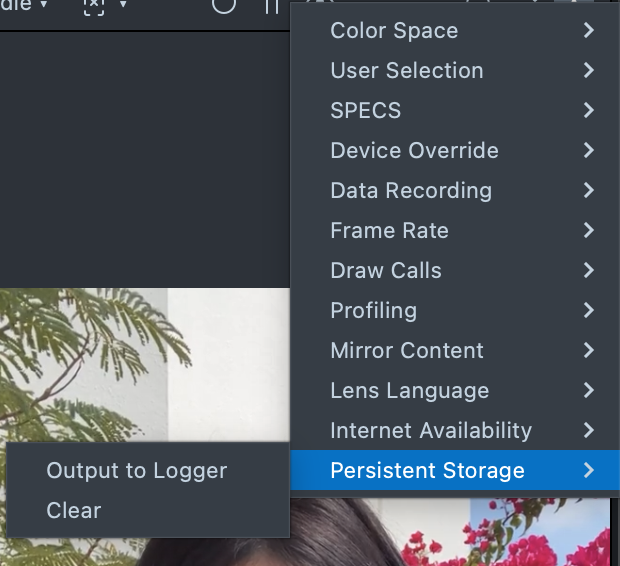
Once a value is stored in Persistent Storage, it stays there even after the user closes the Lens, and in Lens Studio it stays across Lens resets. To see or clear what's stored, open the Preview panel's ⋮ menu > Persistent Storage: Output to Logger prints the stored keys, and Clear deletes them.
Snapchat will clear the Lens' persistent storage 60 days after the user does not touch the Lens.
Printing and Clearing Keys
In Lens Studio, you can print and clear the Persistent Storage system's keys in the Preview Panel.
Printing Keys
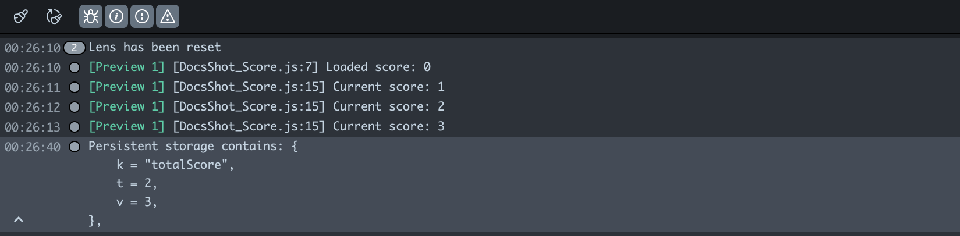
You can print the keys and values you have stored in Persistent Storage in the Preview Panel by selecting ⋮ > Persistent Storage > Output to Logger.
The result will be printed in the Logger Panel.
Clearing Keys
You can clear Lens Studio's Persistent Storage in the Preview Panel by selecting ⋮ > Persistent Storage > Clear.
You can clear Persistent Storage in Snapchat by going to Settings > Clear Lens Data
Storage Capacity
Persistent Storage has a limited capacity. Once it’s full, no new data keys can be added until it's cleared.
When building for SPECS, a Lens's persistent store holds up to 100 KiB (102,400 bytes) on the device. When the store goes over that limit, SPECS doesn't save it and logs:
[PersistentStore] You have reached maximum allowed size of stores which is 102400. The new store won't be written.
Read the limit at runtime with getMaxSizeInBytes rather than hard-coding it. getSizeInBytes returns the current size of the stored data, but only once onStoreFull is set; otherwise it returns 0.
var store = global.persistentStorageSystem.store;
store.onStoreFull = function () {
  print('Storage full');
};
print(
  'Using ' + store.getSizeInBytes() + ' of ' + store.getMaxSizeInBytes() + ' bytes'
);
onStoreFull is a callback function called every time Persistent Storage is full. We can call clear each time this happens to add new values.
store.onStoreFull = function () {
  store.clear();
  print('Storage cleared');
};
A full store isn't saved until it's back under the limit. clear deletes every key; to free space and keep the rest of your data, call remove(key) for the keys you no longer need.
The Final Script
Below you'll find the completed script from this guide:
// Create key for the score variable
var store = global.persistentStorageSystem.store;
var scoreKey = 'totalScore';
// Retrieve the score from persistent storage
var currentGameScore = store.getInt(scoreKey);
// Print the score
print('Loaded score: ' + currentGameScore);
// Function that increments the score
function incrementScore() {
  // Increment the score by 1
  currentGameScore += 1;
  // Store the current score in persistent storage
  store.putInt(scoreKey, currentGameScore);
  // Print the current score
  print('Current score: ' + currentGameScore);
}
// Bind the incrementScore function to the "Mouth Opened" event
script.createEvent('MouthOpenedEvent').bind(incrementScore);
// If persistent storage is full, clear it
store.onStoreFull = function () {
  store.clear();
  print('Storage cleared');
};
// Create key for the score variable
var store = global.persistentStorageSystem.store;
var scoreKey = 'totalScore';
// Retrieve the score from persistent storage
var currentGameScore = store.getInt(scoreKey);
// Print the score
print('Loaded score: ' + currentGameScore);
// Function that increments the score
function incrementScore() {
  // Increment the score by 1
  currentGameScore += 1;
  // Store the current score in persistent storage
  store.putInt(scoreKey, currentGameScore);
  // Print the current score
  print('Current score: ' + currentGameScore);
}
// Bind the incrementScore function to the right-hand pinch
var gestureModule = require('LensStudio:GestureModule');
gestureModule
  .getPinchDownEvent(GestureModule.HandType.Right)
  .add(incrementScore);
// If persistent storage is full, clear it
store.onStoreFull = function () {
  store.clear();
  print('Storage cleared');
};