Gesture Module
Detect pinch, palm tap, targeting, grab, and phone-in-hand gestures in a SPECS Lens with the Gesture Module APIs.
- Snapchat: not supported
- SPECS: fully supported
- Camera Kit Web: not supported
- Camera Kit Mobile: not supported
- SnapchatNot supported
- SPECSFully supported
- Camera Kit WebNot supported
- Camera Kit MobileNot supported
The Gesture Module uses a combination of machine learning and heuristic methods to provide reliable and accurate detection of hand gestures on SPECS, so your Lens can react to what the user's hands do. With the Gesture Module, you can detect these gestures:
- Pinch, with a filtered variant that is more robust while the hand moves
- Palm tap
- Targeting
- Grab
- Phone in hand
Interaction Kit (formerly Spectacles Interaction Kit, SIK) builds its interactions on the Gesture Module. We recommend Interaction Kit for building experiences; the Gesture Module also lets you create your own interaction system.
Get the Gesture Module and subscribe to its events
Every Gesture Module method takes a GestureModule.HandType, GestureModule.HandType.Left or GestureModule.HandType.Right, and returns an event for that hand. Add a callback to the event to receive the gesture's arguments.
The examples on this page get the Gesture Module with require('LensStudio:GestureModule') when the script is created, and add their callbacks inside an OnStartEvent.
Gesture Module events come from hand tracking on SPECS, so they don't fire when you interact with the Lens using the mouse in Lens Studio. To try them in Lens Studio, add your own touch or keyboard stand-in, or send the Lens to SPECS. Interaction Kit components respond to the mouse in Lens Studio.
Detect a pinch gesture
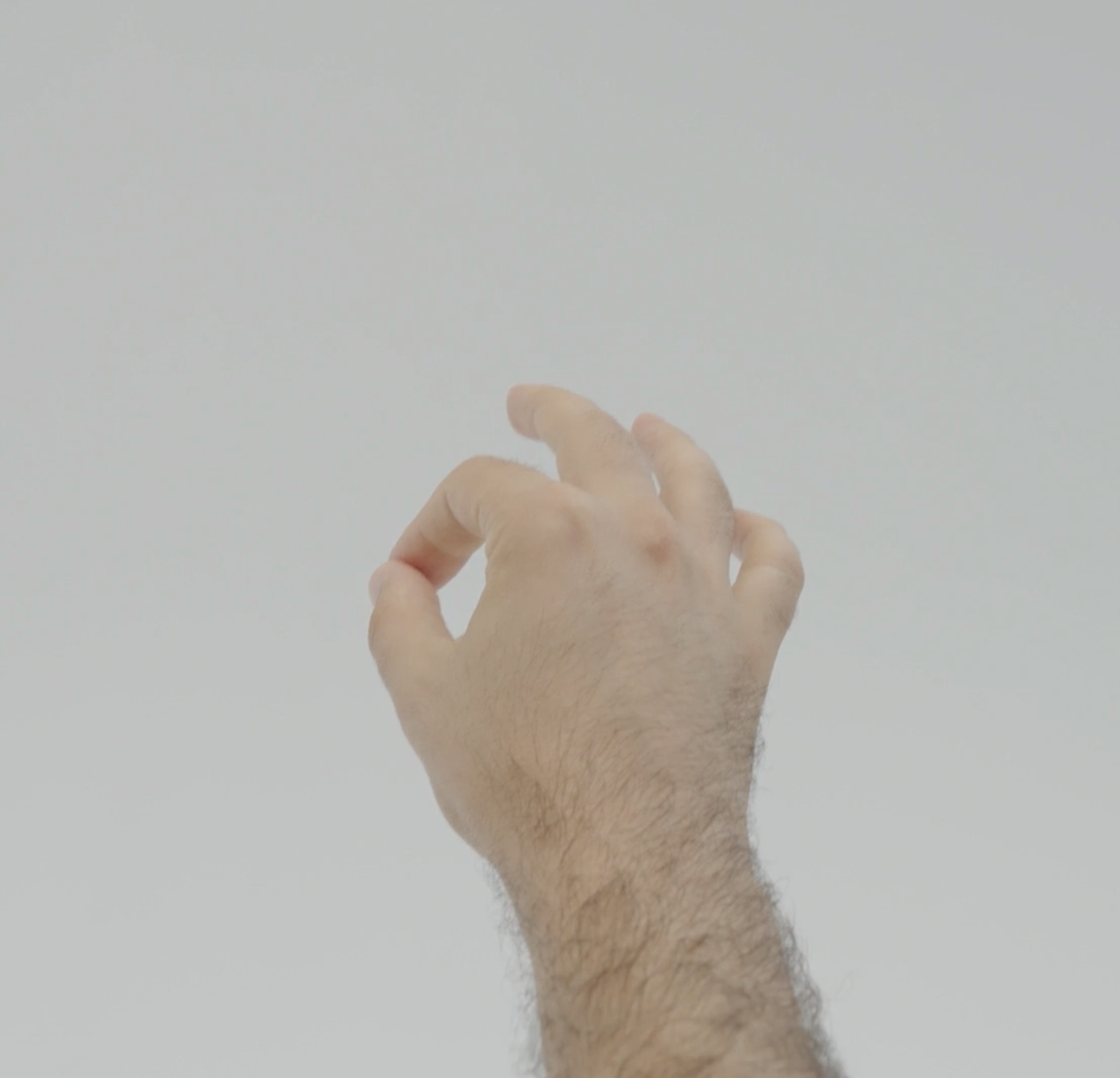
The pinch gesture is detected when the thumb and index finger of the hand in view are pinched together. The Gesture Module reports when a pinch starts, when it ends, and the pinch strength. The filtered pinch events report the same start and end, and are more robust than the plain pinch events when the user moves their hand.
Pinch methods in the Gesture Module
| Method | Fires when | Callback argument |
|---|---|---|
getPinchDownEvent | The thumb and index finger are pinched together. | PinchDownArgs |
getPinchUpEvent | The thumb and index finger separate after a pinch. | PinchUpArgs |
getFilteredPinchDownEvent | The thumb and index finger are pinched together; more robust when the hand moves. | PinchDownArgs |
getFilteredPinchUpEvent | The thumb and index finger separate after a pinch; more robust when the hand moves. | PinchUpArgs |
getPinchStrengthEvent | Reports the strength of the pinch between the thumb and index finger. | PinchStrengthArgs |
Each method has the signature (handType: GestureModule.HandType) => event1<Args, void>, where Args is the callback argument in the table.
Pinch callback arguments
| Class | Property | Type | Description |
|---|---|---|---|
PinchDownArgs | palmOrientation | vec3 | The orientation of the detected gesture. |
PinchUpArgs | palmOrientation | vec3 | The orientation of the detected gesture. |
PinchStrengthArgs | strength | number | The pinch strength of the detected gesture, a normalized value from 0 (no pinch) to 1 (a full pinch). |
Pinch code example
- TypeScript
- JavaScript
@component
export class PinchExample extends BaseScriptComponent {
  private gestureModule: GestureModule = require('LensStudio:GestureModule');

  onAwake() {
    this.createEvent('OnStartEvent').bind(() => {
      this.gestureModule
        .getPinchDownEvent(GestureModule.HandType.Right)
        .add((pinchDownArgs: PinchDownArgs) => {
          print('Right Hand Pinch Down');
        });

      this.gestureModule
        .getPinchUpEvent(GestureModule.HandType.Right)
        .add((pinchUpArgs: PinchUpArgs) => {
          print('Right Hand Pinch Up');
        });

      this.gestureModule
        .getFilteredPinchDownEvent(GestureModule.HandType.Right)
        .add((pinchDownArgs: PinchDownArgs) => {
          print('Right Hand Filtered Pinch Down');
        });

      this.gestureModule
        .getFilteredPinchUpEvent(GestureModule.HandType.Right)
        .add((pinchUpArgs: PinchUpArgs) => {
          print('Right Hand Filtered Pinch Up');
        });

      this.gestureModule
        .getPinchStrengthEvent(GestureModule.HandType.Right)
        .add((pinchStrengthArgs: PinchStrengthArgs) => {
          print('Right Hand Pinch Strength: ' + pinchStrengthArgs.strength);
        });
    });
  }
}
var gestureModule = require('LensStudio:GestureModule');

script.createEvent('OnStartEvent').bind(function () {
  gestureModule
    .getPinchDownEvent(GestureModule.HandType.Right)
    .add(function (pinchDownArgs) {
      print('Right Hand Pinch Down');
    });

  gestureModule
    .getPinchUpEvent(GestureModule.HandType.Right)
    .add(function (pinchUpArgs) {
      print('Right Hand Pinch Up');
    });

  gestureModule
    .getFilteredPinchDownEvent(GestureModule.HandType.Right)
    .add(function (pinchDownArgs) {
      print('Right Hand Filtered Pinch Down');
    });

  gestureModule
    .getFilteredPinchUpEvent(GestureModule.HandType.Right)
    .add(function (pinchUpArgs) {
      print('Right Hand Filtered Pinch Up');
    });

  gestureModule
    .getPinchStrengthEvent(GestureModule.HandType.Right)
    .add(function (pinchStrengthArgs) {
      print('Right Hand Pinch Strength: ' + pinchStrengthArgs.strength);
    });
});
Detect a palm tap gesture
The palm tap gesture is detected when the index finger of one hand taps the palm of the opposite hand. A right-hand palm tap is the right index finger touching the left palm; a left-hand palm tap is the left index finger touching the right palm. The Gesture Module typings note that only a tap on the left palm is currently supported, which is the right-hand palm tap (GestureModule.HandType.Right).
Palm tap methods in the Gesture Module
| Method | Fires when | Callback argument |
|---|---|---|
getPalmTapDownEvent | The index finger of one hand taps the palm of the opposite hand. | PalmTapDownArgs |
getPalmTapUpEvent | The index finger lifts from the opposite palm after touching it. | PalmTapUpArgs |
Palm tap callback arguments
| Class | Property | Type | Description |
|---|---|---|---|
PalmTapDownArgs | confidence | number | The module's confidence in detecting the gesture. |
PalmTapUpArgs | confidence | number | The module's confidence in detecting the gesture. |
Palm tap code example
- TypeScript
- JavaScript
@component
export class PalmTapExample extends BaseScriptComponent {
  private gestureModule: GestureModule = require('LensStudio:GestureModule');

  onAwake() {
    this.createEvent('OnStartEvent').bind(() => {
      this.gestureModule
        .getPalmTapDownEvent(GestureModule.HandType.Right)
        .add((palmTapDownArgs: PalmTapDownArgs) => {
          print('Palm Tap Down, confidence: ' + palmTapDownArgs.confidence);
        });

      this.gestureModule
        .getPalmTapUpEvent(GestureModule.HandType.Right)
        .add((palmTapUpArgs: PalmTapUpArgs) => {
          print('Palm Tap Up, confidence: ' + palmTapUpArgs.confidence);
        });
    });
  }
}
var gestureModule = require('LensStudio:GestureModule');

script.createEvent('OnStartEvent').bind(function () {
  gestureModule
    .getPalmTapDownEvent(GestureModule.HandType.Right)
    .add(function (palmTapDownArgs) {
      print('Palm Tap Down, confidence: ' + palmTapDownArgs.confidence);
    });

  gestureModule
    .getPalmTapUpEvent(GestureModule.HandType.Right)
    .add(function (palmTapUpArgs) {
      print('Palm Tap Up, confidence: ' + palmTapUpArgs.confidence);
    });
});
Detect the targeting gesture
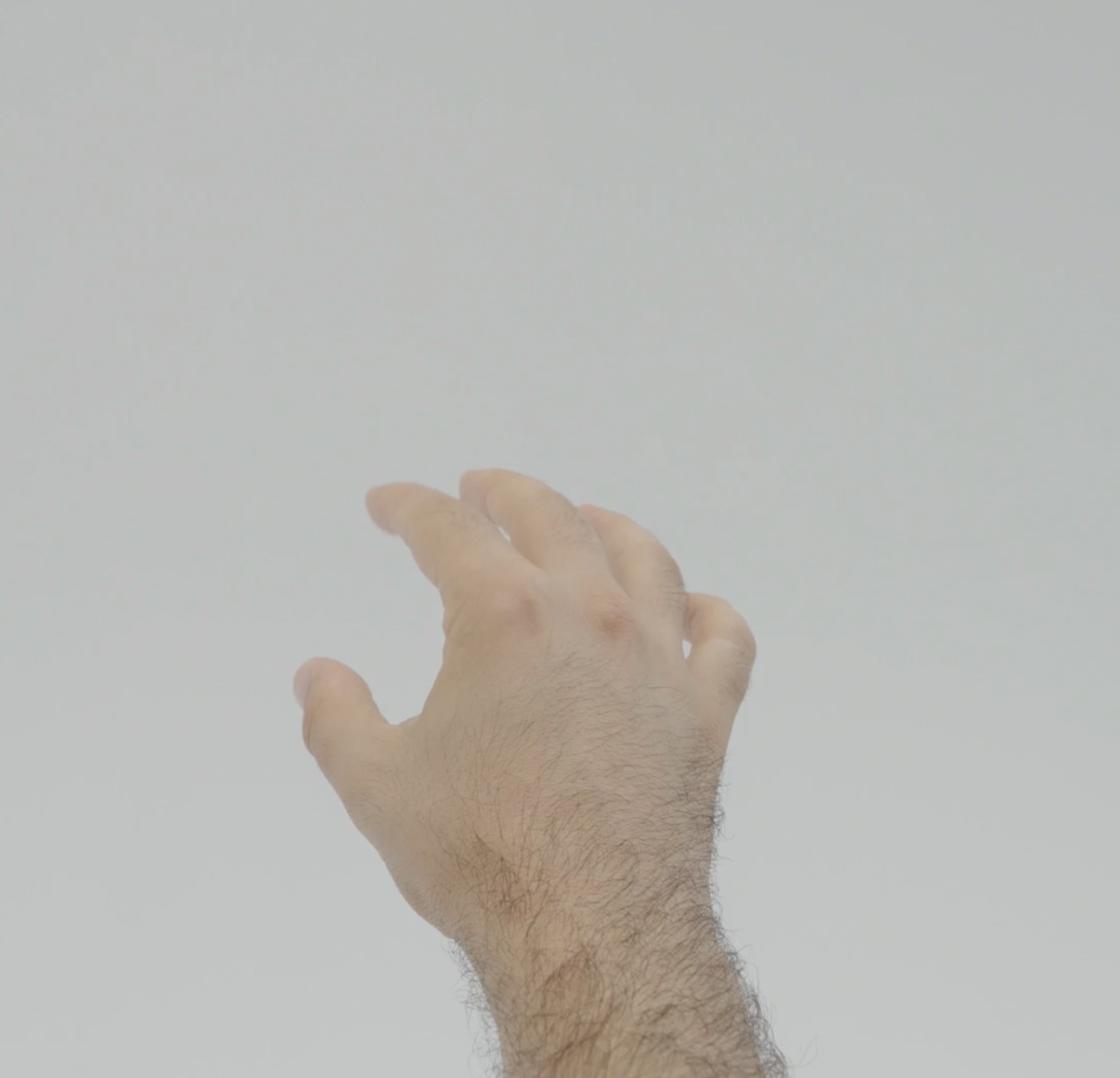
The targeting gesture is detected when the user has an intent to target digital content in space. The Gesture Module reports targeting data for a hand: a ray in world space, whether the data is valid, and whether the hand intends to target.
Targeting method in the Gesture Module
| Method | Fires when | Callback argument |
|---|---|---|
getTargetingDataEvent | The user has an intent to target digital content in space. It triggers every frame. | TargetingDataArgs |
Targeting callback arguments
| Property | Type | Description |
|---|---|---|
handIntendsToTarget | boolean | Whether the hand intends to target. |
isValid | boolean | Whether the targeting data is valid. When it's false, rayDirectionInWorld and rayOriginInWorld return the last calculated values. |
rayOriginInWorld | vec3 | The origin of the targeting ray, in world space. |
rayDirectionInWorld | vec3 | The direction of the targeting ray, in world space. |
Targeting code example
- TypeScript
- JavaScript
@component
export class TargetingExample extends BaseScriptComponent {
  private gestureModule: GestureModule = require('LensStudio:GestureModule');

  onAwake() {
    this.createEvent('OnStartEvent').bind(() => {
      this.gestureModule
        .getTargetingDataEvent(GestureModule.HandType.Right)
        .add((targetArgs: TargetingDataArgs) => {
          print('Hand Intends To Target: ' + targetArgs.handIntendsToTarget);
          print('Is Valid: ' + targetArgs.isValid);
          print('Ray Origin In World: ' + targetArgs.rayOriginInWorld);
          print('Ray Direction In World: ' + targetArgs.rayDirectionInWorld);
        });
    });
  }
}
var gestureModule = require('LensStudio:GestureModule');

script.createEvent('OnStartEvent').bind(function () {
  gestureModule
    .getTargetingDataEvent(GestureModule.HandType.Right)
    .add(function (targetArgs) {
      print('Hand Intends To Target: ' + targetArgs.handIntendsToTarget);
      print('Is Valid: ' + targetArgs.isValid);
      print('Ray Origin In World: ' + targetArgs.rayOriginInWorld);
      print('Ray Direction In World: ' + targetArgs.rayDirectionInWorld);
    });
});
Detect a grab gesture
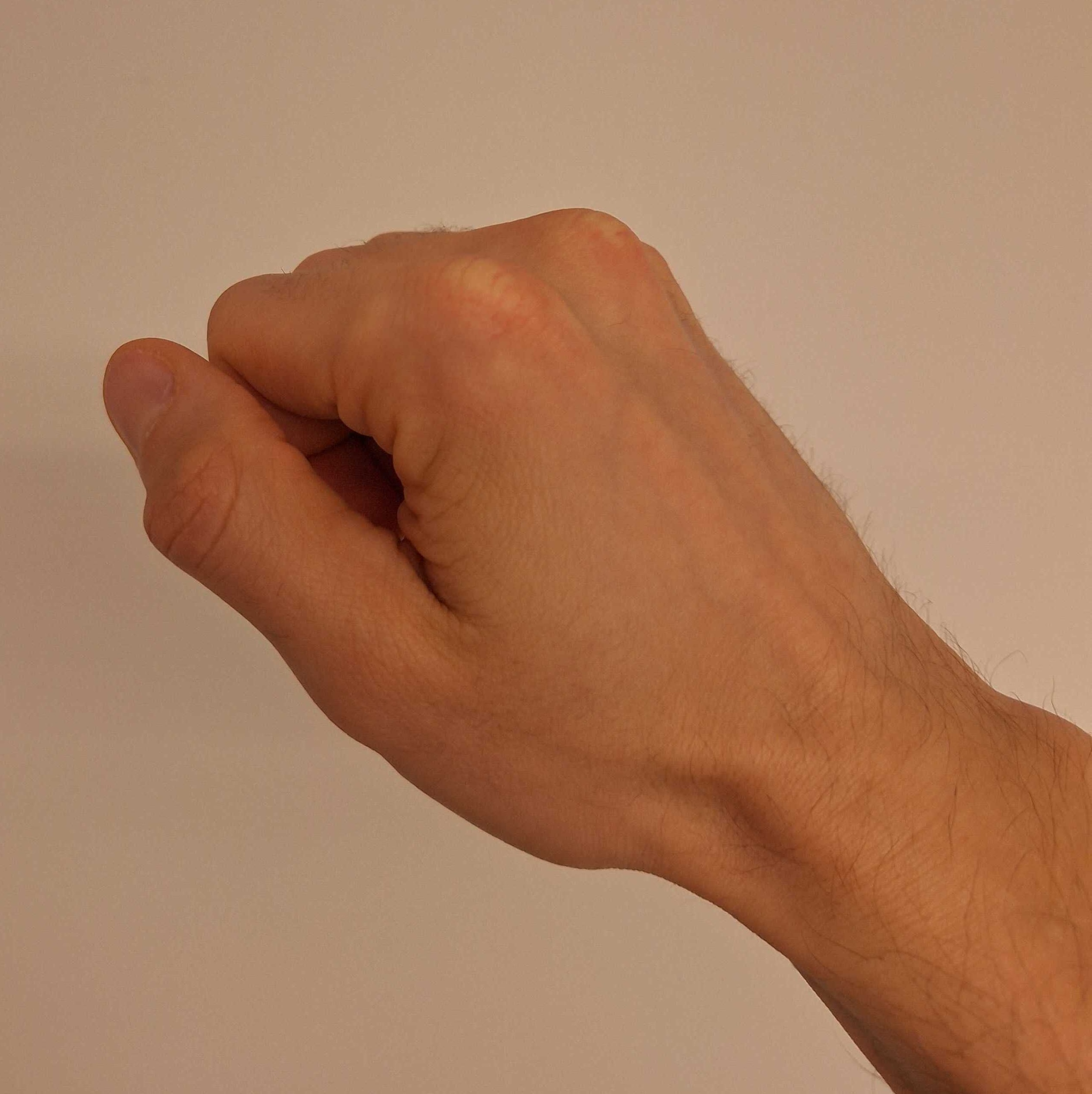
The grab gesture is detected when the hand in view performs a grab pose, which enables interactions such as grabbing virtual objects or making a fist. The Gesture Module reports when the grab pose begins and when the hand opens again.
Grab methods in the Gesture Module
| Method | Fires when | Callback argument |
|---|---|---|
getGrabBeginEvent | The hand in view starts performing a grab pose. | GrabBeginArgs |
getGrabEndEvent | The hand in view ends the grab pose and opens. | GrabEndArgs |
GrabBeginArgs and GrabEndArgs are currently unused: they carry no data.
Grab code example
- TypeScript
- JavaScript
@component
export class GrabExample extends BaseScriptComponent {
  private gestureModule: GestureModule = require('LensStudio:GestureModule');

  onAwake() {
    this.createEvent('OnStartEvent').bind(() => {
      this.gestureModule
        .getGrabBeginEvent(GestureModule.HandType.Right)
        .add((grabBeginArgs: GrabBeginArgs) => {
          print('Right Hand Grab Begin');
        });

      this.gestureModule
        .getGrabEndEvent(GestureModule.HandType.Right)
        .add((grabEndArgs: GrabEndArgs) => {
          print('Right Hand Grab End');
        });
    });
  }
}
var gestureModule = require('LensStudio:GestureModule');

script.createEvent('OnStartEvent').bind(function () {
  gestureModule
    .getGrabBeginEvent(GestureModule.HandType.Right)
    .add(function (grabBeginArgs) {
      print('Right Hand Grab Begin');
    });

  gestureModule
    .getGrabEndEvent(GestureModule.HandType.Right)
    .add(function (grabEndArgs) {
      print('Right Hand Grab End');
    });
});
Detect a phone in the hand
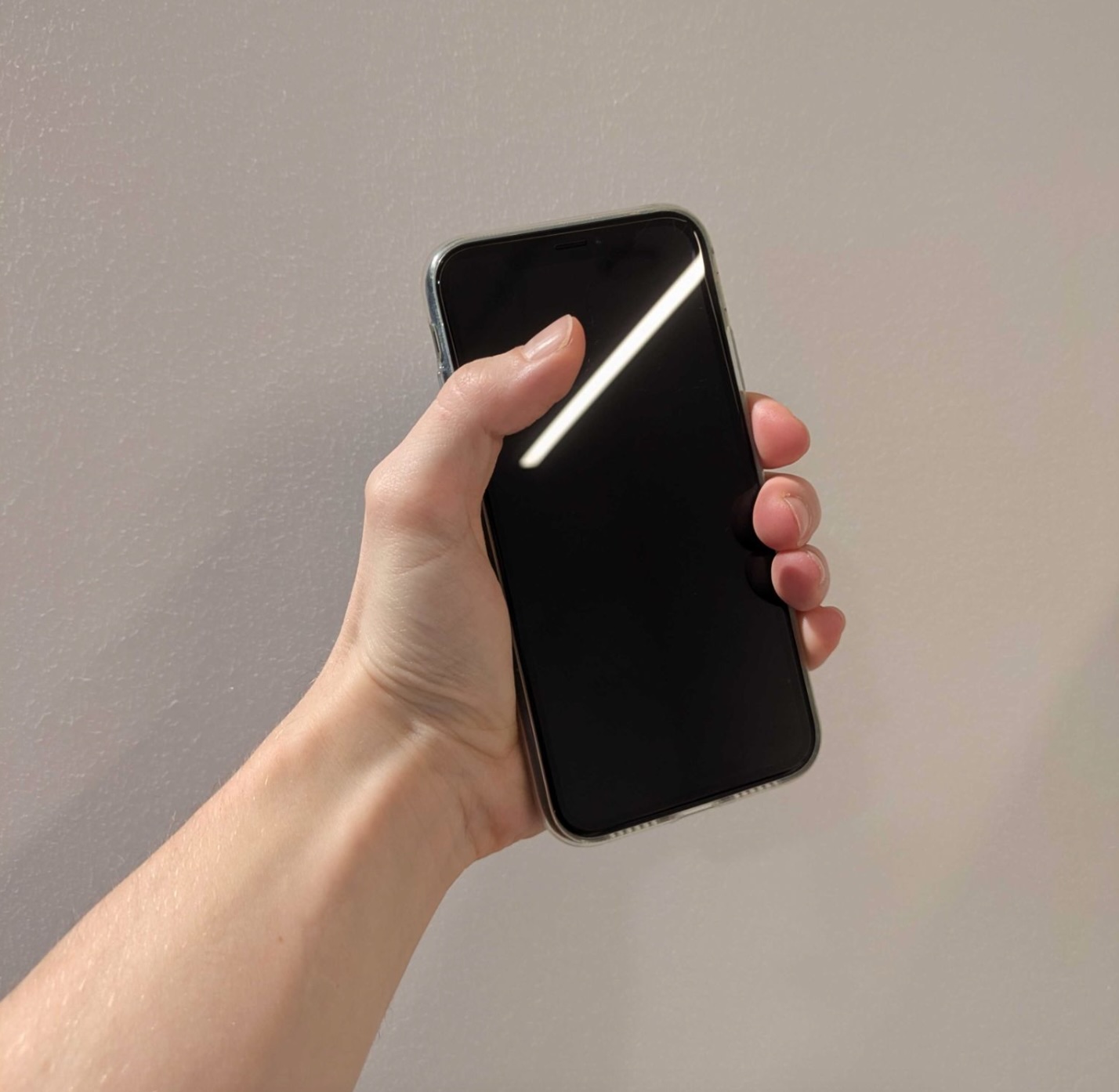
The phone-in-hand events indicate whether a tracked hand is holding a phone-like object. Only objects with a smartphone-like appearance are detected.
If a Lens subscribes to a phone-in-hand event from the start, the Gesture Module sends an initial event when the Lens starts: the begin event if a hand already holds a phone, the end event if it doesn't. A Lens that subscribes later gets no initial event after it subscribes.
Phone-in-hand methods in the Gesture Module
| Method | Fires when | Callback argument |
|---|---|---|
getIsPhoneInHandBeginEvent | A phone is detected in the hand. | IsPhoneInHandBeginArgs |
getIsPhoneInHandEndEvent | A phone is no longer detected in the hand. | IsPhoneInHandEndArgs |
IsPhoneInHandBeginArgs and IsPhoneInHandEndArgs are currently empty.
Phone-in-hand code example
- TypeScript
- JavaScript
@component
export class IsPhoneInHandExample extends BaseScriptComponent {
  private gestureModule: GestureModule = require('LensStudio:GestureModule');

  onAwake() {
    this.createEvent('OnStartEvent').bind(() => {
      this.gestureModule
        .getIsPhoneInHandBeginEvent(GestureModule.HandType.Right)
        .add((phoneInHandBeginArgs: IsPhoneInHandBeginArgs) => {
          print('Right hand started to hold a phone.');
        });

      this.gestureModule
        .getIsPhoneInHandEndEvent(GestureModule.HandType.Right)
        .add((phoneInHandEndArgs: IsPhoneInHandEndArgs) => {
          print('Right hand stopped holding a phone.');
        });
    });
  }
}
var gestureModule = require('LensStudio:GestureModule');

script.createEvent('OnStartEvent').bind(function () {
  gestureModule
    .getIsPhoneInHandBeginEvent(GestureModule.HandType.Right)
    .add(function (phoneInHandBeginArgs) {
      print('Right hand started to hold a phone.');
    });

  gestureModule
    .getIsPhoneInHandEndEvent(GestureModule.HandType.Right)
    .add(function (phoneInHandEndArgs) {
      print('Right hand stopped holding a phone.');
    });
});
Related
- Interaction Kit: ready-made interactions built on the Gesture Module.
- Keyboard: text input in SPECS Lenses.
- Send a Lens to SPECS: run the Lens on the device to try the gestures with your hands.