Get Started
Set up Navigation Kit to add place-to-place navigation and direction guidance to your SPECS Lens.
- Snapchat: not supported
- SPECS: fully supported
- Camera Kit Web: not supported
- Camera Kit Mobile: not supported
- SnapchatNot supported
- SPECSFully supported
- Camera Kit WebNot supported
- Camera Kit MobileNot supported
What Navigation Kit does
Navigation Kit (formerly Spectacles Navigation Kit) enables low-code development of guided experiences on SPECS in Lens Studio. The package includes scripts and components to navigate between places of interest, and APIs to calculate the direction and distance to them from the user's current position.
To start building navigation Lenses with Navigation Kit, follow the instructions to start a new project or update an existing project in Lens Studio.
Before you start with Navigation Kit
- Lens Studio 5.25.0 or later. The Navigation Kit 4.0.0 build in the Asset Library is built for Lens Studio 5.25.0.
- SPECS, to test navigation from the user's real position.
Navigation Kit package dependencies
Navigation Kit depends on Interaction Kit, which is added automatically and doesn't need to be installed separately.
Start a new Navigation Kit project
Two options are available for starting a new navigation project: add the kit to a project, or start from the Navigation Kit sample.
Add Navigation Kit to a project
-
In the Asset Library, search for Navigation Kit and select Import on its card. This adds the scripts, components, and dependencies (Interaction Kit) to the Packages folder. See Asset Library.
-
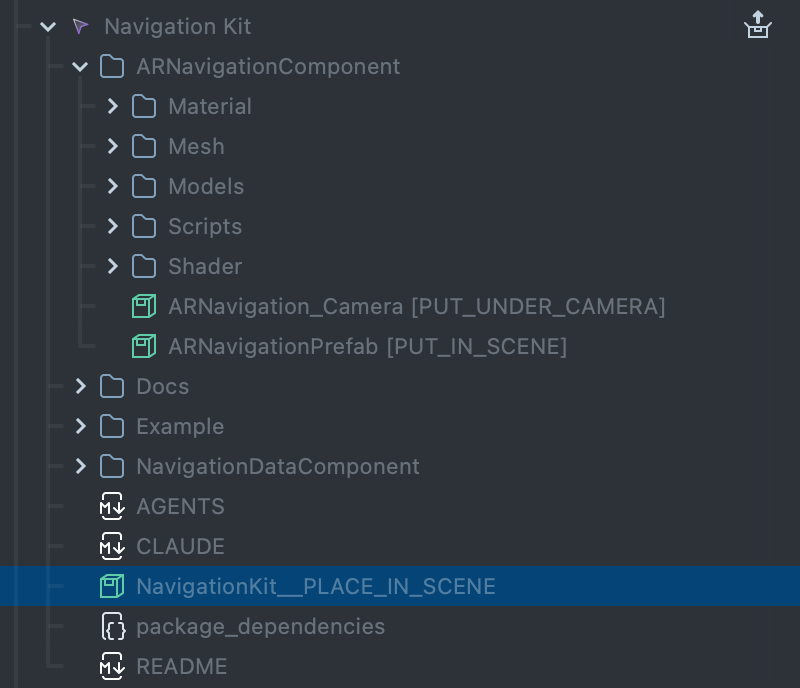
Drag NavigationKit__PLACE_IN_SCENE.prefab from the package root into the Scene Hierarchy. It adds a menu for selecting one of 3 sample places.
-
The prefab already includes the navigation arrow: an AR Navigation object under NavigationKitDemo. The package's
ARNavigationComponentfolder also has the arrow on its own, ARNavigationPrefab [PUT_IN_SCENE], andARNavigation_Camera [PUT_UNDER_CAMERA], which goes under the camera, for building your own setup. Adding ARNavigationPrefab [PUT_IN_SCENE] next to the example prefab gives you a second arrow (see Components List). -
In the Preview panel, select a place from the list. The
ARNavigationarrow turns to point at the selected place.
When you send the Lens to SPECS, the direction and distance are relative to the user's position.
From here, you can start building a complete navigation experience. To change the sample places,
edit the ManualPlaceList component on the Navigation Kit prefab (see
Components List).
Start from the Navigation Kit sample
Alternatively, the feature-rich Navigation Kit sample is a fuller starting point. You can find it in the Navigation Kit folder of the SPECS samples repository. The sample provides a selection menu, a map, and sample content anchored to Custom Locations.
A README in the kit and in the sample explains how to set up the project and add new locations.
Update an existing project with Navigation Kit
To add Navigation Kit to an existing project, search the Asset Library for Navigation Kit and install it, as for a new project. It helps to get familiar with the Navigation Kit sample, and copy its scripts and prefabs as needed: they give your own components a head start.
Navigation Kit indoors and outdoors
The sample lets you build navigation experiences that are either indoors or outdoors. Transitions between indoors and outdoors aren't supported.
Build medium to large outdoor experiences from individual Custom Locations and geocoordinates; the scale of these experiences isn't a good fit for Custom Location Groups. Users may launch the Lens far away from any place of interest, so provide navigation from launch.
Build indoor experiences on a single Custom Location Group. Geopositioning isn't reliable indoors,
so don't provide arrow-based navigation until a member of the group has been localized. Once one
member is localized, Navigation Kit calculates the relative position of the other members of the
group (PlacesFromLocationGroup, see
Components List).
Related
- Components List: every Navigation Kit component, asset and API.
- Custom Locations: scanning the places a Navigation Kit experience anchors to.
- Location: the GPS position that Navigation Kit's user position is built on.
- Interaction Kit: the input the sample menu uses.