Depth Module
Request depth frames on SPECS to understand scene geometry, measure distances, and place content against real-world surfaces.
- Snapchat: not supported
- SPECS: fully supported
- Camera Kit Web: not supported
- Camera Kit Mobile: not supported
- SnapchatNot supported
- SPECSFully supported
- Camera Kit WebNot supported
- Camera Kit MobileNot supported
On SPECS, the DepthModule gives a Lens depth frames: images whose pixels encode the distance to the real-world scene, in centimeters. Use them to understand the user's surroundings, measure distances, and place content against real surfaces.
The Depth Module requires camera access, and a depth frame contains user information. On SPECS, a Lens that combines camera access with internet access is publishable through Transparent Permission: the Lens asks for permission at launch and the LED blinks while it captures. Users who turn on Extended Permissions skip the permission prompt.
Lens Studio Preview doesn't stream depth: onNewFrame never fires in Preview. Test depth code on
SPECS (Send a Lens to SPECS).
Request and receive depth frames on SPECS
The DepthModule creates a DepthFrameSession, which delivers a steady stream of DepthFrameData. Frames arrive about five times a second, a rate independent of the color camera frame rate and the render rate.
Start and stop a depth frame session
To receive depth frames, create a DepthFrameSession and add a callback to its onNewFrame event,
which passes a DepthFrameData for each frame. The session starts computing depth when you call
DepthFrameSession.start; onNewFrame fires only after that. DepthFrameSession.stop stops depth
computation for all of the session's callbacks.
Create the session in OnStartEvent, as in this example: createDepthFrameSession can't be called
inside onAwake.
- TypeScript
- JavaScript
@component
export class DepthFrameRequest extends BaseScriptComponent {
  private depthModule: DepthModule = require('LensStudio:DepthModule');
  private session: DepthFrameSession;
  private registration: EventRegistration;

  onAwake() {
    this.createEvent('OnStartEvent').bind(() => {
      this.session = this.depthModule.createDepthFrameSession();

      this.registration = this.session.onNewFrame.add(
        (depthFrameData: DepthFrameData) => {
          // Process the depth frame data.
        }
      );

      // Start depth estimation to receive depth frame data via the onNewFrame event.
      this.session.start();
    });

    this.createEvent('OnDestroyEvent').bind(() => {
      this.session.onNewFrame.remove(this.registration);

      // Stop depth estimation for this session.
      this.session.stop();
    });
  }
}
const depthModule = require('LensStudio:DepthModule');
let session;
let registration;

script.createEvent('OnStartEvent').bind(function () {
  session = depthModule.createDepthFrameSession();

  registration = session.onNewFrame.add(function (depthFrameData) {
    // Process the depth frame data.
  });

  // Start depth estimation to receive depth frame data via the onNewFrame event.
  session.start();
});

script.createEvent('OnDestroyEvent').bind(function () {
  session.onNewFrame.remove(registration);

  // Stop depth estimation for this session.
  session.stop();
});
Read the depth camera's parameters, pose, and timestamp
Each DepthFrameData carries:
depthFrame: the depth values as a linearFloat32Arrayin centimeters, one per pixel, row by row.deviceCamera: the DeviceCamera that describes how the depth camera maps 3D space to the 2D frame: itsresolution,focalLength, andprincipalPointin pixels, and itspose, the offset between the device's reference point and the camera.toWorldTrackingOriginFromDeviceRef: the pose of the device reference point relative to the frame of reference of the tracked device position (the world tracking origin).timestampSeconds: the start of the frame's exposure, in seconds. Use it to pair a depth frame with the matching color frame from the CameraModule.
- TypeScript
- JavaScript
this.session.onNewFrame.add((depthFrameData: DepthFrameData) => {
  const depthDeviceCamera = depthFrameData.deviceCamera;
  print(depthDeviceCamera.resolution);
  print(depthDeviceCamera.focalLength);
  print(depthDeviceCamera.principalPoint);
  print(depthDeviceCamera.pose); // The relative offset between a reference point on the device and the camera

  print(depthFrameData.toWorldTrackingOriginFromDeviceRef); // The pose of the device reference relative to the frame of reference of the tracked device position.

  print(depthFrameData.timestampSeconds); // The timestamp of the depth frame can be used to find the matching color frame used for estimating depth.
});
session.onNewFrame.add(function (depthFrameData) {
  const depthDeviceCamera = depthFrameData.deviceCamera;
  print(depthDeviceCamera.resolution);
  print(depthDeviceCamera.focalLength);
  print(depthDeviceCamera.principalPoint);
  print(depthDeviceCamera.pose); // The relative offset between a reference point on the device and the camera

  print(depthFrameData.toWorldTrackingOriginFromDeviceRef); // The pose of the device reference relative to the frame of reference of the tracked device position.

  print(depthFrameData.timestampSeconds); // The timestamp of the depth frame can be used to find the matching color frame used for estimating depth.
});
DeviceCamera also has project and unproject methods, which convert a 3D point in device
reference space to a normalized 2D point in the frame (origin at the top left), and back.
Convert a depth pixel to a world position
This script samples the depth at one pixel of each depth frame, back-projects it to the device's
reference space with unproject, and transforms it to world space with
toWorldTrackingOriginFromDeviceRef.
-
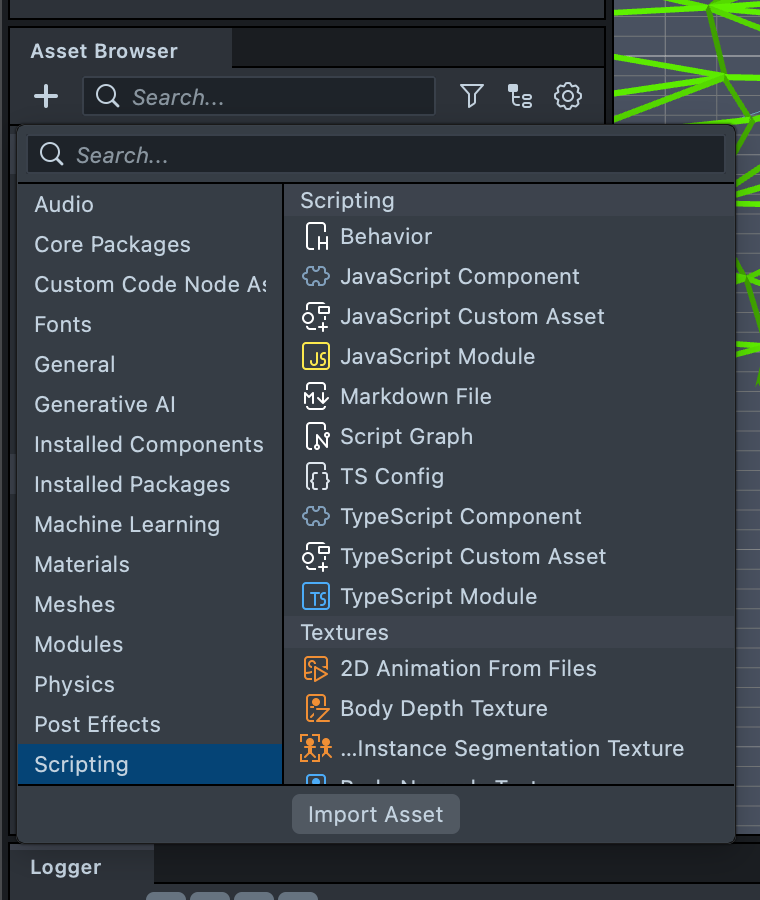
In the Asset Browser panel, select + > Scripting, then create a TypeScript Component or a JavaScript Component.
-
Paste the following code into the file.
-
Attach the script to an object in the scene.
-
Send the Lens to SPECS. For each depth frame, the script prints the world position of the sampled pixel.
- TypeScript
- JavaScript
@component
export class DepthModuleExample extends BaseScriptComponent {
  private depthModule: DepthModule = require('LensStudio:DepthModule');
  private session: DepthFrameSession;
  private registration: EventRegistration;

  onAwake() {
    this.createEvent('OnStartEvent').bind(() => {
      this.session = this.depthModule.createDepthFrameSession();

      this.registration = this.session.onNewFrame.add(
        (depthFrameData: DepthFrameData) => {
          const depthDeviceCamera = depthFrameData.deviceCamera;

          // Sample depth for specific pixel
          const pixelCoordX = 112;
          const pixelCoordY = 80;
          const depthFrameArrayIdx = Math.floor(
            pixelCoordX + pixelCoordY * depthDeviceCamera.resolution.x
          );
          const depthValue = depthFrameData.depthFrame[depthFrameArrayIdx];

          // Back-project depth pixel to device reference space
          const normalizedCoord = new vec2(
            pixelCoordX / depthDeviceCamera.resolution.x,
            pixelCoordY / depthDeviceCamera.resolution.y
          );
          const point3dInDeviceRef = depthDeviceCamera.unproject(
            normalizedCoord,
            depthValue
          );

          // Transform point in device reference space to world tracking origin space
          const worldFromDeviceRef =
            depthFrameData.toWorldTrackingOriginFromDeviceRef;
          const point3dInWorld =
            worldFromDeviceRef.multiplyPoint(point3dInDeviceRef);
          print(point3dInWorld);
        }
      );

      this.session.start();
    });

    this.createEvent('OnDestroyEvent').bind(() => {
      this.session.onNewFrame.remove(this.registration);
      this.session.stop();
    });
  }
}
const depthModule = require('LensStudio:DepthModule');
let session;
let registration;

script.createEvent('OnStartEvent').bind(() => {
  session = depthModule.createDepthFrameSession();

  registration = session.onNewFrame.add((depthFrameData) => {
    const depthDeviceCamera = depthFrameData.deviceCamera;

    // Sample depth for specific pixel
    const pixelCoordX = 112;
    const pixelCoordY = 80;
    const depthFrameArrayIdx = Math.floor(
      pixelCoordX + pixelCoordY * depthDeviceCamera.resolution.x
    );
    const depthValue = depthFrameData.depthFrame[depthFrameArrayIdx];

    // Back-project depth pixel to device reference space
    const normalizedCoord = new vec2(
      pixelCoordX / depthDeviceCamera.resolution.x,
      pixelCoordY / depthDeviceCamera.resolution.y
    );
    const point3dInDeviceRef = depthDeviceCamera.unproject(
      normalizedCoord,
      depthValue
    );

    // Transform point in device reference space to world tracking origin space
    const worldFromDeviceRef =
      depthFrameData.toWorldTrackingOriginFromDeviceRef;
    const point3dInWorld = worldFromDeviceRef.multiplyPoint(point3dInDeviceRef);
    print(point3dInWorld);
  });

  session.start();
});

script.createEvent('OnDestroyEvent').bind(() => {
  session.onNewFrame.remove(registration);
  session.stop();
});