Sync Materials
Synchronize material property changes like color and numeric values across connected Spectacles users with the Sync Kit SyncMaterials component.
- Snapchat: not supported
- SPECS: fully supported
- Camera Kit Web: not supported
- Camera Kit Mobile: not supported
- SnapchatNot supported
- See Sync Materials
- SPECSFully supported
- Camera Kit WebNot supported
- Camera Kit MobileNot supported
The SyncMaterials component can be used to sync material properties, such as color. Any changes to the configured properties are automatically synchronized across the network. Attaching a SyncMaterials component to a scene object turns that object into a SyncEntity. The SyncMaterials component uses storage properties to sync material properties.
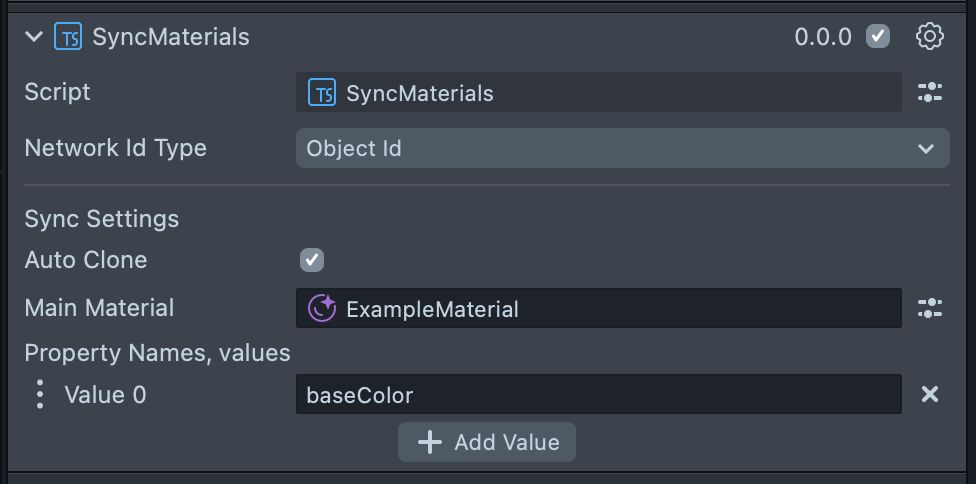
The SyncMaterials component supports syncing material properties of the following types:
- float
- vec2
- vec3
- vec4
Setup
-
Add the SyncMaterials component to the scene object in the Scene Hierarchy that uses the material to be synced.
-
Add the material to be synced to the Main Material Input.
-
Under Property Names, click
+ Add Valueand enter the string of the property name to be synced, for example,baseColor.
Auto clone
If Auto Clone is enabled, the Main Material is immediately cloned on Lens start. Next, the scene object that the SyncMaterials component is attached to, and all of its children, are recursively searched to find any MaterialMeshVisuals that are using the assigned Main Material. The main material on each MaterialMeshVisual is then set to the cloned material. This is useful when instantiating a new object and assigning its own material to it, so the material is not shared with other instances of the prefab.