Session Controller
Access session information and manage session setup for Sync Kit multiplayer Lenses using the SessionController.
- Snapchat: not supported
- SPECS: fully supported
- Camera Kit Web: not supported
- Camera Kit Mobile: not supported
- SnapchatNot supported
- SPECSFully supported
- Camera Kit WebNot supported
- Camera Kit MobileNot supported
The SessionController is a script that manages the state of a shared session and provides APIs for accessing session information, such as users in the session and server time. It acts as a central interface that all Sync Kit scripts can talk to and get the information they need. The SessionControllerComponent can be found on the SessionController [CONFIGURE_ME] scene object in the Scene Hierarchy.
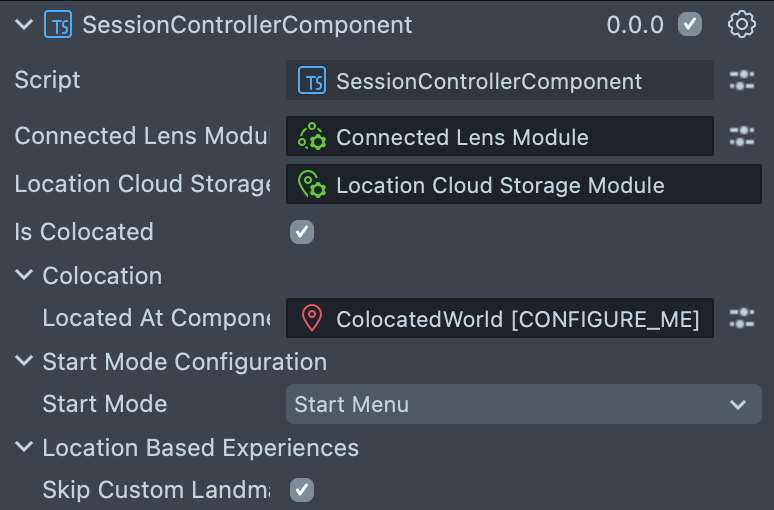
Referencing SessionController
The SessionController script can be referenced from other scripts as follows:
- TypeScript
- JavaScript
import { SessionController } from 'SpectaclesSyncKit.lspkg/Core/SessionController';

@component
export class ReferencingSessionControllerExample extends BaseScriptComponent {
  onAwake() {
    const sessionController: SessionController =
      SessionController.getInstance();
  }
const SessionController = global.sessionController;
Session Setup
The SessionController handles a number of steps when a user starts or joins a shared session. It is important that the SessionController has completed this setup before other scripts attempt to use SessionController APIs. To check that the SessionController is ready to use, call SessionController.notifyOnReady(). The method accepts a callback function that executes once session setup is complete. If setup is already finished, the callback function runs immediately, and only once. A callback registered before setup finishes also runs again each time Sync Kit joins another session after a leave, as described in Leaving and Rejoining Sessions.
- TypeScript
- JavaScript
const sessionController: SessionController =
  SessionController.getInstance();

sessionController.notifyOnReady(() => {
  // SessionController is ready to use
});
global.sessionController.notifyOnReady(function () {
  // SessionController is ready to use
});
You can also check if setup has completed by checking SessionController.getIsReady(), which returns a boolean.
- TypeScript
- JavaScript
if (SessionController.getInstance().getIsReady()) {
  // Session is ready
}
if (global.sessionController.getIsReady()) {
  // Session is ready
}
Logging
The SessionController scene object has a script attached to it called SyncKitLogLevelConfiguration. From the Inspector panel, select the Log Level Filter to control what type of logs are printed from Sync Kit in the Logger. The available options are: Error, Warning, Info, Debug, or Verbose.

APIs
The SessionController script offers the following APIs for accessing information about the current shared session.
Important: Wait until SessionController.notifyOnReady() has been called or SessionController.getIsReady() returns true before using these APIs.
SessionController.getIsReady(): boolean
Returns true if the SessionController has finished joining the session, and the user has successfully mapped or relocalized.
SessionController.getLocalConnectionId(): string
Returns the connection ID of the local user.
SessionController.getLocalUserId(): string
Returns the user ID of the local user.
SessionController.getLocalUserInfo(): ConnectedLensModule.UserInfo
Returns the UserInfo object of the local user.
SessionController.getLocalUserName(): string
Returns the display name of the local user.
SessionController.getSpecsUser(userInfo: ConnectedLensModule.UserInfo, callback: (user: SpecsUser | null) => void)
Calls the callback with the SpecsUser of a user in the session, or null if there is no session, in mocked singleplayer mode, or if the user's account is not a SPECS account.
SessionController.getSession(): MultiplayerSession
Returns the current MultiplayerSession object. Always use this instead of storing a reference to the session, since it is possible for the session to change.
SessionController.getUsers(): ConnectedLensModule.UserInfo[]
Returns a list of users currently connected to the session, represented as UserInfo objects.
SessionController.getUserByConnectionId(connectionId: string): ConnectedLensModule.UserInfo
Returns the UserInfo of a user currently connected to the session with the matching connection ID, or null if none exists.
SessionController.getUsersByUserId(userId: string): ConnectedLensModule.UserInfo[]
Returns a list of users currently connected to the session who have a matching user ID.
SessionController.getServerTimeInSeconds(): number?
Returns the current server timestamp in seconds, or null if not available.
SessionController.isSingleplayer(): boolean
Returns true if the current session is singleplayer, and false if it is multiplayer.
SessionController.leaveSession()
Leaves the session from inside the Lens. Fires onWillBecomeInactive and onSessionLeft with "userLeft", clears Sync Kit's session state, and shows the Start Menu, except in Off start mode. Other users stay in the session. Ignored when the Lens is not in a session. See Leaving and Rejoining Sessions for what is cleared and what a later join restores.
SessionController.notifyOnReady(onReady)
Calls the onReady callback as soon as the SessionController has finished all setup, and the user has successfully mapped or relocalized. If setup is already finished, the callback is called immediately, and only once. Called before setup finishes, the callback is also called on each join into another session after a leave, like an onReady listener.
Leave and Rejoin Events
The SessionController fires these events when Sync Kit leaves its session and joins again, after a suspension or a call to leaveSession(). Subscribe with add(), or with addWhileAlive(script, callback) to remove the listener when the script is destroyed. Leaving and Rejoining Sessions explains when each one fires and what the Lens does there.
| Event | Fires |
|---|---|
onWillBecomeInactive: EventWrapper<[reason: LeaveReason]> | Just before the leave, while the Lens is still in the session. Use this callback for local cleanup only; sending updates to other users from it is not supported. In a single player session, a suspension fires it too, but keeps the session. |
onSessionLeft: EventWrapper<[reason: LeaveReason]> | Once Sync Kit has left the session, before it clears its session state. |
onSessionResumed: EventWrapper<[]> | Instead of onReady, when a join after a leave is ready and Sync Kit is back in the session it left. In a single player session, on the return from a suspension. |
onSessionResumeFailed: EventWrapper<[reason: string]> | When the return after a suspension could not join, for example because the session has ended or the Lens was away more than 5 minutes. onConnectionFailed fires first. |
onReady: EventWrapper<[]> | On the first join, and on each join into another session after a leave. |
LeaveReason is "suspended" when SPECS suspended the Lens, and "userLeft" when the Lens called leaveSession().