Prefab Instantiation
Dynamically spawn and synchronize prefab instances across connected SPECS users using Sync Kit's networked instantiation.
- Snapchat: not supported
- SPECS: fully supported
- Camera Kit Web: not supported
- Camera Kit Mobile: not supported
- SnapchatNot supported
- See Instantiator
- See Network Spawner
- SPECSFully supported
- Camera Kit WebNot supported
- Camera Kit MobileNot supported
To create new objects at run-time, use the Instantiator script. Any objects instantiated through this script will automatically be instantiated across the network.
Setup
Add the Instantiator script to a scene object in the Scene Hierarchy. The scene object should be located lower in the Scene Hierarchy than the SessionController, and above the script that will reference it to instantiate objects.
In the Inspector panel, configure the following inputs:
- Prefabs: Add any prefabs to be instantiated by this Instantiator.
- Spawner Owns Object: If enabled, the local user will claim ownership of the instantiated object.
- Spawn as Children: If enabled, a Spawn Under Parent input will be visible. Populate this input with the scene object that will be the parent of instantiated objects. If left blank, objects will be spawned under the Instantiator scene object.
- Auto Instantiate: See more information below.
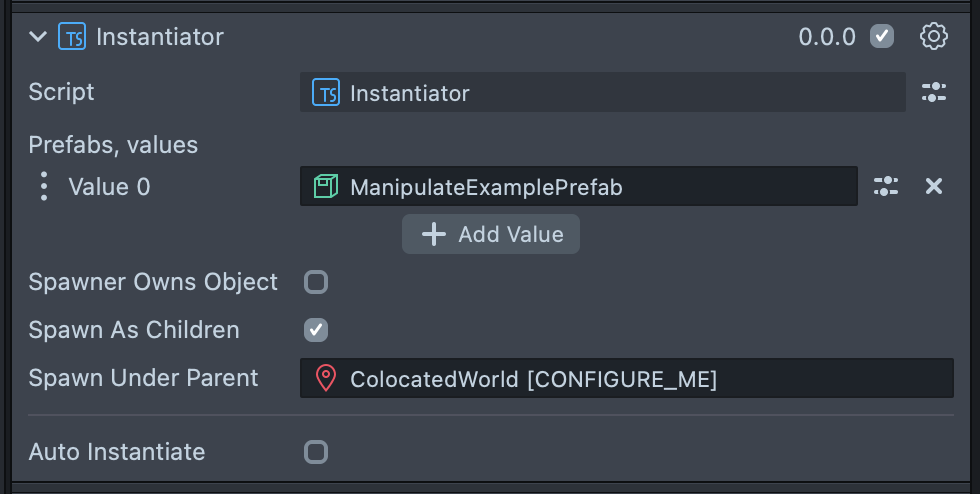
Once the Instantiator is set up in the Scene Hierarchy, it can be called on from another script.
First, reference the Instantiator from the other script. In the Inspector for the script component, verify that the instantiator field is populated with the Instantiator script.
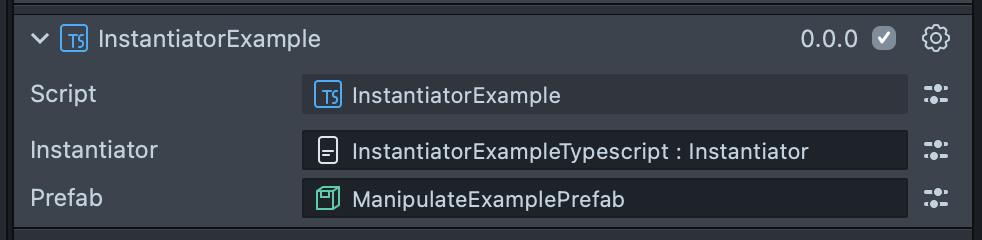
Add an ObjectPrefab input and populate the Inspector with the prefab to be instantiated. The prefab should already be added to the Instantiator's Prefabs list.
- TypeScript
- JavaScript
@input()
instantiator: Instantiator;

@input()
prefab: ObjectPrefab;
// @input Component.ScriptComponent instantiator
// @input Asset.ObjectPrefab prefab

var instantiator = script.instantiator;
var prefab = script.prefab;
Basic Instantiation
Before instantiating an object, check that the Instantiator has finished setting up and is ready to use. This can be done either by checking Instantiator.isReady(), which returns a boolean, or Instantiator.notifyOnReady() similar to SyncEntity and SessionController. After a leave, a notifyOnReady() callback registered before setup finished runs again when Sync Kit joins another session, not when it returns to the same session, so an object instantiated there isn't instantiated twice. Once ready, the Instantiator can be used to instantiate the prefab by calling Instantiator.instantiate(), which takes the prefab as a required parameter.
- TypeScript
- JavaScript
onReady() {
  this.instantiator.instantiate(this.prefab);
}

onAwake() {
  this.instantiator.notifyOnReady(() => {
    this.onReady();
  });
}
instantiator.notifyOnReady(function () {
  instantiator.instantiate(prefab);
});
Advanced Instantiation Options
Use the InstantiationOptions class to define options for instantiation. Each of the options on this class is optional, meaning you only need to define the ones you want to use. The options object can be passed into the Instantiator.instantiate() method as an optional second parameter.
Below is the full list of options with examples:
InstantiationOptions.claimOwnership: If true, the local user who instantiates the prefab will own its Realtime Store (boolean).InstantiationOptions.persistence:RealtimeStoreCreateOptions.Persistenceof the instantiated object.Persist Persistence option is deprecated; see Sync Entity for the migration to Snap Cloud.
InstantiationOptions.overrideNetworkId: Sets a custom network ID (string).InstantiationOptions.localPosition: The initial local position of the prefab's root (vec3), defaults to(0,0,0).InstantiationOptions.localRotation: The initial local rotation of the prefab's root (quat), defaults toquat.quatIdentity().InstantiationOptions.localScale: The initial local scale of the prefab's root (vec3), defaults to(1,1,1).InstantiationOptions.worldPosition: The initial world position of the prefab's root (vec3), defaults to(0,0,0).InstantiationOptions.worldRotation: The initial world rotation of the prefab's root (quat), defaults toquat.quatIdentity().InstantiationOptions.worldScale: The initial world scale of the prefab's root (vec3), defaults to(1,1,1).InstantiationOptions.onSuccess: Function called when the prefab is successfully instantiated.InstantiationOptions.onError: Function called when an error occurs during instantiation.
- TypeScript
- JavaScript
onAwake() {
  this.sessionController = SessionController.getInstance();
  this.instantiator.notifyOnReady(() => {
    this.onReady();
  });
}

onReady() {
  const customDataStore = GeneralDataStore.create();
  customDataStore.putString(
    'displayName',
    this.sessionController.getLocalUserName()
  );

  const options = new InstantiationOptions();
  options.claimOwnership = true;
  options.persistence = 'Session';
  options.localPosition = new vec3(0, 0, 0);
  options.localRotation = quat.quatIdentity();
  options.localScale = new vec3(0, 0, 0);
  options.onSuccess = (networkRootInfo) => {
    print('Success!');
  };
  options.onError = (error) => {
    print('Error!');
  };
  options.customDataStore = customDataStore;

  this.instantiator.instantiate(this.prefab, options);
}
var customDataStore = GeneralDataStore.create();
customDataStore.putString(
  'displayName',
  sessionController.getLocalUserName()
);

var options = new InstantiationOptions();
options.claimOwnership = true;
options.localPosition = new vec3(0, 0, 0);
options.localRotation = quat.quatIdentity();
options.localScale = new vec3(0, 0, 0);
options.persistence = 'Session';
options.onSuccess = function (networkRootInfo) {
  print('Success!');
};
options.onError = function (error) {
  print('Error!');
};
options.customDataStore = customDataStore;

instantiator.instantiate(prefab, options);
You can also pass a JS object instead of the InstantionOptions class.
- TypeScript
- JavaScript
onAwake() {
  this.instantiator.notifyOnReady(() => {
    this.onReady();
  });
}

onReady() {
  this.instantiator.instantiate(this.prefab, {
    claimOwnership: true,
    persistence: 'Session',
    localPosition: new vec3(0, 0, -100),
  });
}
instantiator.instantiate(prefab, {
  claimOwnership: true,
  persistence: 'Session',
  localPosition: new vec3(0, 0, -100),
});
Auto Instantiation
Auto instantiation automatically instantiates prefabs when a user joins the session. To use auto instantiation, enable Auto Instantiate in the Instantiator Inspector panel. When enabled, additional input fields will appear:
- Prefabs: Click
+ Add Valueto add the prefabs to be auto instantiated. - Persistence: See Sync Entity for options. Persist is deprecated; move properties that must survive across sessions to Snap Cloud.
- Auto Instantiate Owner: If Owned is selected, the local user who spawns the prefab will claim ownership of the object. Otherwise, the instantiated object will be unowned.
After a leave, auto instantiation runs again when Sync Kit joins another session. On a return to the same session it runs again only for Owned prefabs with Owner persistence, which the server deleted with the leave; the other prefabs this user instantiated are spawned again from the session. See Leaving and Rejoining Sessions.
Referencing the New Object
The newly created object can be referenced from its NetworkRootInfo. A NetworkRootInfo is created on the root scene object of every instantiated prefab and can be accessed either from the onSuccess callback, or from the object's SyncEntity, if it has one. A NetworkRootInfo provides the following information about the instantiated object, as well as methods similar to SyncEntity:
NetworkRootInfo.instantiatedObject: The instantiated scene object.NetworkRootInfo.locallyCreated: Boolean indicating whether the prefab was instantiated by the local user.NetworkRootInfo.dataStore: The GeneralDataStore associated with the instantiated object, which stores information about the prefab's instantiation. Returns theInstantiationOptions.customDataStore, if set during instantiation.NetworkRootInfo.onDestroyed: Event that fires when the instantiated object is destroyed by anyone.NetworkRootInfo.onLocalDestroyed: Event that fires when the instantiated object is destroyed by the local user.NetworkRootInfo.onRemoteDestroyed: Event that fires when the instantiated object is destroyed by another user.NetworkRootInfo.getOwnerUserId():UserInfo.userIdof the owner (string), or null.NetworkRootInfo.getOwnerId(): UserInfo of the owner, or null.NetworkRootInfo.isOwnedBy(connectionId: string): Returns a boolean indicating whether the instantiated object is owned by a user with the given connectionId.NetworkRootInfo.isOwnedByUserInfo(user: ConnectedLensModule.UserInfo): Returns a boolean indicating whether the instantiated object is owned by the given UserInfo.NetworkRootInfo.canIModifyStore(): Returns a boolean indicating whether the local user can modify the instantiated object's Realtime Store.NetworkRootInfo.doIOwnStore(): Returns a boolean indicating whether the local user owns the instantiated object's Realtime Store.
OnSuccess Callback
An onSuccess callback receives a NetworkRootInfo parameter when it is called. An onSuccess callback can be passed to Instantiator.instantiate() as part of the InstantiationOptions. It can also be passed as a third parameter, which overrides a callback set in the InstantationOptions object.
Here is an example of how to reference the instantiated object in an onSuccess callback:
- TypeScript
- JavaScript
this.instantiator.instantiate(
  this.prefab,
  {},
  (networkRootInfo: NetworkRootInfo) => {
    const newObj = networkRootInfo.instantiatedObject;
    print('instantiated new object: ' + newObj);
  }
);
instantiator.instantiate(prefab, {}, function (networkRootInfo) {
  var newObj = networkRootInfo.instantiatedObject;
  print('instantiated new object: ' + newObj);
});
SyncEntity.networkRoot
Any SyncEntity that has been instantiated will also have a reference to its NetworkRootInfo.
- TypeScript
- JavaScript
if (this.syncEntity.networkRoot) {
  print("Looks like I've been instantiated");

  if (this.syncEntity.networkRoot.locallyCreated) {
    print('I was created by the local user.');
  } else {
    print('I was created by another user.');
  }
}
if (syncEntity.networkRoot) {
  print("Looks like I've been instantiated");

  if (syncEntity.networkRoot.locallyCreated) {
    print('I was created by the local user.');
  } else {
    print('I was created by another user.');
  }
}
Hierarchy of Instantiated Objects
When a prefab is instantiated by the Instantiator, it is created as a child of a root scene object that holds the NetworkRootInfo. The NetworkRootInfo scene object is spawned as a child of the Spawn Under Parent set in the Instantiator Inspector inputs. This was done to solve a few problems, including enabling SyncEntities to find their NetworkRootInfo, and ensuring initial transforms are correct.
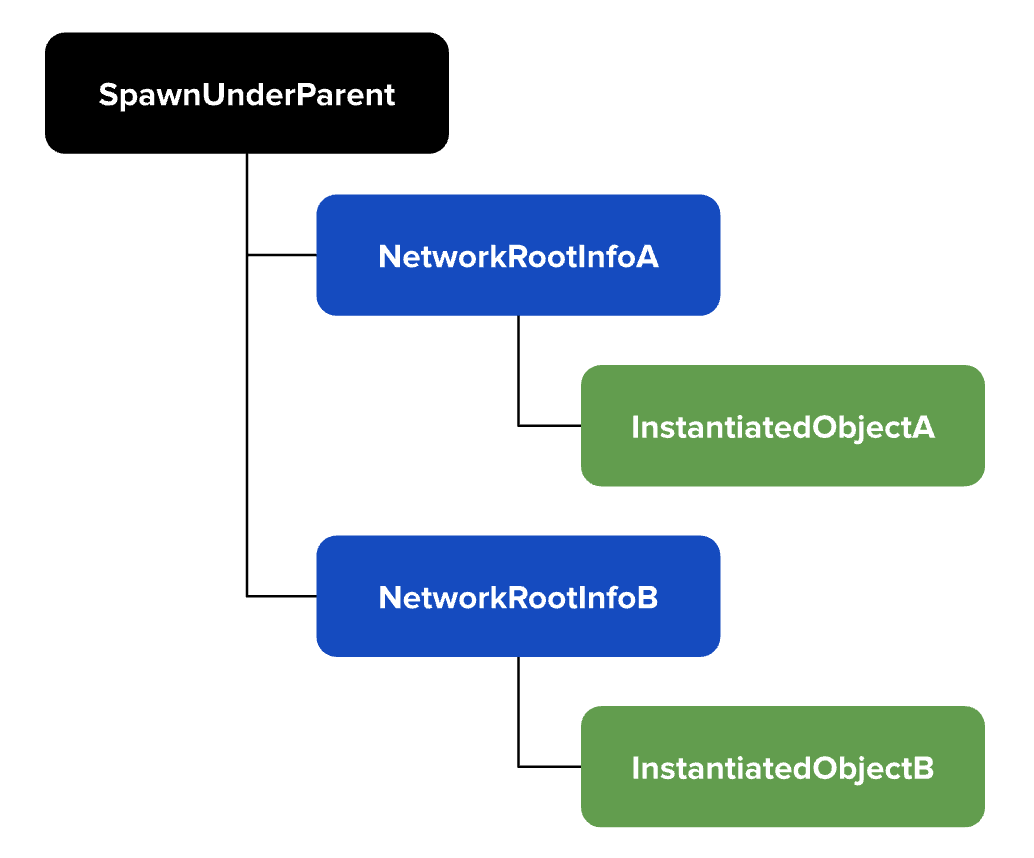
It is important to keep the following points in mind regarding transformations:
- The position, rotation, and scale options specific in InstantiationOptions are applied to the NetworkRootInfo scene object, not the instantiated object.
- After instantiation, any changes to the instantiated object's local position, rotation, and scale are made relative to the NetworkRootInfo scene object. This is especially relevant if you include a SyncTransform on a prefab that is configured to sync locally.
Instantiation Flow
Here is a recap of how instantiation works using the Instantiator component:
- Once the Instantiator setup is finished,
Instantiator.notifyOnReady()will execute its callbacks andInstantiator.isReady()will return true. - Once the Instantiator is ready,
Instantiator.instantiate()can be called. - An empty scene object is created using the world or local transform data, as specified in optional InstantiationOptions. NetworkRootInfo is attached to the empty scene object.
- The prefab is instantiated as a child of the NetworkRootInfo scene object.
- Immediately
OnAwake, all SyncEntities look upward in their hierarchy to search for a NetworkRootInfo and determine if they are under a prefab. If a NetworkRootInfo is found, they generate their network ID in a special way in order to be tied to the prefab. - Immediately after instantiating the object and after SyncEntities have found their NetworkRootInfos, the
onSuccesscallback is executed.