Lifecycle
How a Connected Lenses session starts with Sync Kit, the order in which Sync Kit sets it up, and when each Sync Kit feature is safe to use.
- Snapchat: not supported
- SPECS: fully supported
- Camera Kit Web: not supported
- Camera Kit Mobile: not supported
- SnapchatNot supported
- SPECSFully supported
- Camera Kit WebNot supported
- Camera Kit MobileNot supported
A Connected Lens sends and receives information to and from the other users wearing SPECS in the same session. Users choose to join a session before the connected experience starts. This page describes how a session starts, the order in which Sync Kit sets it up, and when each Sync Kit feature is safe to use.
How a session starts
Sync Kit's Session Controller creates and manages the session for your Lens.
- The user enters the Lens. The Sync Kit Start Menu shows Multiplayer and Singleplayer. The start mode on the Session Controller can skip the menu.
- Multiplayer takes the user into the system session selector and then the colocated joining flow. Singleplayer puts the user directly into the Lens. Using Connected Lenses shows the flow from the user's side.
- Sync Kit sets up the session in the order that the next section describes.
When the Lens calls SessionController.leaveSession() and joins again, Sync Kit runs the setup steps again. Leaving and Rejoining Sessions describes what changes.
Session setup steps
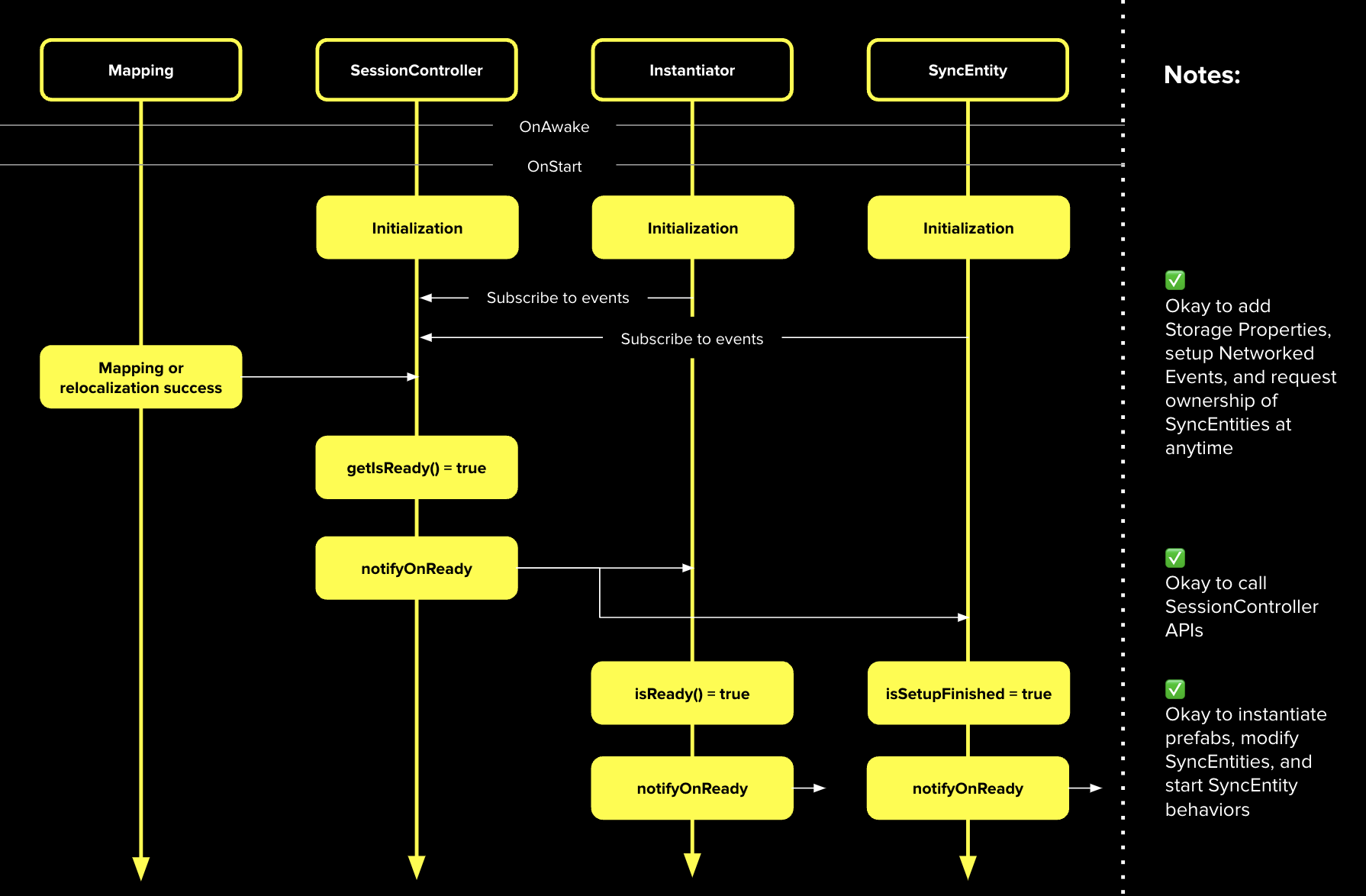
- SessionController is initialized.
- SyncEntities in the scene subscribe to events on SessionController.
✅ It is okay to add storage properties, subscribe to events, and request ownership of SyncEntities.
- Instantiators in the scene are initialized and subscribe to events on SessionController.
- On mapping or relocalization success, SessionController begins to set up the session. When the session setup is finished,
SessionController.getIsReady()becomes true and allSessionController.notifyOnReady()callbacks are executed.
✅ SessionController is now completely ready to use and SessionController APIs can be called.
- All SyncEntities begin to initialize themselves. Depending on the situation, they may initialize immediately, or may take up to a second to initialize. When each SyncEntity is ready and fully initialized, they execute their
SyncEntity.notifyOnReady()callbacks.
✅ SyncEntity is now completely ready to use. Storage properties can be set and retrieved, and networked events can be sent and received.
- When each Instantiator is ready and fully initialized, they execute their
Instantiator.notifyOnReady()callbacks.
✅ Instantiator is now completely ready to use. Prefabs can be instantiated across the network.
Session setup flowchart
Key takeaways
These are the most important points to remember as a developer:
SessionController
- If you need to use SessionController APIs, wait for the
SessionController.notifyOnReady()callback to run, or forSessionController.getIsReady()to return true. - Do session setup in an
onReadylistener, not inOnStartEvent: after a leave,onReadyfires again on a join into another session, whileOnStartEventfires only once per Lens run.
SyncEntity
- If you need to set up a SyncEntity by adding storage properties or callbacks, it is fine to do so at any point.
- If you need to make changes to a SyncEntity (for example, get / set a storage property) or start its behavior, wait for the
SyncEntity.notifyOnReady()callback, or forSyncEntity.isSetupFinishedto return true.
Instantiator
- If you need to instantiate a prefab using the Instantiator, wait for the
Instantiator.notifyOnReady()callback, or forInstantiator.isReady()to return true.
Users in the session
When building for SPECS, Sync Kit gives your scripts information about each user in the session as UserInfo: the user ID and the display name. User Information describes each field, and Session Controller lists the methods that return the users in the session and the server time.