Set Up CLAD in Cursor
Connect Cursor to Lens Studio through the MCP server and install the CLAD plugin, so Cursor can build and test Lenses in your project.
- Snapchat: fully supported
- SPECS: fully supported
- Camera Kit Web: not supported
- Camera Kit Mobile: not supported
- SnapchatFully supported
- SPECSFully supported
- Camera Kit WebNot supported — CLAD's skills cover Snapchat and SPECS Lenses
- Camera Kit MobileNot supported — CLAD's skills cover Snapchat and SPECS Lenses
Cursor connects to the project you have open in Lens Studio through the Lens Studio MCP server, and the CLAD plugin gives it the agents and skills to build, test, and publish Lenses. Follow these steps in order: Lens Studio has to be running before Cursor opens the project, so Cursor finds its server.
Before you start
-
Lens Studio 5.25 or later, with your project saved and open.
When building for SPECS, start from a SPECS project: see Set Up Lens Studio for SPECS.
-
The Lens Studio MCP server running. See Connect Your Agent to Lens Studio.
-
The Cursor desktop app, from cursor.com, and Git.
Install the CLAD plugin in Cursor
Cursor installs this plugin from a local folder: copy it out of the ls-extensions repository into Cursor's local plugin folder.
-
In a terminal, clone the ls-extensions repository into a folder outside your Lens Studio project:
git clone https://github.com/lens-studio-devs/ls-extensions.git -
Copy the CLAD plugin into Cursor's local plugin folder.
On macOS:
mkdir -p ~/.cursor/plugins/localcp -R ls-extensions/plugins/ls-clad ~/.cursor/plugins/local/mkdir -pcreates any missing folders and doesn't fail if the folder exists.On Windows, in PowerShell:
New-Item -ItemType Directory -Force -Path "$env:USERPROFILE\.cursor\plugins\local" | Out-NullCopy-Item -Recurse -Force ls-extensions\plugins\ls-clad "$env:USERPROFILE\.cursor\plugins\local"-ForceletsNew-Itemsucceed when the folder already exists, and letsCopy-Itemoverwrite an earlier copy;Out-Nullhides routine output.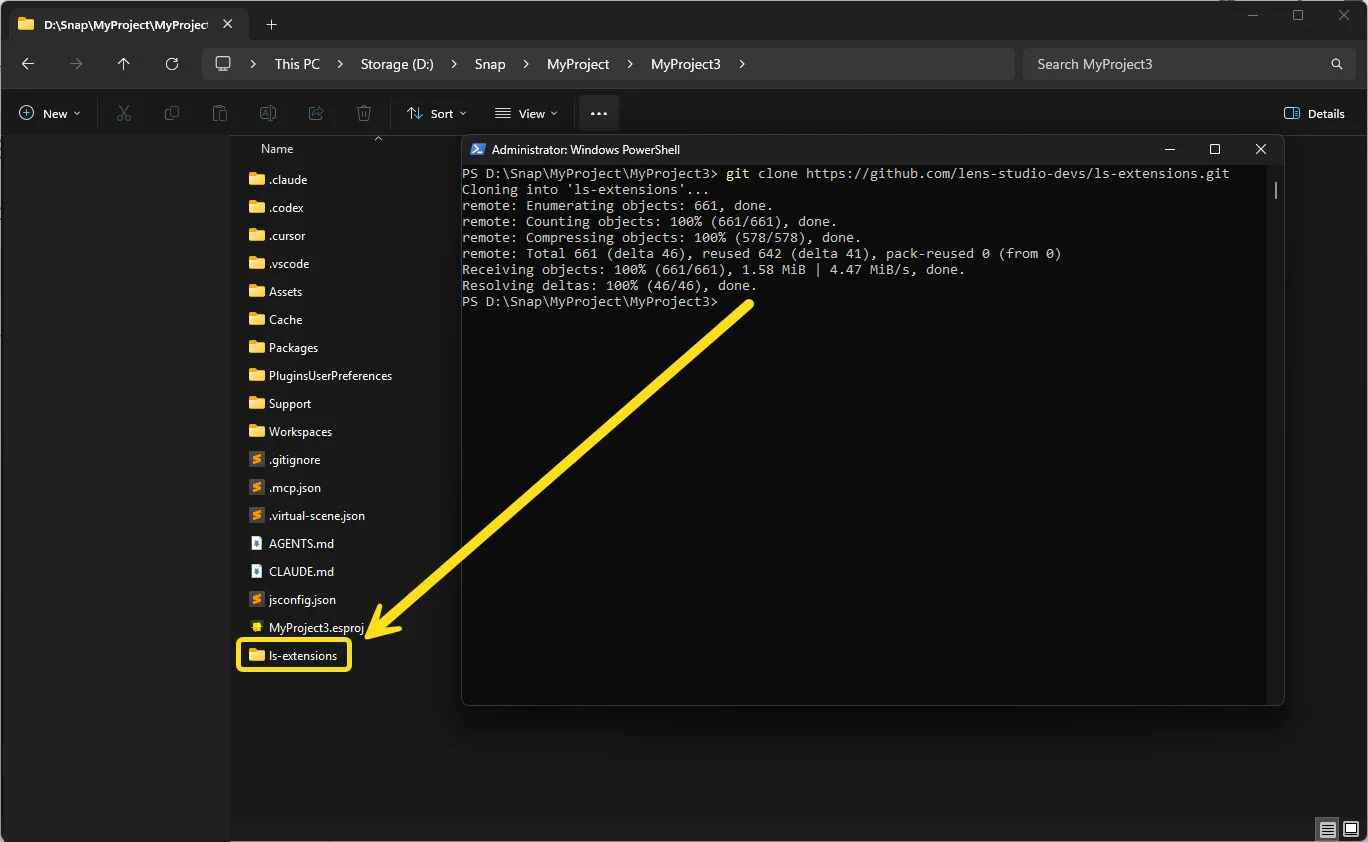
-
In Cursor, open the command palette (Cmd+Shift+P on macOS, Ctrl+Shift+P on Windows) and run Developer: Reload Window. If the plugin doesn't appear, quit and reopen Cursor.
To update the plugin later, pull the repository and run the copy command again. Both commands copy
into the local folder, so the new files replace the installed ls-clad folder's files. The
ls-extensions repository has the latest
installation steps, and Plugins in the Cursor documentation
covers local plugins.
Open the Lens Studio project in Cursor
- In Cursor, select File > Open Folder and choose your Lens Studio project folder. It
holds the
.cursor/mcp.jsonfile that tells Cursor where this Lens Studio window's server is. If you installed Cursor's command-line tool, you can instead runcursor .in a terminal in the project folder. Cursor also has a command-line agent. - Open Customize in the Cursor sidebar and check that the CLAD plugin is listed.
Turn on the Lens Studio server in Cursor
In Customize, find lens-studio under the MCP servers and turn its toggle on. A disabled
server doesn't load in chat. If lens-studio isn't listed or won't connect, see
Troubleshoot Lens Studio MCP.
Let Cursor work without asking at every step
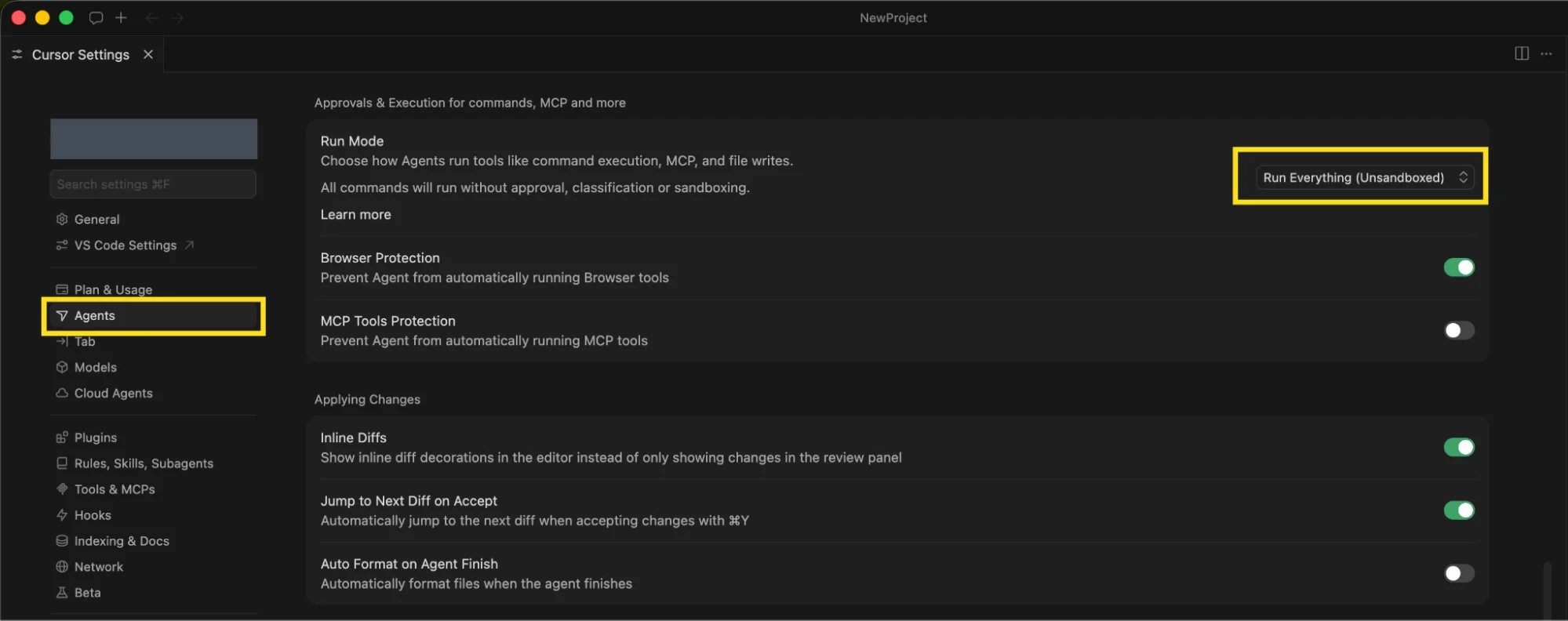
A Lens build calls hundreds of tools. In Cursor, open Settings > Agents > Approvals & Execution and choose a run mode:
| Run mode | What it does with Lens Studio tool calls |
|---|---|
| Auto-review | Runs allowlisted calls at once, and checks the others automatically |
| Run Everything | Runs every call without asking |
With Auto-review, add lens-studio to the allowlist so Lens Studio tool calls run without
waiting for you.
Use Run Everything only in a project you can restore, such as one under version control.
Build a Lens with Cursor and CLAD
Describe the Lens you want in the Cursor agent chat.
When building for SPECS, start the prompt with "Make … for SPECS" so CLAD uses its SPECS Experience Builder:
Make a periodic table Lens for SPECS that shows the atomic structure of each element
Cursor builds the Lens in the open Lens Studio window, so you can watch the scene and Preview change. A full Lens can take 30 minutes or more.
Related
- What Is CLAD: what the plugin adds.
- CLAD Agents and Skills: the skills to name in a prompt.
- Give Your AI Agent Lens Studio Context: add your own rules for Cursor.
- Troubleshoot Lens Studio MCP: when the server won't connect.