Hand Visualization
Draw a hand mesh that occludes AR content with the Interaction Kit HandVisual component, or attach your own effects to hand keypoints on SPECS.
- Snapchat: not supported
- SPECS: fully supported
- Camera Kit Web: not supported
- Camera Kit Mobile: not supported
- SnapchatNot supported
- SPECSFully supported
- Camera Kit WebNot supported
- Camera Kit MobileNot supported
Interaction Kit can draw a mesh over the user's hands with the HandVisual component, so AR content behind a hand is hidden as it would be behind a real object. To build your own hand effects instead, attach objects to hand keypoints with Lens Studio's ObjectTracking3D component.
Show a hand mesh with HandVisual
HandVisual processes the data from HandInputData to draw a mesh on a tracked hand. The InteractionKit prefab has one HandVisual for each hand, under [OPTIONAL] Visuals > HandVisuals. Hand interaction (pinch and poke) never depends on HandVisual.
| Input | What it does |
|---|---|
| Hand Type | The hand this HandVisual tracks: Left or Right. |
| Mesh Type | None (the default) shows no hand mesh and loads no hand model. Full loads the full skinned hand mesh. |
| Full Hand Material | Optional material for the Full mesh. Empty, the mesh uses the bundled hand occluder material, which hides AR content behind the hand. Each hand gets its own copy of the material; the asset isn't changed. |
The prefab's HandVisuals start with Mesh Type set to None, so no hand mesh shows until you change it:
- In the Scene Hierarchy, select LeftHandVisual under [OPTIONAL] Visuals > HandVisuals.
- In the Inspector, set Mesh Type to Full.
- Repeat for RightHandVisual.
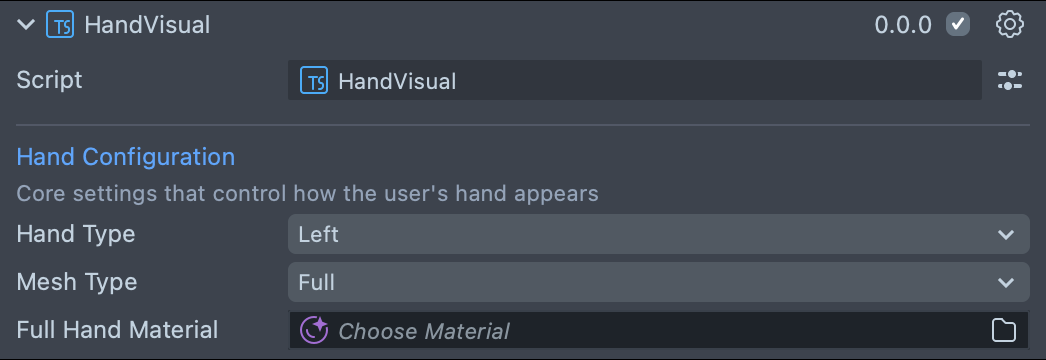
From a script, set meshType (HandMeshType.None or HandMeshType.Full, from
InteractionKit.lspkg/Components/Interaction/HandVisual/HandVisual) and fullHandMaterial
at runtime. The mesh loads asynchronously: isReady is true once the Full mesh shows, and
onReady fires each time a Full mesh finishes loading.
Earlier versions drew a glow on the fingertips when the user pinched. Interaction Kit 4.0.0 has no
fingertip glow and no visual styles: the legacy HandVisualSelection values still compile but
have no visual effect. Use Mesh Type instead.
Attach custom effects to hand keypoints
Lens Studio's ObjectTracking3D component can set attachment points on a
hand's keypoints. An object you attach follows its keypoint every frame, which is useful for
custom visual effects. Track the hand with a HandTracking3DAsset, and
name the keypoint with its landmark name, such as index-3 for the tip of the index finger.
This script attaches an object to the right index fingertip:
- TypeScript
- JavaScript
@component
export class ExampleHandVisualizationScript extends BaseScriptComponent {
  @input()
  visualSceneObject: SceneObject;

  @input()
  rightHand: HandTracking3DAsset;

  private objectTracking3DComponent: ObjectTracking3D;

  onAwake() {
    this.objectTracking3DComponent = this.sceneObject.createComponent(
      'Component.ObjectTracking3D'
    );
    this.objectTracking3DComponent.trackingAsset = this.rightHand;
    this.objectTracking3DComponent.addAttachmentPoint(
      'index-3',
      this.visualSceneObject
    );
  }
}
// @input SceneObject visualSceneObject
// @input Asset.HandTracking3DAsset rightHand

function onAwake() {
  // Wait for other components to initialize by deferring to OnStartEvent.
  script.createEvent('OnStartEvent').bind(() => {
    onStart();
  });
}

function onStart() {
  const objectTracking3DComponent = script.sceneObject.createComponent(
    'Component.ObjectTracking3D'
  );
  objectTracking3DComponent.trackingAsset = script.rightHand;
  objectTracking3DComponent.addAttachmentPoint(
    'index-3',
    script.visualSceneObject
  );
}

onAwake();
The landmark names are wrist; thumb-0 to thumb-3, index-0 to index-3, mid-0 to
mid-3, ring-0 to ring-3, and pinky-0 to pinky-3, from the base of each finger to its tip;
and wrist_to_thumb, wrist_to_index, wrist_to_mid, wrist_to_ring, and wrist_to_pinky.
Related
- Hand Tracking: read the same keypoints through Interaction Kit's TrackedHand.
- Components List: every Interaction Kit component.
- Interaction Kit Get Started: the prefab that contains the HandVisuals.