Architecture
How Interaction Kit for SPECS is structured: input data providers, interactors, Interactables, and the InteractionManager that processes their events each frame.
- Snapchat: not supported
- SPECS: fully supported
- Camera Kit Web: not supported
- Camera Kit Mobile: not supported
- SnapchatNot supported
- SPECSFully supported
- Camera Kit WebNot supported
- Camera Kit MobileNot supported
Interaction Kit is built in layers: input data providers read Lens Studio modules and assets, interactors turn that input into targeting and triggering, and Interactables receive the resulting events through a central InteractionManager. This page shows how those parts connect, for developers who extend Interaction Kit or debug how an interaction reaches their script.
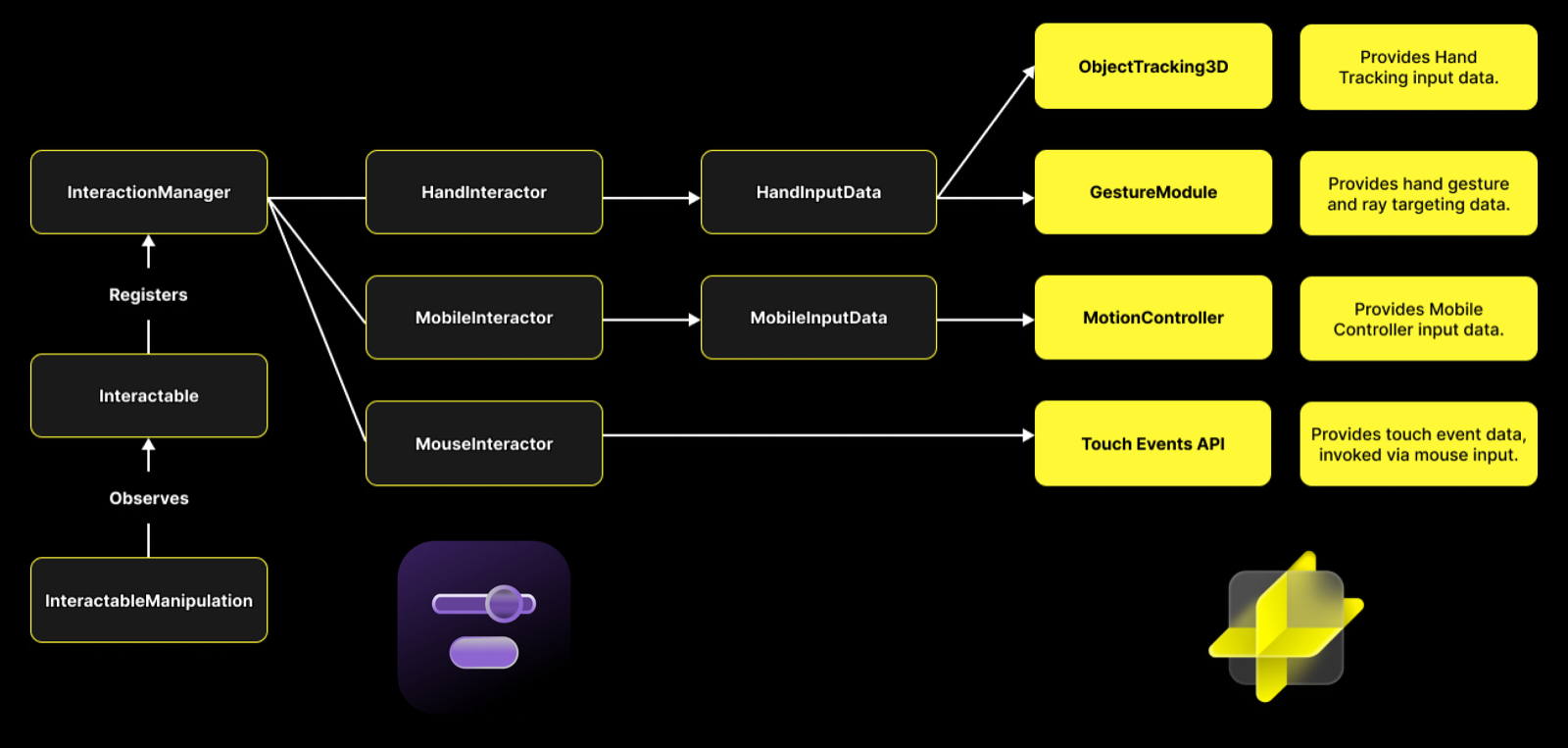
How Interaction Kit interactors get their input data
Each Interaction Kit interactor reads one input source through a provider:
- HandInteractor reads HandInputData, which gets hand tracking data from ObjectTracking3D and hand gestures from GestureModule.
- MobileInteractor reads MobileInputData, which gets a phone's input from the MotionControllerModule. The InteractionKit prefab doesn't include a MobileInteractor, and on SPECS 27 a phone is no longer available as a motion controller.
- MouseInteractor reads touch events, which the mouse produces in the Lens Studio Preview panel.
Every interactor registers with the InteractionManager. An Interactable registers with the InteractionManager too, and InteractableManipulation observes the Interactable on its scene object to move, rotate, and scale it.
On SPECS, the system's interaction runtime also backs hand targeting and the hand cursors.
Interaction Kit uses it internally through Core/SpecsInteraction; Lens scripts don't import
those files, which can change between package versions.
How the InteractionManager processes Interactable events each frame
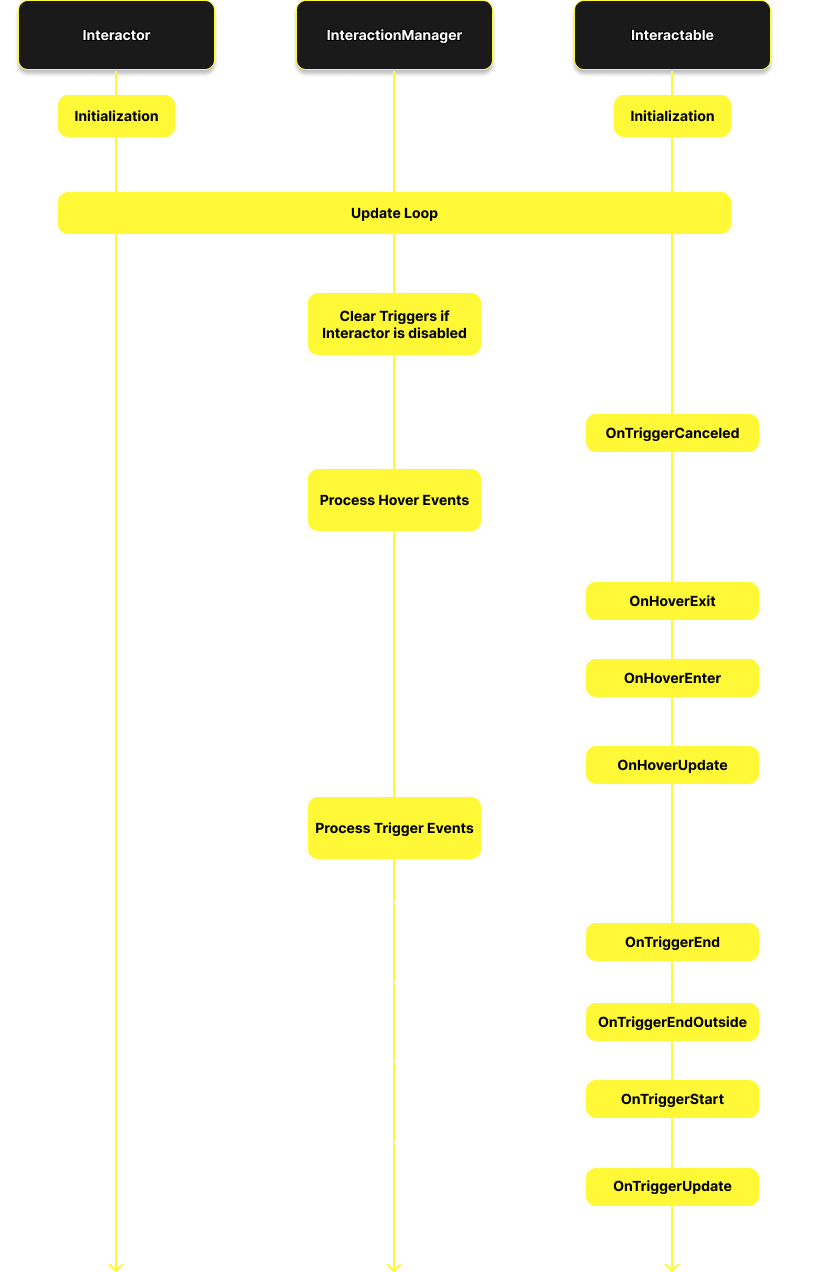
Interactors and Interactables initialize first. Then, in every update, the InteractionManager updates each interactor and processes its events:
- If the interactor is disabled, for example because its hand lost tracking, while it was triggering an Interactable, the InteractionManager sends that Interactable onTriggerCanceled.
- Hover events: onHoverExit when the interactor leaves its previous target, onHoverEnter when it reaches a new one, and onHoverUpdate while it stays.
- Trigger events: onTriggerStart on the frame a trigger (a pinch, a poke, a click) begins, onTriggerUpdate while it is held, and on release onTriggerEnd, or onTriggerEndOutside if the interactor no longer hovers the Interactable.
- Secondary trigger events, sent when the user holds a trigger: onSecondaryTriggerStart, onSecondaryTriggerUpdate, and onSecondaryTriggerEnd. While a secondary trigger is active, the primary trigger events in step 3 aren't sent.
The InteractionManager sends each event to the targeted Interactable and to its ancestor Interactables. For the full list of events, see Interaction System.
This diagram shows the same stages, without the secondary trigger events:
Related
- Interaction System: the Interactable events and how to handle them in a script.
- Hand Tracking: HandInputData, TrackedHand, and HandInteractor in code.
- Components List: every component in Interaction Kit 4.0.0.