Get Started
Sell non-consumables, consumables, and subscriptions in SPECS Lenses with Commerce Kit 4.0— products on the SPECS developer portal, Preview simulation, and migration from 3.x.
- Snapchat: not supported
- SPECS: fully supported
- Camera Kit Web: not supported
- Camera Kit Mobile: not supported
- SnapchatNot supported
- SPECSFully supported
- Camera Kit WebNot supported
- Camera Kit MobileNot supported
Overview
CommerceKit is a simplified wrapper around Lens Studio's CommerceKitModule for selling products inside SPECS Lenses. Products (non-consumables, consumables and subscriptions) are defined in the cloud, on the SPECS developer portal at developers.specs.com/lenses; your Lens only refers to them by product ID. CommerceKit connects to the commerce service, restores and finalizes purchases, and delivers consumables exactly when it is safe to. In Lens Studio Preview, where the commerce service is not available, it simulates purchases so you can build your store UI without a device.
Get started: configure your products on the SPECS developer portal at developers.specs.com/lenses, then follow the Quick Start below.
Features
- Products defined in the cloud: names, descriptions, localized prices and subscription plans come from the SPECS developer portal. Change them without republishing the Lens; no product data is stored in the Lens.
- Three product types: non-consumables (one-time unlocks), consumables (coins, lives, hints) and auto-renewing subscriptions with free trials and introductory prices.
- Safe purchase lifecycle: every completed purchase is acknowledged, because unacknowledged purchases are refunded automatically. Purchases interrupted by closing the Lens are finalized on the next launch, a user is never charged again while an earlier purchase of the same product is still being finalized, and CommerceKit reconnects by itself if the commerce service restarts.
- Consumable delivery: your handler grants the item before CommerceKit consumes the purchase, and a delivered purchase is not delivered again, even across Lens sessions.
- Subscriptions: list offers, describe them ("Free for 1 week, then $4.99 / month") and show renewal status. Less common operations, such as cancelling, go through the underlying client.
- Works in Lens Studio Preview: purchases are simulated without any setup, as in CommerceKit 3.x.
- Compatible with CommerceKit 3.x: existing calls such as
purchaseProduct(),getProductInfo()andisProductOwned()keep their signatures; new capabilities are new methods or optional parameters. - Typed API and errors: typed product and purchase records, and a
CommerceKitErrorcarrying aCommerce.ResponseCode.
Requirements
- Lens Studio 5.25 or later, targeting SPECS (CommerceKit 4.0.0 ships with the S9 package set).
- A product catalog for your Lens, configured at developers.specs.com/lenses.
How It Works
SPECS developer portal (developers.specs.com/lenses)
your products: IDs, names, prices, types, subscription offers
        |
        |  product IDs, used in your scripts
        v
CommerceKit.getInstance()  -->  CommerceKitModule (on device)
(connection, restore,           simulation (Lens Studio Preview)
 finalize, deliver)
Your scripts refer to products by their product IDs. On device, all product details come from the developer portal. In Lens Studio Preview, CommerceKit simulates the commerce service (see Testing in Lens Studio Preview).
Quick Start
-
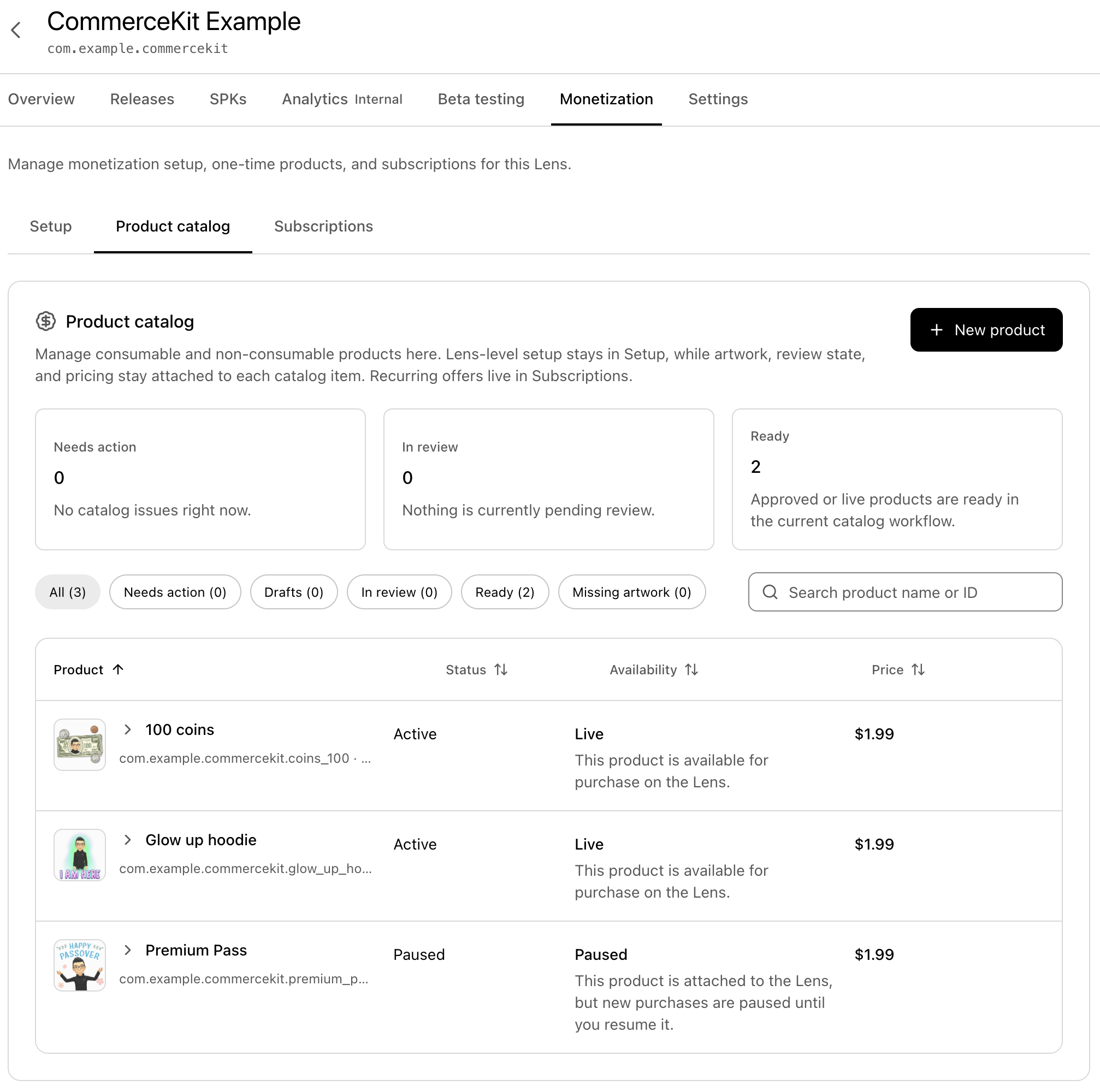
Create your products for your Lens at developers.specs.com/lenses (Monetization → Product catalog). Note each product ID for your scripts—do not edit a product list inside Lens Studio.
-
Drop in the example prefab—drag
CommerceKit__PLACE_IN_SCENEinto the Scene Hierarchy. It starts Commerce Kit and opens three purchase panels (non-consumable, consumable, subscription).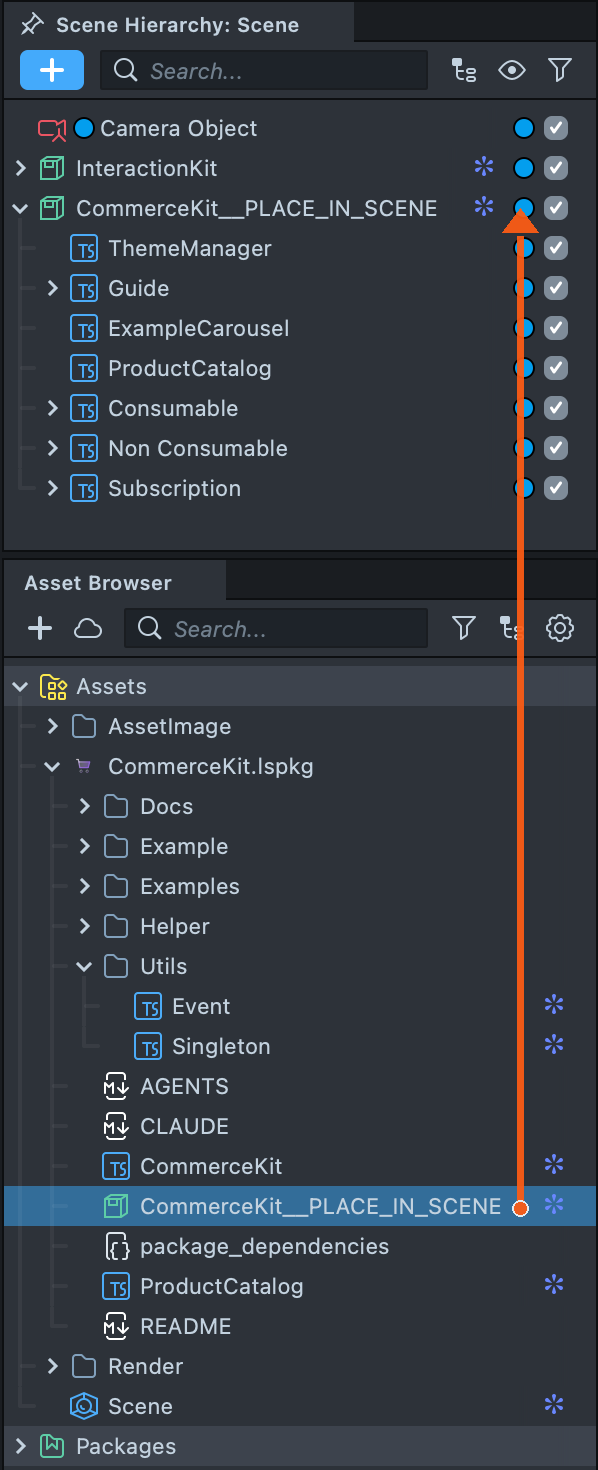
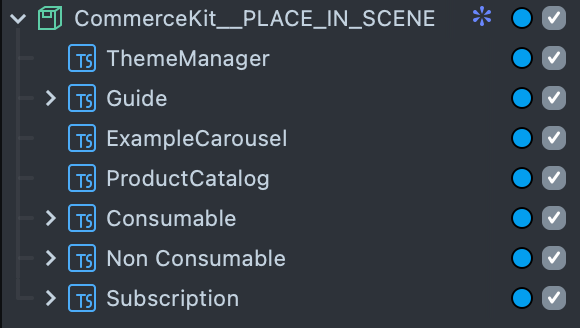
Walk through those panels first—each one is the buy-and-use path for one product type. Details are on Examples. For what the user sees on device during checkout, see User Purchase Flow.
-
Sell from your own scripts using the same product IDs, from
OnStartEventor later:
import { CommerceKit } from "CommerceKit.lspkg/CommerceKit";

const commerceKit = CommerceKit.getInstance();

// Connects, restores purchases and finalizes any pending ones.
await commerceKit.initialize();

// On device, product details always come from the developer portal.
const product = await commerceKit.getProductInfo("remove_ads");
priceText.text = product.nativeProduct.price.displayPrice; // "$1.99", "1,99 €", ...

if (!commerceKit.isProductOwned("remove_ads")) {
  const outcome = await commerceKit.purchaseProduct("remove_ads");
  if (outcome.success) {
    hideAds();
  } else if (outcome.cancelled) {
    print("User closed the checkout");
  }
}
Product Types
| Type | Typical use | How CommerceKit finalizes a purchase | Ownership |
|---|---|---|---|
| Non-consumable | Unlock a character, remove ads | Acknowledges it automatically | isProductOwned() is true from then on (unless refunded) |
| Consumable | Coins, lives, hints | Calls your registerConsumable handler, then consumes it | Never "owned"; can be bought again right away |
| Subscription | Premium tier, season pass | Acknowledges it automatically | isProductOwned() is true while the subscription is active |
Non-Consumables
const owned = commerceKit.isProductOwned("glow_up_hoodie");
unlockHoodie(owned);

commerceKit.onPurchasesChanged.add(() => {
  // Purchases restored, completed, or refunded.
  unlockHoodie(commerceKit.isProductOwned("glow_up_hoodie"));
});
Consumables
A consumable must have a delivery handler before it can be sold. CommerceKit calls the handler for every completed purchase, including purchases that were interrupted when the Lens closed, and acknowledges (consumes) the purchase only after the handler completes. For each purchase the order is:
- The checkout succeeds; the commerce service reports the purchase as Pending, not acknowledged.
- CommerceKit calls your handler with the purchase. The handler processes
purchase.token, for example by granting the item or by having your server redeem the token, and CommerceKit waits until it completes. - CommerceKit acknowledges the purchase, which consumes it.
purchaseProduct()resolves.
Process tokens only in the handler: by the time purchaseProduct() resolves, the purchase is
consumed, and its outcome carries no purchase record for consumables. After consume, the commerce
service no longer tracks that purchase—your app must persist what was granted.
When the grant should live on an account (for example a currency top-up shared across devices), redeem
purchase.token on your server in the handler, credit the user there, and only then let the
handler complete. Return false if the server has not finished yet, so the purchase stays pending:
commerceKit.registerConsumable("coins_100", async (purchase) => {
  // redeemOnServer is your own code. It must be idempotent per token: CommerceKit offers the same
  // purchase again until the handler completes.
  const result = await redeemOnServer(purchase.productId, purchase.token);
  if (result.status !== "done") {
    return false; // not processed yet: keep the purchase pending, try again later
  }
  coinsText.text = `${result.balance}`;
});
For Preview or a device-only grant with no backend, you can write to local storage instead—the
package's ExampleConsumableController does this. That state lives only on the device:
const store = global.persistentStorageSystem.store;

commerceKit.registerConsumable("coins_100", (purchase) => {
  store.putInt("coins", store.getInt("coins") + 100);
});

const outcome = await commerceKit.purchaseProduct("coins_100");
if (outcome.status === "purchased") {
  coinsText.text = `${store.getInt("coins")}`;
}
Register handlers early, for example in onAwake, so purchases recovered at startup are delivered right away, and so Lens Studio Preview simulates the product as a consumable (it only does when the handler exists before the product is first used).
If the handler returns false, throws or rejects, the purchase stays pending and is offered to it again later: on the next refresh(), in the next Lens session, or on the next purchaseProduct() call for that product (which finalizes it instead of charging again). Throwing also logs a warning; returning false does not. Once the handler has completed, CommerceKit remembers the delivery in persistent storage and only retries the acknowledgement, so the handler is not called again for that purchase even if the acknowledgement fails and the Lens closes. For strict once-only delivery, also record purchase.token together with what you granted (or let your server ignore tokens it has already credited) and skip tokens you have already seen.
A handler must eventually return or throw. If it processes the token asynchronously, it must return that work's promise (or be async and await it): CommerceKit acknowledges the purchase as soon as the handler's result settles. It may call other CommerceKit methods, such as refresh(), but not purchaseProduct(). Examples/ExampleConsumableController.ts shows a complete handler.
Subscriptions
import { describeOffer } from "CommerceKit.lspkg/Helper/SubscriptionOffers";

const premium = await commerceKit.getProductInfo("premium_pass");
const offers = premium.nativeProduct.subscriptionOfferDetails || [];
offers.forEach((offer) => print(describeOffer(offer)));
// For example, a monthly plan with a 1-week free trial offer:
// $4.99 / month
// Free for 1 week, then $4.99 / month

const outcome = await commerceKit.purchaseProduct("premium_pass", offers[0].offerId);

const purchase = commerceKit.getPurchase("premium_pass");
if (commerceKit.isProductOwned("premium_pass") && purchase && purchase.expiryTime) {
  const date = new Date(purchase.expiryTime).toDateString();
  statusText.text = purchase.isAutoRenewing ? `Renews ${date}` : `Active until ${date}`;
}
Offer IDs are opaque: pass them back unchanged. Omit the offer ID to buy the product's default offer. Switching an active subscription to another plan is not supported yet.
To let users cancel, call the native cancelSubscription() through
client(), then refresh(). The user keeps access
until expiryTime; the subscription then expires instead of renewing:
const purchase = commerceKit.getPurchase("premium_pass");
if (purchase && purchase.isAutoRenewing) {
  const client = await commerceKit.client();
  const result = await client.cancelSubscription(purchase.token);
  await commerceKit.refresh(); // CommerceKit sees the change after a sync
  if (result.responseCode !== Commerce.ResponseCode.Success) {
    statusText.text = "Could not cancel, try again later";
  }
}
Examples/ExampleSubscriptionController.ts puts these steps together in one panel. Subscriptions are not simulated in Lens Studio Preview; test them on device.
Purchase Lifecycle
You do not have to manage these steps; they explain what CommerceKit does on your behalf:
purchaseProduct()opens the system checkout. When the user pays, the commerce service reports the purchase as Pending.- CommerceKit finalizes it: a consumable is first processed by your handler and only then acknowledged, which consumes it; other purchases are acknowledged right away and become Purchased. If delivery or acknowledgement fails, CommerceKit syncs with the commerce service and tries once more before resolving.
- Purchases that are never acknowledged are refunded automatically after a grace period. That is why CommerceKit also finalizes pending purchases on
initialize()andrefresh(), after every checkout, and when a consumable handler is registered. - If a purchase still cannot be finalized, for example because the device went offline,
purchaseProduct()resolves with status"pending". The payment went through; the purchase is finalized automatically later, and buying the same product again finalizes it instead of charging again. - If the checkout result never reaches the Lens (for example because the commerce service restarted), CommerceKit completes the purchase as soon as a sync such as
refresh()finds it. On Lens platforms that providesetTimeout, it stops waiting after 10 minutes and rejects withError; the purchase is still finalized if it shows up later. - If the commerce service restarts, CommerceKit reconnects with a new connection on the next request and retries it once.
Screenshots of the on-device checkout UI are on User Purchase Flow.
Testing in Lens Studio Preview
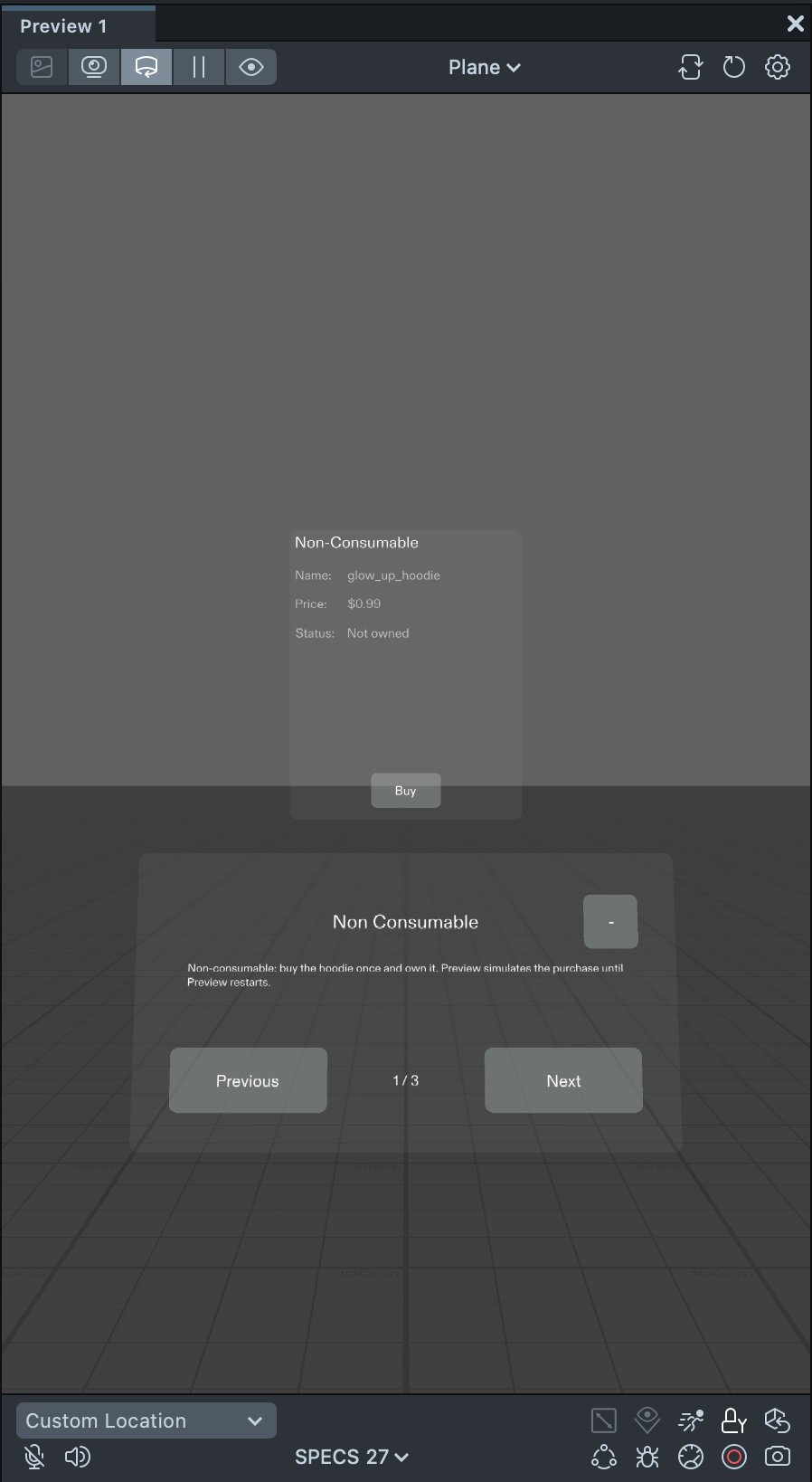
Lens Studio has no commerce service, so CommerceKitModule cannot connect in Preview. CommerceKit simulates the service there, without any setup, so your store UI keeps working in the editor:
- Every product ID your scripts use is a product named after its ID that costs $0.99. It is a consumable if a
registerConsumable()handler was registered for it before its first use, otherwise a non-consumable. The Logger says so once per product. - Every checkout succeeds right away. Non-consumables become owned; consumables go through your handler, are consumed and can be bought again.
- Simulated purchases last until Preview restarts.
client()resolves to the simulated client. It does not simulate subscriptions:cancelSubscription()resolves withItemNotOwnedandupdateSubscription()withError.
Real names and prices, cancelled and failed payments, unknown product IDs and subscriptions can only be tested on device.
Purchases aren't supported in internal releases installed from the Store. To test purchases, push your Lens directly to your device from Lens Studio, where purchases are simulated at no charge.
Migrating from CommerceKit 3.x
Products moved from the Lens to the cloud, and consumables and subscriptions were added:
| CommerceKit 3.x | Now |
|---|---|
ProductCatalog defined products (prices, names) inside the Lens | Products are defined only on the SPECS developer portal (developers.specs.com/lenses); scripts use their product IDs. ProductCatalog has no product entries anymore, and entries saved in existing scenes are ignored: create the same products on the portal. |
initializeCatalog(products) | Still works, but deprecated: it just calls initialize() and ignores the products. Call initialize() in new code. |
getProductInfo(id) | Unchanged signature and fields (price.price is still a decimal amount); type can also be "Consumable" or "Subscription". New: nativeProduct, the Lens API product, with the formatted price.displayPrice and subscriptionOfferDetails. CommerceProduct and CommercePrice are no longer Inspector types (@typedef), since products are not listed in the Lens anymore. |
purchaseProduct(id) resolved { success, cancelled? }, non-consumables only | Same call and fields, plus status, purchase and an optional offerId for subscriptions. Consumables need registerConsumable() first. Failures reject with CommerceKitError. |
isProductOwned(id), checkPurchaseStatus(id) | Unchanged. isProductOwned also covers active subscriptions. New: getPurchase(), onPurchasesChanged. |
client() | Unchanged. In Lens Studio Preview it now resolves to the simulated client instead of rejecting. |
| Prices limited to USD | Prices and currencies come from the portal. |
| In the editor, buying a product from the list succeeded at once; other IDs failed | In Lens Studio Preview, buying any product ID succeeds at once, at $0.99. Products with a registerConsumable() handler are simulated as consumables. |
Script Highlights
- Examples/ExamplePurchaseController.ts: non-consumable panel—
purchaseProduct()once, thenisProductOwned(). - Examples/ExampleConsumableController.ts: consumable panel—
registerConsumable()then buy; grant in the handler before acknowledge/consume. - Examples/ExampleSubscriptionController.ts: subscription panel—offer +
purchaseProduct(id, offerId), renewal viagetPurchase(), cancel viaclient(). - Examples/ExampleProductPanel.ts: shared panel UI; subclasses implement
prepare/describe/runAction. - CommerceKit.ts: singleton—connection, restore, finalize, ownership,
CommerceKitError. - Helper/SubscriptionOffers.ts:
describeOffer(),getFreeTrialPhase(). - CommerceKit__PLACE_IN_SCENE.prefab: demo with the three panels above (
glow_up_hoodie,coins_100,premium_pass). Non-consumable and consumable work in Preview; subscriptions need a device. On device, swap in your portal product IDs.
Troubleshooting
- "Product not found" /
ItemUnavailable: the product ID does not match a product of your Lens at developers.specs.com/lenses, or the product is not published. - A purchase stays pending: look for a CommerceKit warning in the Logger. Usually a consumable has no
registerConsumablehandler, or the handler throws. Pending purchases are finalized on the nextrefresh(), Lens launch or purchase attempt. - A purchase takes a long time to resolve: its checkout result may have been lost. Call
refresh(), for example when the Lens resumes; CommerceKit then completes the purchase from the inventory. - "Session already started or connecting": another script created its own client with
CommerceKitModule.createClient(). UseCommerceKit.getInstance()(orclient()) everywhere instead. - Preview shows the product ID and $0.99 instead of the real name and price: expected. Preview simulates every product; the device uses the developer portal.
- A consumable behaves like a non-consumable in Preview: register its handler with
registerConsumable()before the product is first used, for example inonAwake. - Purchases fail in a Store internal release: expected. Push the Lens to the device from Lens Studio instead; purchases are simulated there at no charge.