Examples
How the Commerce Kit prefab buys and uses a non-consumable, a consumable, and a subscription— matching ExamplePurchaseController, ExampleConsumableController, and ExampleSubscriptionController.
- Snapchat: not supported
- SPECS: fully supported
- Camera Kit Web: not supported
- Camera Kit Mobile: not supported
- SnapchatNot supported
- SPECSFully supported
- Camera Kit WebNot supported
- Camera Kit MobileNot supported
The CommerceKit__PLACE_IN_SCENE prefab ships three purchase panels. Each panel is one product
type: buy once and unlock, buy repeatedly and grant, or subscribe and show renewal. Product IDs
come from developers.specs.com/lenses—nothing is edited in
a catalog inside Lens Studio.
For what the user sees on device during checkout, see User Purchase Flow.
| Prefab panel | Script | Buy / use |
|---|---|---|
| Non Consumable | Examples/ExamplePurchaseController.ts | purchaseProduct() once → isProductOwned() |
| Consumable | Examples/ExampleConsumableController.ts | registerConsumable() then purchaseProduct() → grant in the handler |
| Subscription | Examples/ExampleSubscriptionController.ts | purchaseProduct(id, offerId) → getPurchase() for renewal; cancel via client() |
Shared UI wiring (button, labels, onPurchasesChanged refresh) lives in
Examples/ExampleProductPanel.ts. Subclasses only implement prepare(), describe(), and
runAction().
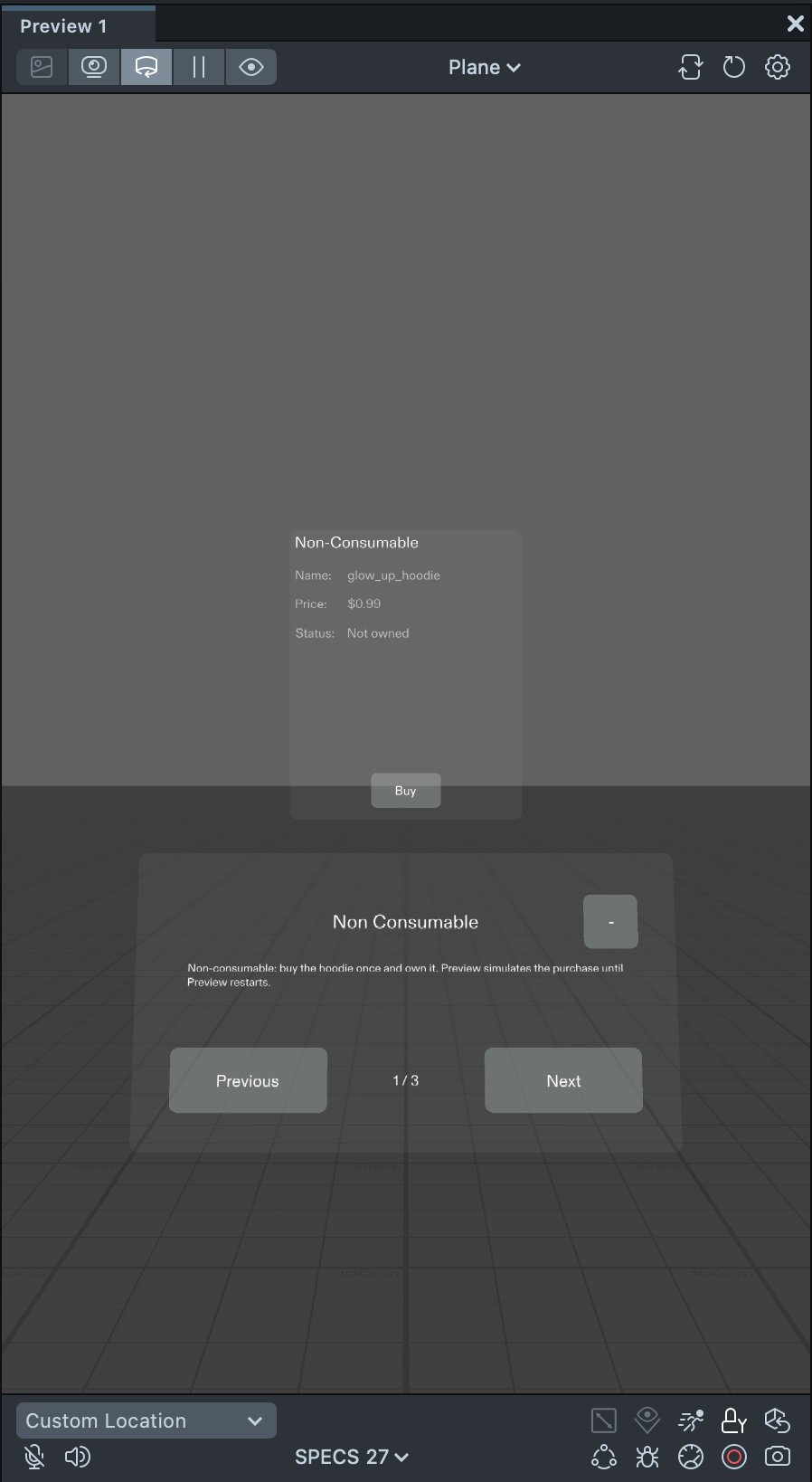
Non-consumable—buy once, then unlock
ExamplePurchaseController buys with purchaseProduct(), then treats the product as owned. Pending
purchases (paid but not finalized) show "Pending, tap to finish" and tapping Buy finalizes without
charging again.
import { CommerceKit } from 'CommerceKit.lspkg/CommerceKit';

async function buyOnce(id: string): Promise<string> {
  const kit = CommerceKit.getInstance();
  if (kit.isProductOwned(id)) return 'Owned';
  try {
    const outcome = await kit.purchaseProduct(id);
    switch (outcome.status) {
      case 'purchased':
      case 'alreadyOwned':
        return 'Owned';
      case 'pending':
        return 'Payment received, finishing up...';
      case 'cancelled':
        return 'Cancelled';
    }
  } catch (error) {
    return `Purchase failed: ${error.message}`;
  }
}

// Use ownership to unlock content; re-render on changes.
const kit = CommerceKit.getInstance();
unlockHoodie(kit.isProductOwned('glow_up_hoodie'));
kit.onPurchasesChanged.add(() => {
  unlockHoodie(kit.isProductOwned('glow_up_hoodie'));
});
Consumable—buy, deliver, buy again
ExampleConsumableController registers a delivery handler in onAwake before anything else uses
the product. Commerce Kit calls the handler for every completed purchase (including ones recovered
after the Lens closed), and only then acknowledges—which consumes—the purchase. The sample credits
coins in persistent storage (a stand-in for your own grant logic; account-backed grants usually
redeem purchase.token on a server—see Consumables).
import { CommerceKit } from 'CommerceKit.lspkg/CommerceKit';

const store = global.persistentStorageSystem.store;
const kit = CommerceKit.getInstance();

// Register early (onAwake) so recovered purchases deliver, and so Preview treats this ID as a consumable.
kit.registerConsumable('coins_100', (purchase) => {
  store.putInt('coins', store.getInt('coins') + 100); // grant before Commerce Kit consumes
});

async function buyCoins(): Promise<number> {
  const outcome = await kit.purchaseProduct('coins_100');
  return outcome.status === 'purchased' ? store.getInt('coins') : -1;
}
Return false from the handler to keep a purchase pending (for example when your server could not
redeem purchase.token yet). See Consumables.
Subscription—subscribe, show renewal, cancel
ExampleSubscriptionController lists offers with describeOffer(), subscribes with
purchaseProduct(productId, offerId), reads renewal from getPurchase(), and cancels through the
native client. Preview does not simulate subscriptions—test on device.
import { CommerceKit } from 'CommerceKit.lspkg/CommerceKit';
import { describeOffer } from 'CommerceKit.lspkg/Helper/SubscriptionOffers';

async function subscribe(id: string, statusText: Text): Promise<void> {
  const kit = CommerceKit.getInstance();
  const product = await kit.getProductInfo(id);
  const offers = product.nativeProduct.subscriptionOfferDetails || [];
  if (offers.length > 0) statusText.text = describeOffer(offers[0]);

  await kit.purchaseProduct(id, offers.length > 0 ? offers[0].offerId : null);

  const purchase = kit.getPurchase(id);
  if (kit.isProductOwned(id) && purchase && purchase.expiryTime) {
    const date = new Date(purchase.expiryTime).toDateString();
    statusText.text = purchase.isAutoRenewing
      ? `Renews ${date}`
      : `Active until ${date}`;
  }
}

async function cancelSubscription(id: string): Promise<void> {
  const kit = CommerceKit.getInstance();
  const purchase = kit.getPurchase(id);
  if (!purchase || !purchase.isAutoRenewing) return;
  const client = await kit.client();
  await client.cancelSubscription(purchase.token);
  await kit.refresh(); // Commerce Kit sees the change after a sync
}
Handle errors by code
import { CommerceKit, CommerceKitError } from 'CommerceKit.lspkg/CommerceKit';

async function tryPurchase(id: string): Promise<string> {
  try {
    await CommerceKit.getInstance().purchaseProduct(id);
    return 'Done';
  } catch (error) {
    if (
      error instanceof CommerceKitError &&
      error.code === Commerce.ResponseCode.NetworkError
    ) {
      return "You're offline";
    }
    if (
      error instanceof CommerceKitError &&
      error.code === Commerce.ResponseCode.ItemUnavailable
    ) {
      return 'Product not found';
    }
    return `Purchase failed: ${error.message}`;
  }
}