Remote Service Gateway
Call AI services from OpenAI, Google, and Snap in a SPECS Lens through the Remote Service Gateway, including alongside the camera, location, and audio.
- Snapchat: not supported
- SPECS: fully supported
- Camera Kit Web: not supported
- Camera Kit Mobile: not supported
- SnapchatNot supported
- SPECSFully supported
- Camera Kit WebNot supported
- Camera Kit MobileNot supported
Overview
The Remote Service Gateway gives a SPECS Lens a set of AI APIs that can be used alongside user-sensitive data, such as the camera frame, location, and audio. By default, a Lens that uses internet-connected components can't access sensitive data unless the user accepts the Transparent Permission prompt, or has turned on Extended Permissions in the SPECS App.
Services available through the Remote Service Gateway
OpenAI
Externally hosted by OpenAI
- Chat Completions: generate conversational AI responses with GPT models, such as GPT-5, GPT-4o, and
gpt-4.1-nano. - Image Generation: create images from text descriptions with
gpt-image-2. See the OpenAI image generation example. - Image Edit: edit images by providing a prompt, a base image, and a mask.
- Text-to-Speech: convert text to natural-sounding speech audio, with several voices.
- Realtime: real-time conversational AI with low-latency voice (WebSocket).
Google Generative AI
Externally hosted by Google
Gemini
- Gemini Model: access Google's Gemini large language models for multimodal AI (text, images, video).
- Gemini Live: real-time conversational AI with voice and video (WebSocket).
Imagen
- Image Generation: generate images from text prompts.
In Remote Service Gateway 4.0.0, image generation on the Imagen route uses the Gemini image models
(gemini-3.1-flash-image and gemini-3.1-flash-lite-image) through Imagen.generateContent. The
Remote Service Gateway no longer serves the older Imagen predict models (imagen-3.0 and
imagen-4.0), so predict requests through the deprecated Imagen.generateImage fail. See
Imagen image generation example.
Lyria
- Music Generation: create original music from text descriptions.
Snap-hosted APIs
Hosted directly by Snap
Snap3D
- Text-to-3D: generate 3D models (GLB) and assets from text descriptions and images, optimized for SPECS. See the Snap3D example.
Get started with the Remote Service Gateway
Remote Service Gateway prerequisites
You need Lens Studio 5.25 and a SPECS 27 device.
Set up the Remote Service Gateway in a Lens
Install the Remote Service Gateway package
The Remote Service Gateway package (version 4.0.0 for Lens Studio 5.25) contains helper scripts and examples for setting up and calling the APIs, and the token plugin that creates your API tokens. The package's scripts call the APIs through RemoteServiceModule.
- Open the Asset Library and search for Remote Service Gateway.
- Select Import on the Remote Service Gateway card.
The package adds a RemoteServiceGateway object to the Scene Hierarchy, with the RemoteServiceGatewayCredentials object and the package's examples inside it.
Configure API tokens
The Remote Service Gateway needs an API token for each provider whose services you call. The package's Remote Service Gateway Tokens window creates all of them.
Generate Remote Service Gateway tokens
-
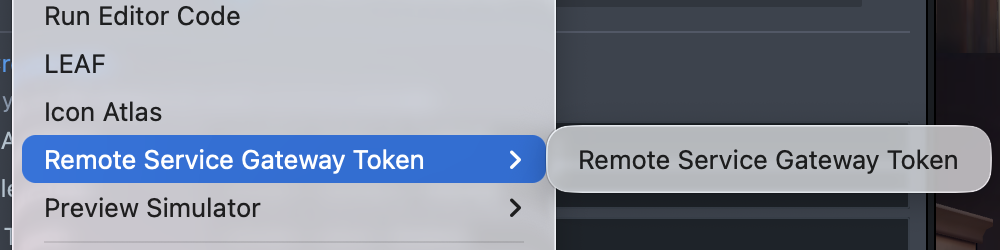
In the menu bar, select Window > Remote Service Gateway Token > Remote Service Gateway Token.
-
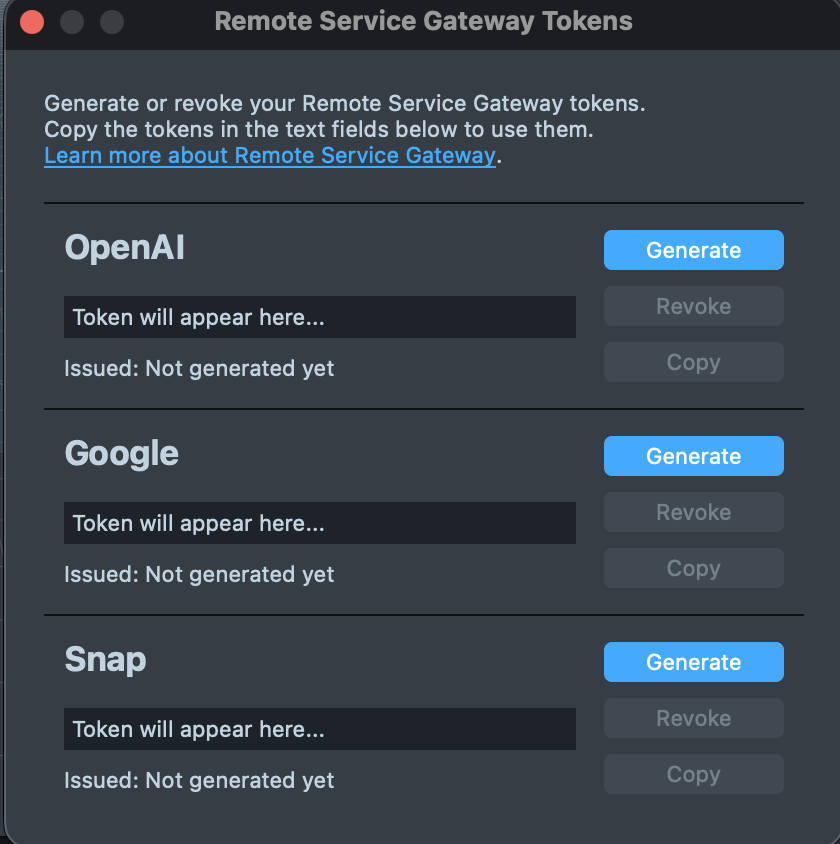
If the Remote Service Gateway Tokens window asks you to log in, select Login and log in to Lens Studio. The window shows your tokens only when you're logged in.
-
Select Generate for each service you need.
-
Select Copy next to a token to copy it to the clipboard.
-
In the Scene Hierarchy, select RemoteServiceGateway > RemoteServiceGatewayCredentials.
-
In the Inspector, paste each token into its field (OpenAI Token, Google Token, or Snap Token), for the services you plan to use. Until you do, the fields show placeholder text such as
[INSERT OPEN AI TOKEN].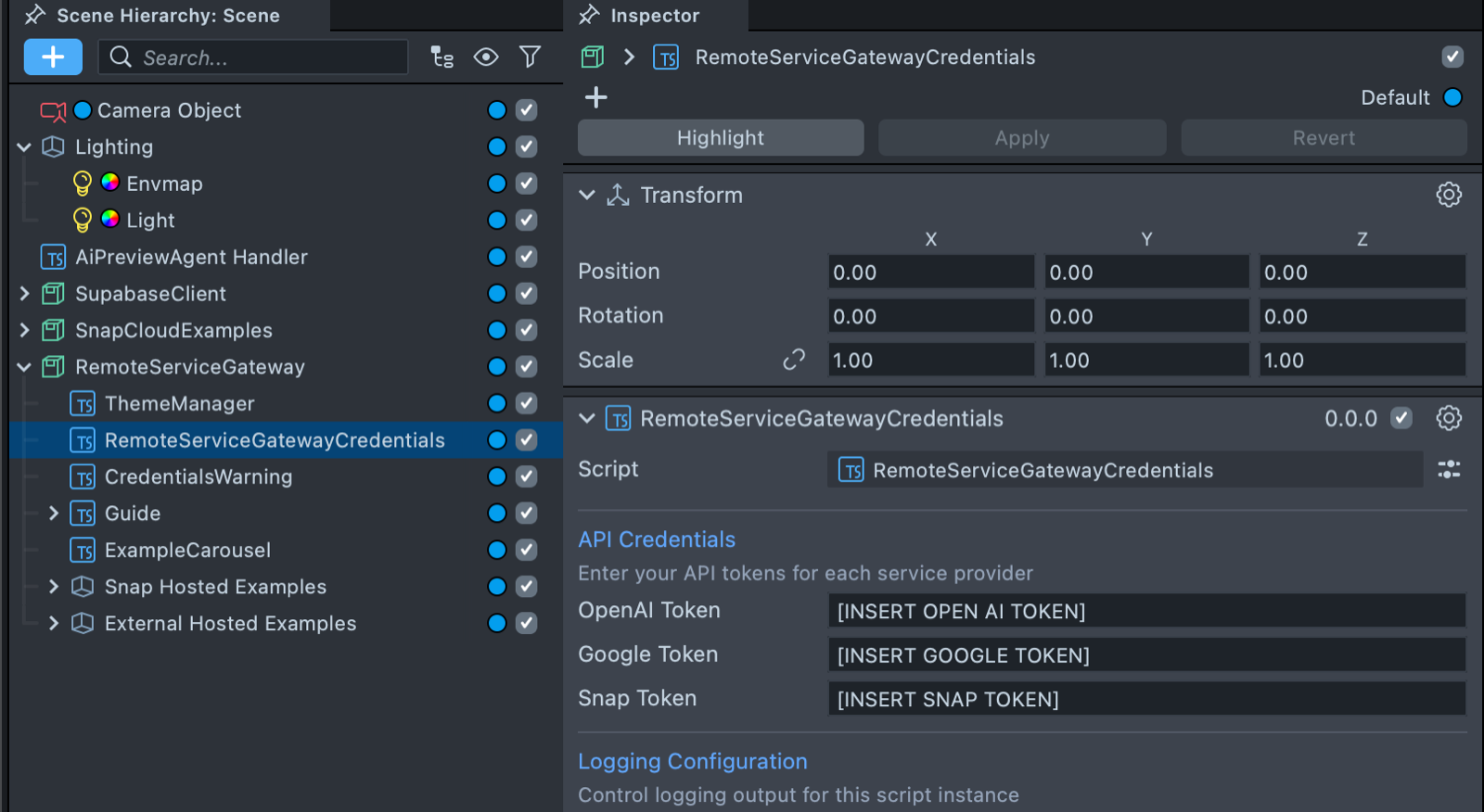
The token generator creates these tokens:
- Snap Token: required for Snap-hosted APIs (Snap3D).
- OpenAI Token: required for OpenAI services (Chat Completions, Image Generation, Image Edit, Text-to-Speech, Realtime).
- Google Token: required for Google GenAI services (Gemini, Imagen, and Lyria).
Tokens are tied to your Snapchat account and can be used across several projects and computers. When you generate a token on another computer and a token already exists for your Snapchat account, the generator shows the existing token instead of creating a new one.
To generate a new token, revoke the old one first: in the Remote Service Gateway Tokens window, select Revoke for that service, then Yes, Revoke.
Revoking a token stops Remote Service Gateway API calls in every existing Lens that uses it. You can't undo this.
API tokens are unique to your account; treat them as confidential. Don't include tokens when you share your project with others or commit code to version control.
Remote Service Gateway examples
These examples assume you've installed the Remote Service Gateway package from the Asset Library.
For more examples, see the example prefab included in the Remote Service Gateway package, or the AI Playground sample on the Lens Studio home screen.
OpenAI chat completions example
This example calls OpenAI's Chat Completions API from a SPECS Lens, sending a system instruction and a user question to a GPT model.
- TypeScript
- JavaScript
import { OpenAI } from 'RemoteServiceGateway.lspkg/HostedExternal/OpenAI';

@component
export class OpenAIExample extends BaseScriptComponent {
  onAwake() {
    this.createEvent('OnStartEvent').bind(() => {
      this.doChatCompletions();
    });
  }
  doChatCompletions() {
    OpenAI.chatCompletions({
      model: 'gpt-4.1-nano',
      messages: [
        {
          role: 'system',
          content:
            "You are an incredibly smart but witty AI assistant who likes to answers life's greatest mysteries in under two sentences",
        },
        {
          role: 'user',
          content: 'Is a hotdog a sandwich?',
        },
      ],
      temperature: 0.7,
    })
      .then((response) => {
        print(response.choices[0].message.content);
      })
      .catch((error) => {
        print('Error: ' + error);
      });
  }
}
const OpenAI =
  require('RemoteServiceGateway.lspkg/HostedExternal/OpenAI').OpenAI;

script.createEvent('OnStartEvent').bind(() => {
  doChatCompletions();
});
function doChatCompletions() {
  OpenAI.chatCompletions({
    model: 'gpt-4.1-nano',
    messages: [
      {
        role: 'system',
        content:
          "You are an incredibly smart but witty AI assistant who likes to answers life's greatest mysteries in under two sentences",
      },
      {
        role: 'user',
        content: 'Is a hotdog a sandwich?',
      },
    ],
    temperature: 0.7,
  })
    .then((response) => {
      print(response.choices[0].message.content);
    })
    .catch((error) => {
      print('Error: ' + error);
    });
}
Gemini example
This example calls Gemini's model API from a SPECS Lens, sending a system instruction and a user question.
- TypeScript
- JavaScript
import { Gemini } from 'RemoteServiceGateway.lspkg/HostedExternal/Gemini';
import { GeminiTypes } from 'RemoteServiceGateway.lspkg/HostedExternal/GeminiTypes';

@component
export class GeminiExample extends BaseScriptComponent {
  onAwake() {
    this.createEvent('OnStartEvent').bind(() => {
      this.textToTextExample();
    });
  }
  textToTextExample() {
    let request: GeminiTypes.Models.GenerateContentRequest = {
      model: 'gemini-2.5-flash-lite',
      type: 'generateContent',
      body: {
        contents: [
          {
            parts: [
              {
                text: "You are an incredibly smart but witty AI assistant who likes to answers life's greatest mysteries in under two sentences",
              },
            ],
            role: 'model',
          },
          {
            parts: [
              {
                text: 'Is a hotdog a sandwich?',
              },
            ],
            role: 'user',
          },
        ],
      },
    };

    Gemini.models(request)
      .then((response) => {
        print(response.candidates[0].content.parts[0].text);
      })
      .catch((error) => {
        print('Error: ' + error);
      });
  }
}
const Gemini =
  require('RemoteServiceGateway.lspkg/HostedExternal/Gemini').Gemini;

script.createEvent('OnStartEvent').bind(() => {
  textToTextExample();
});

function textToTextExample() {
  let request = {
    model: 'gemini-2.5-flash-lite',
    type: 'generateContent',
    body: {
      contents: [
        {
          parts: [
            {
              text: "You are an incredibly smart but witty AI assistant who likes to answers life's greatest mysteries in under two sentences",
            },
          ],
          role: 'model',
        },
        {
          parts: [
            {
              text: 'Is a hotdog a sandwich?',
            },
          ],
          role: 'user',
        },
      ],
    },
  };

  Gemini.models(request)
    .then((response) => {
      print(response.candidates[0].content.parts[0].text);
    })
    .catch((error) => {
      print('Error: ' + error);
    });
}
OpenAI image generation example
This example generates an image from a text prompt in a SPECS Lens with OpenAI's gpt-image-2 model, then decodes the returned Base64 data into a texture on an Image component.
- TypeScript
- JavaScript
import { OpenAI } from 'RemoteServiceGateway.lspkg/HostedExternal/OpenAI';

@component
export class OpenAIImageExample extends BaseScriptComponent {
  @input
  image: Image;

  onAwake() {
    this.createEvent('OnStartEvent').bind(() => {
      this.generateImage();
    });
  }

  generateImage() {
    OpenAI.imagesGenerate({
      model: 'gpt-image-2',
      prompt: 'A futuristic cityscape at sunset',
      n: 1,
      size: '1024x1024',
    })
      .then((response) => {
        const b64 = response.data[0].b64_json;
        Base64.decodeTextureAsync(
          b64,
          (texture) => {
            this.image.mainPass.baseTex = texture;
          },
          () => {
            print('Failed to decode texture from base64 data.');
          }
        );
      })
      .catch((error) => {
        print('Image generation error: ' + error);
      });
  }
}
const OpenAI =
  require('RemoteServiceGateway.lspkg/HostedExternal/OpenAI').OpenAI;

//@input Component.Image image

script.createEvent('OnStartEvent').bind(() => {
  generateImage();
});

function generateImage() {
  OpenAI.imagesGenerate({
    model: 'gpt-image-2',
    prompt: 'A futuristic cityscape at sunset',
    n: 1,
    size: '1024x1024',
  })
    .then((response) => {
      const b64 = response.data[0].b64_json;
      Base64.decodeTextureAsync(
        b64,
        (texture) => {
          script.image.mainPass.baseTex = texture;
        },
        () => {
          print('Failed to decode texture from base64 data.');
        }
      );
    })
    .catch((error) => {
      print('Image generation error: ' + error);
    });
}
Imagen image generation example
This example, from the package's ExampleImagenCalls script, generates an image from a text prompt
with the gemini-3.1-flash-image model through Imagen.generateContent, then decodes the image part
of the response into a texture on an Image component.
import { Imagen } from 'RemoteServiceGateway.lspkg/HostedExternal/Imagen';
import { GoogleGenAITypes } from 'RemoteServiceGateway.lspkg/HostedExternal/GoogleGenAITypes';

@component
export class ImagenExample extends BaseScriptComponent {
  @input imgObject: SceneObject;
  @input prompt: string = 'A futuristic cityscape at sunset';

  onAwake() {
    this.createEvent('OnStartEvent').bind(() => this.generateImage());
  }

  private generateImage() {
    const request: GoogleGenAITypes.Imagen.GenerateContentRequest = {
      model: 'gemini-3.1-flash-image',
      type: 'generateContent',
      body: {
        contents: [{ role: 'user', parts: [{ text: this.prompt }] }],
        generationConfig: { responseModalities: ['TEXT', 'IMAGE'] },
      },
    };

    Imagen.generateContent(request)
      .then((response) => {
        const parts = response.candidates?.[0]?.content?.parts ?? [];
        const imagePart = parts.find((part) => part?.inlineData?.data);
        if (!imagePart) {
          print('Imagen response has no image part');
          return;
        }
        Base64.decodeTextureAsync(
          imagePart.inlineData.data,
          (texture) => {
            const image = this.imgObject.getComponent('Image');
            image.mainMaterial = image.mainMaterial.clone();
            image.mainPass.baseTex = texture;
          },
          () => print('Failed to decode the image')
        );
      })
      .catch((error) => print('Imagen error: ' + error));
  }
}
Lyria example
This example calls Google's Lyria API from a SPECS Lens to generate original music from a text description, and plays it through the package's DynamicAudioOutput helper.
Lyria's music generation can take a long time to complete. Allow for long response times when you test it.
- TypeScript
- JavaScript
import { Lyria } from 'RemoteServiceGateway.lspkg/HostedExternal/Lyria';
import { GoogleGenAITypes } from 'RemoteServiceGateway.lspkg/HostedExternal/GoogleGenAITypes';
import { DynamicAudioOutput } from 'RemoteServiceGateway.lspkg/Helpers/DynamicAudioOutput';

@component
export class LyriaExample extends BaseScriptComponent {
  @input
  dynamicAudioOutput: DynamicAudioOutput;

  onAwake() {
    this.createEvent('OnStartEvent').bind(() => {
      this.generateMusic();
    });
  }

  generateMusic() {
    const musicRequest: GoogleGenAITypes.Lyria.LyriaRequest = {
      model: 'lyria-002',
      type: 'predict',
      body: {
        instances: [
          {
            prompt: 'An energetic electronic dance track with a fast tempo',
            negative_prompt: 'vocals, slow tempo',
            seed: 12345,
          },
        ],
        parameters: {
          sample_count: 1,
        },
      },
    };

    this.dynamicAudioOutput.initialize(48000);

    Lyria.performLyriaRequest(musicRequest)
      .then((response) => {
        print('Music generated successfully');
        response.predictions.forEach((prediction) => {
          let b64 = prediction.bytesBase64Encoded;
          this.dynamicAudioOutput.addAudioFrame(Base64.decode(b64), 2);
        });
      })
      .catch((error) => {
        print('Music generation failed: ' + error);
      });
  }
}
const Lyria = require('RemoteServiceGateway.lspkg/HostedExternal/Lyria').Lyria;
const DynamicAudioOutput =
  require('RemoteServiceGateway.lspkg/Helpers/DynamicAudioOutput').DynamicAudioOutput;

//@input ScriptComponent dynamicAudioOutput

script.createEvent('OnStartEvent').bind(() => {
  generateMusic();
});

function generateMusic() {
  const musicRequest = {
    model: 'lyria-002',
    type: 'predict',
    body: {
      instances: [
        {
          prompt: 'An energetic electronic dance track with a fast tempo',
          negative_prompt: 'vocals, slow tempo',
          seed: 12345,
        },
      ],
      parameters: {
        sample_count: 1,
      },
    },
  };

  script.dynamicAudioOutput.initialize(48000);

  Lyria.performLyriaRequest(musicRequest)
    .then((response) => {
      print('Music generated successfully');
      response.predictions.forEach((prediction) => {
        let b64 = prediction.bytesBase64Encoded;
        script.dynamicAudioOutput.addAudioFrame(Base64.decode(b64), 2);
      });
    })
    .catch((error) => {
      print('Music generation failed: ' + error);
    });
}
Snap3D example
This example calls Snap3D from a SPECS Lens to turn a text prompt into an image, then into a 3D asset (GLB).
Snap3D processing can take a long time to complete. Allow for long response times when you test it.
- TypeScript
- JavaScript
import { Snap3D } from 'RemoteServiceGateway.lspkg/HostedSnap/Snap3D';
import { Snap3DTypes } from 'RemoteServiceGateway.lspkg/HostedSnap/Snap3DTypes';

@component
export class Snap3DExample extends BaseScriptComponent {
  onAwake() {
    this.createEvent('OnStartEvent').bind(() => {
      this.do3DGeneration();
    });
  }
  do3DGeneration() {
    Snap3D.submitAndGetStatus({
      prompt: 'A cute cartoony hotdog character',
      format: 'glb',
      refine: true,
      use_vertex_color: false,
    })
      .then((submitGetStatusResults) => {
        submitGetStatusResults.event.add(([value, assetOrError]) => {
          if (value === 'image') {
            let imageAsset = assetOrError as Snap3DTypes.TextureAssetData;
            //Apply imageAsset.texture;
          } else if (value === 'base_mesh') {
            let gltfAsset = assetOrError as Snap3DTypes.GltfAssetData;
            //Apply gltfAsset.gltf;
          } else if (value === 'refined_mesh') {
            let gltfAsset = assetOrError as Snap3DTypes.GltfAssetData;
            //Apply gltfAsset.gltf;
          } else if (value === 'failed') {
            let error = assetOrError as {
              errorMsg: string;
              errorCode: number;
            };
            print('Error: ' + error.errorMsg);
          }
        });
      })
      .catch((error) => {
        print('Error: ' + error);
      });
  }
}
const Snap3D = require('RemoteServiceGateway.lspkg/HostedSnap/Snap3D').Snap3D;

script.createEvent('OnStartEvent').bind(() => {
  do3DGeneration();
});

function do3DGeneration() {
  Snap3D.submitAndGetStatus({
    prompt: 'A cute cartoony hotdog character',
    format: 'glb',
    refine: true,
    use_vertex_color: false,
  })
    .then((submitGetStatusResults) => {
      submitGetStatusResults.event.add(([value, assetOrError]) => {
        if (value === 'image') {
          let imageAsset = assetOrError;
          //Apply imageAsset.texture;
        } else if (value === 'base_mesh') {
          let gltfAsset = assetOrError;
          //Apply gltfAsset.gltf;
        } else if (value === 'refined_mesh') {
          let gltfAsset = assetOrError;
          //Apply gltfAsset.gltf;
        } else if (value === 'failed') {
          let error = assetOrError;
          print('Error: ' + error.errorMsg);
        }
      });
    })
    .catch((error) => {
      print('Error: ' + error);
    });
}
Helper scripts in the Remote Service Gateway package
The Remote Service Gateway package includes utility scripts that simplify media handling and AI integrations.
Media processing helpers
-
VideoController- Captures and encodes camera frames for visual AI processing. Provides formatted video data for APIs that support visual input (for example, Gemini Live). -
MicrophoneRecorder- Manages microphone input and audio frame recording. Handles audio capture for real-time voice interactions. -
AudioProcessor- Buffers and formats audio data for external services. Processes audio streams into the appropriate format for AI APIs. -
DynamicAudioOutput- Handles playback of PCM16 audio from generative AI models. Enables real-time audio output from text-to-speech and voice generation APIs. The Lyria example uses it to play generated music.
Utility classes
Event- Event system for managing callbacks and listenersPromisfy- Promise utilities for asynchronous operations
These helpers streamline integration with APIs requiring audio/visual input or supporting audio output. See the example prefab included in the Remote Service Gateway package for usage demonstrations.
Known limitations of the Remote Service Gateway
- The OpenAI
chat_completionsendpoint doesn't support streaming. - Imagen image editing and upscaling aren't supported.
- For the Gemini Live API, use the model that the package's
ExampleGeminiLivescript uses,models/gemini-live-2.5-flash.