Lens Performance Overlay
The Performance HUD shows your SPECS Lens's frame rate, frame time, CPU, GPU, and memory use, and power manager state in real time, on the SPECS display.
The Lens Performance Overlay shows performance data in real time on the SPECS display. The SPECS Monitor in Lens Studio shows more data on your computer, including power and temperature.
The overlay uses some power itself. For the most precise power readings in the SPECS Monitor, turn the overlay off while you read them.
Turn on the Performance HUD on SPECS
Turn on the overlay in either place:
- In the developer settings of the SPECS mobile app.
- With Enable Lens Overlay in the SPECS Monitor.
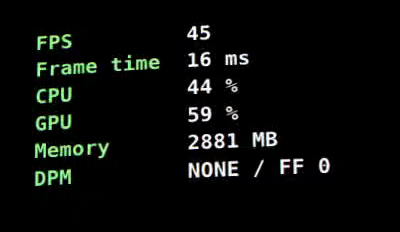
Performance HUD metrics
| Label | Metric | Units | What it measures |
|---|---|---|---|
| FPS | Frame rate | Frames per second | The frame rate of the Lens in the foreground. |
| Frame time | Lens frame time | Milliseconds | The average time from the compositor's frame request to the Lens's frame submission. |
| CPU | CPU use | 0–100% | The system's CPU usage. |
| GPU | GPU use | 0–100% | The system's GPU usage. |
| Memory | Memory use | MB | The system's memory usage. |
| DPM | Dynamic power manager | NONE, MED, or HIGH, then FF and a number | The mode of the dynamic power manager, which throttles a Lens that uses too much power, then the frame factor (FF). FF is 0 when your Lens isn't capped. Otherwise it's 3 or more, and your frame rate is capped at 90 ÷ FF. See Device Power Management. |
Related
- SPECS Monitor: graph power and temperature in Lens Studio, and record Perfetto traces.
- Optimizing Lens Performance: techniques and tips.
- Device Power Management: how SPECS throttle a Lens.
- Publishing Your Lens: the developer checklist for Lens Explorer.