Lifecycle
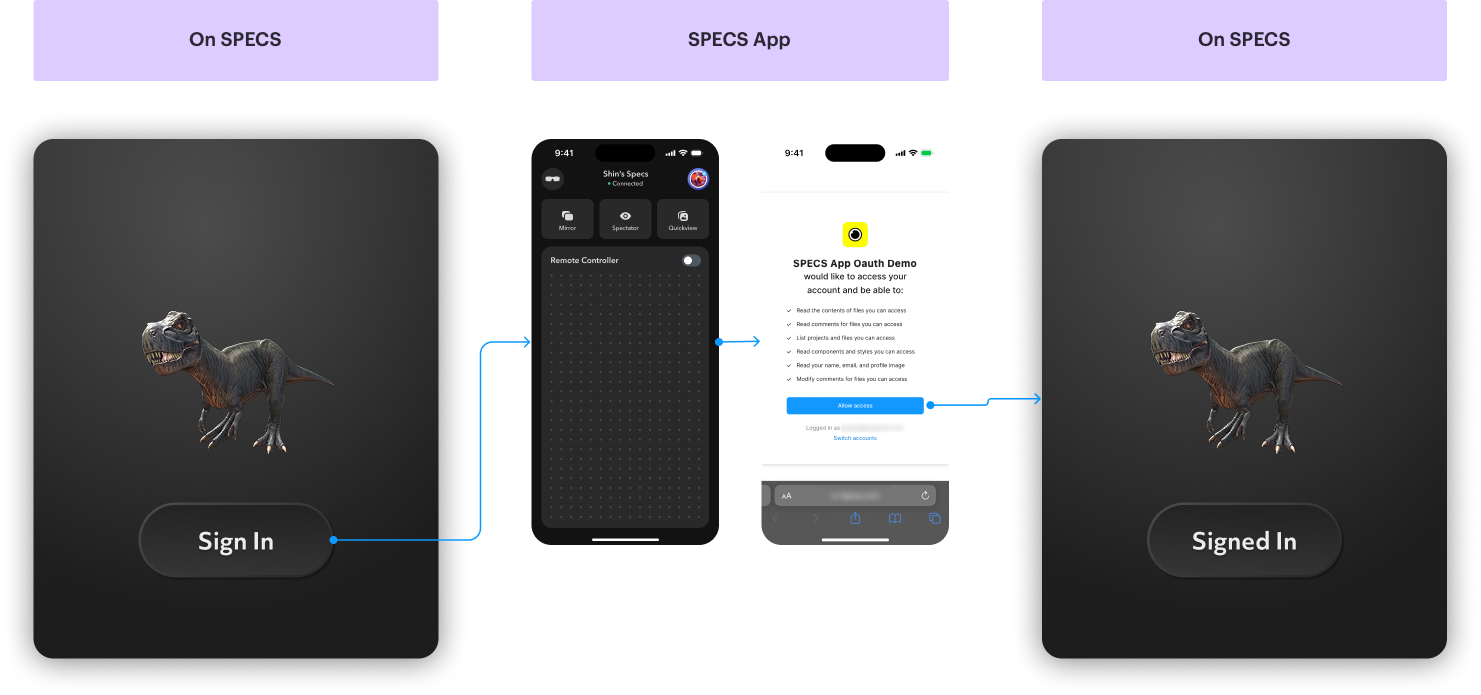
Understand the Auth Kit OAuth2 sign-in, which hands the user from the Lens on SPECS to the SPECS App and back.
- Snapchat: not supported
- SPECS: fully supported
- Camera Kit Web: not supported
- Camera Kit Mobile: not supported
- SnapchatNot supported
- SPECSFully supported
- Camera Kit WebNot supported
- Camera Kit MobileNot supported
How the Auth Kit sign-in moves between SPECS and the SPECS App
Auth Kit starts the OAuth2 flow from your Lens on SPECS. It opens the provider's sign-in page in the
SPECS App on the paired phone, through DeepLinkModule. The user signs
in and grants access there. The provider then redirects to the Auth Kit redirect URI, and the SPECS
App passes the result back to the Lens, where Auth Kit receives it through
DeepLinkModule.onUriReceived. The SPECS App must be running in the foreground to handle this
authorization callback.
Each sign-in carries a random state value. Auth Kit ignores a callback whose state doesn't match
the sign-in it started, so several OAuth2 instances in one Lens don't take each other's callbacks.