Collision and Overlap
- Available on all platforms
The physics system allows you to respond to collisions and overlap through events on the Collider or Body component.
Collision events occur whenever a dynamic body hits some other collider during simulation. Overlap events occur while any colliders overlap.
Add responses to collision and overlaps without scripting through Behavior.
OnCollisionEnter/Stay/Exit Events
These events are triggered whenever dynamic bodies hit another collider, such as when a box falls and hits the ground. They happen all the time whether or not you listen for them with onCollision events. The typical use-case for these is to perform some handling that occurs on collision, such as playing a sound or emitting visual effects.
Only dynamic physics bodies are simulated so they are the only things generating collision events. You will never see collision events between two static colliders - only between a dynamic body and another body/collider.
When a collision occurs between two objects, both objects receive collision events.
On SPECS, dynamic bodies can also collide with the World Mesh, the mesh SPECS builds of the surfaces around the wearer, once it has a mesh collider (see Physics Assets and Components). The World Mesh can have gaps that let objects fall through, so add colliders under your play area. See the SPECS Assets FAQ.
- TypeScript
- JavaScript
// Create a scene object with a collider component.
const obj = global.scene.createSceneObject('MyBox');
const body = obj.createComponent('Physics.BodyComponent');

// The default shape for a collider/body is a sphere. Change it to a box (using the default size).
body.shape = Shape.createBoxShape();

// Print collision events.
// The 'collider' property is the other body/collider component that hit this one.
body.onCollisionEnter.add((e) => {
  const collision = e.collision;
  print('CollisionEnter(' + collision.id + '): ---> ' + collision.collider);
});
body.onCollisionStay.add((e) => {
  const collision = e.collision;
  print('CollisionStay(' + collision.id + '): ---> ' + collision.collider);
});
body.onCollisionExit.add((e) => {
  const collision = e.collision;
  print('CollisionExit(' + collision.id + '): ---> ' + collision.collider);
});
// Create a scene object with a collider component.
var obj = scene.createSceneObject('MyBox');
var body = obj.createComponent('Physics.BodyComponent');

// The default shape for a collider/body is a sphere. Change it to a box (using the default size).
body.shape = Shape.createBoxShape();

// Print collision events.
// The 'collider' property is the other body/collider component that hit this one.
body.onCollisionEnter.add(function (e) {
  var collision = e.collision;
  print('CollisionEnter(' + collision.id + '): ---> ' + collision.collider);
});
body.onCollisionStay.add(function (e) {
  var collision = e.collision;
  print('CollisionStay(' + collision.id + '): ---> ' + collision.collider);
});
body.onCollisionExit.add(function (e) {
  var collision = e.collision;
  print('CollisionExit(' + collision.id + '): ---> ' + collision.collider);
});
Contact Information
When these collision events occur, you are provided contact points with surface and response information (position, normal, impulse, etc.).
- TypeScript
- JavaScript
const collider = this.collider;

collider.onCollisionStay.add((e) => {
  const contacts = e.collision.contacts;
  const contactCount = e.collision.contactCount;
  const points: vec3[] = [];
  for (let i = 0; i < contactCount; ++i) {
    const contact = contacts[i];
    const distance = contact.distance;
    const impulse = contact.impulse;
    const n = contact.normal;
    const p0 = contact.position;
    const p1 = p0.add(n.uniformScale(10.0));
    points[2 * i + 0] = p0;
    points[2 * i + 1] = p1;
  }
});
/** @type {ColliderComponent} */
var collider = script.collider;

collider.onCollisionStay.add(function (e) {
  var contacts = e.collision.contacts;
  var contactCount = e.collision.contactCount;
  var points = [];
  for (var i = 0; i < contactCount; ++i) {
    var contact = contacts[i];
    var distance = contact.distance;
    var impulse = contact.impulse;
    var n = contact.normal;
    var p0 = contact.position;
    var p1 = p0.add(n.uniformScale(10.0));
    points[2 * i + 0] = p0;
    points[2 * i + 1] = p1;
  }
});
OnOverlapEnter/Stay/Exit Events
These events are triggered whenever a collider overlaps another, typically used for volume triggers. For example, they could be used to detect when a player enters a room, using an intangible box collider to encompass the region.
They are similar to onCollision events but with some important differences:
- They act as explicit requests for the overlap of two colliders, and are only detected when you listen for
onOverlap. - They can detect arbitrary overlap between any two colliders, even non-simulated (static) or intangible ones.
- They don't generate contact information, and only tell you when colliders overlap, not where.
- You can filter them to specific collider types, such 'intangible' or 'dynamic'.
OverlapFilter
The onOverlap events have additional settings that allow you to filter which objects you want to listen to. These live in the Overlap Filter field of the collider (overlapFilter in script), which is a Physics.Filter.
includeStatic: (default: true) set true to include static colliders in intersection tests.includeDynamic: (default: true) set true to include dynamic bodies in intersection tests.includeIntangible: (default: false) set true to include intangible colliders in intersection tests.
For the typical volume trigger use-case, the collider representing the trigger should be set to intangible, so normal dynamic bodies can pass through it unaffected. includeIntangible is set to false by default, because you usually do not need to detect overlap between multiple triggers. If you do need to detect overlap between intangible colliders, make sure to set includeIntangible to true.
- TypeScript
- JavaScript
// Create a scene object with a collider component.
const obj = global.scene.createSceneObject('MyCollider');
const collider = obj.createComponent('Physics.ColliderComponent');

// Set it to intangible so nothing collides with it.
collider.intangible = true;

// Adjust the overlap filter. For this example, we want to detect all non-intangible colliders and bodies.
// Note, these match the defaults, but are included for demonstration.
collider.overlapFilter.includeIntangible = false;
collider.overlapFilter.includeDynamic = true;
collider.overlapFilter.includeStatic = true;

// Print overlap events.
collider.onOverlapEnter.add((e) => {
  print('OverlapEnter(' + e.overlap.id + '): ' + e.overlap.collider);
});
collider.onOverlapStay.add((e) => {
  const overlapCount = e.currentOverlapCount;
  if (overlapCount == 0) {
    return;
  }
  const overlaps = e.currentOverlaps;
  for (let i = 0; i < overlaps.length; ++i) {
    const overlap = overlaps[i];
    print(
      'Overlap[' +
        i +
        ']: id=' +
        overlap.id +
        ', collider=' +
        overlap.collider
    );
  }
});
collider.onOverlapExit.add((e) => {
  print('OverlapExit(' + e.overlap.id + ')');
});
// Create a scene object with a collider component.
var obj = scene.createSceneObject('MyCollider');
var collider = obj.createComponent('Physics.ColliderComponent');

// Set it to intangible so nothing collides with it.
collider.intangible = true;

// Adjust the overlap filter. For this example, we want to detect all non-intangible colliders and bodies.
// Note, these match the defaults, but are included for demonstration.
collider.overlapFilter.includeIntangible = false;
collider.overlapFilter.includeDynamic = true;
collider.overlapFilter.includeStatic = true;

// Print overlap events.
collider.onOverlapEnter.add(function (e) {
  print('OverlapEnter(' + e.overlap.id + '): ' + e.overlap.collider);
});
collider.onOverlapStay.add(function (e) {
  var overlapCount = e.currentOverlapCount;
  if (overlapCount == 0) {
    return;
  }
  var overlaps = e.currentOverlaps;
  for (var i = 0; i < overlaps.length; ++i) {
    var overlap = overlaps[i];
    print(
      'Overlap[' +
        i +
        ']: id=' +
        overlap.id +
        ', collider=' +
        overlap.collider
    );
  }
});
collider.onOverlapExit.add(function (e) {
  print('OverlapExit(' + e.overlap.id + ')');
});
To learn more about Behavior Script and APIs for Collision Events, check the Physics Template - Collision Event and Overlap Event Examples.
Collision Filter
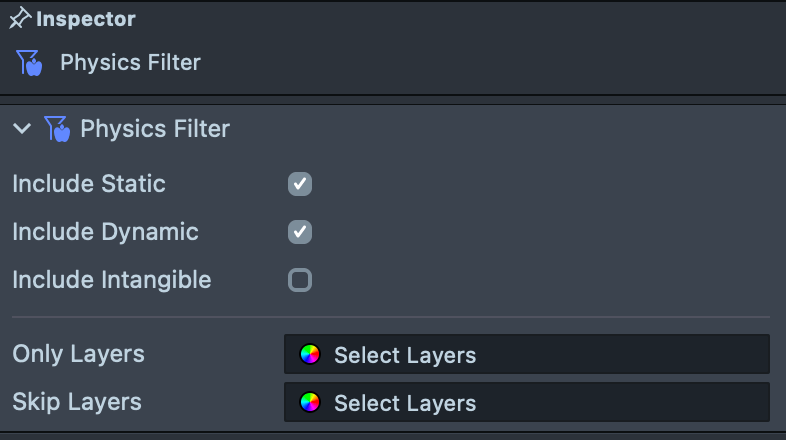
Physics Filter
Physics Filter allows filtering by layer and to specific colliders. For detailed information about this component, check out the Physics Component guide section on Physics Filter.
- TypeScript
- JavaScript
// Get object layer
const objectLayer = this.getSceneObject().layer;

// Create a new filter and adjust its settings.
const filter = Physics.Filter.create();
filter.skipLayers = objectLayer;
filter.onlyColliders = [this.myCollider1, this.myCollider2];

// Use the filter for collider overlap test.
this.myCollider3.overlapFilter = filter;
this.myCollider3.onOverlapEnter.add((e) => {
  print('OverlapEnter(' + e.overlap.id + '): ' + e.overlap.collider);
});
// Get object layer
var objectLayer = script.getSceneObject().layer;

// Create a new filter and adjust its settings.
var filter = Physics.Filter.create();
filter.skipLayers = objectLayer;
filter.onlyColliders = [script.myCollider1, script.myCollider2];

// Use the filter for collider overlap test.
script.myCollider3.overlapFilter = filter;
script.myCollider3.onOverlapEnter.add(function (e) {
  print('OverlapEnter(' + e.overlap.id + '): ' + e.overlap.collider);
});
There's two ways to assign a Physics Filter. Add a Physics Filter to Physics World Settings or to a specific Physics Collider or Physics Body.
Layer Collision Matrix
Layer Collision Matrix is one of the settings in the Physics World Settings. For each pair of layers, it indicates if colliders in one layer collide with colliders in the other. For detailed information about this component, check out the Physics Component guide section on World Settings.
Layer Collision Matrix Setting
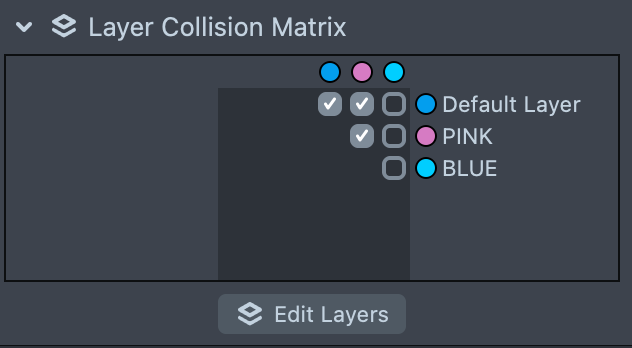
Click here to learn more about creating new layers.
- TypeScript
- JavaScript
// Create world settings.
const settings = Physics.WorldSettingsAsset.create();
print(settings);

// Modify layer collision matrix.
settings.setLayersCollidable(0, 3, false);

// Assign world settings to a collider.
this.myCollider.worldSettings = settings;
// Create world settings.
var settings = Physics.WorldSettingsAsset.create();
print(settings);

// Modify layer collision matrix.
settings.setLayersCollidable(0, 3, false);

// Assign world settings to a collider.
script.myCollider.worldSettings = settings;
Compound Colliders
A dynamic physics body merges the colliders on its child objects into a single compound shape and simulates them as one rigid object. Static colliders do the same when Force Compound is enabled on them. This is the standard way to build a body out of multiple primitive shapes.
Merging has a side effect: the compound collider ignores the merged child's own Layer, Filter, World Settings, and Intangible settings, and the child doesn't report its own collision or overlap events. The whole compound collides and reports events according to the root's settings.
Exclude From Parent Compounding
To keep a child collider independent, enable Exclude From Parent Compounding on it. The collider then never merges into an ancestor's compound shape: it keeps its own settings, reports its own collision and overlap events, and still follows its parent's motion through the scene hierarchy.
- It takes precedence over Force Compound on the ancestor body: the ancestor still compounds its other children, just not this one.
- It doesn't change whether this collider compounds its own children. That is still governed by its own Dynamic and Force Compound settings.
- Splitting out of a compound doesn't suppress collisions with the former compound. Whether the two collide follows the normal collision filter rules above, based on their layers, filters, and intangible settings.
A typical use is an interaction-only trigger volume attached to a dynamic body, such as an oversized proximity region around a ball. Without the flag, the trigger's shape merges into the ball and changes how it collides. With Exclude From Parent Compounding and Intangible enabled, the trigger rides along with the ball, reports its own overlap events, and leaves the ball's physics untouched.
- TypeScript
- JavaScript
// An interaction-only trigger volume under a dynamic body.
const triggerObj = global.scene.createSceneObject('Proximity Trigger');
triggerObj.setParent(this.ballObject);

const trigger = triggerObj.createComponent('Physics.ColliderComponent');
// Keep it out of the ball's compound shape, and intangible so it doesn't collide.
trigger.excludeFromParentCompounding = true;
trigger.intangible = true;

trigger.onOverlapEnter.add((e) => {
  print('Near the ball: ' + e.overlap.collider);
});
// An interaction-only trigger volume under a dynamic body.
var triggerObj = global.scene.createSceneObject('Proximity Trigger');
triggerObj.setParent(script.ballObject);

var trigger = triggerObj.createComponent('Physics.ColliderComponent');
// Keep it out of the ball's compound shape, and intangible so it doesn't collide.
trigger.excludeFromParentCompounding = true;
trigger.intangible = true;

trigger.onOverlapEnter.add(function (e) {
  print('Near the ball: ' + e.overlap.collider);
});