Visual Scripting Nodes
Reference for every node of Visual Scripting, Lens Studio's node-based Script Graphs for Lens logic and interactivity without code: what each node does and its inputs and outputs.
Visual Scripting adds logic and interactivity to a Lens without code: you connect nodes into a Script Graph. This reference has one page per node, with what the node does and its inputs and outputs. Find a node by name with Search, or browse the sidebar.
To learn Visual Scripting itself, start with the Visual Scripting Overview, which walks through creating your first Script Graph.
Visual Scripting was first released in Lens Studio 3.3 (2020) and is available in Lens Studio 5 from version 5.16. Like the Material Editor and VFX Editor, the Script Graph editor shows its sidebar in the Inspector panel.
Browse the Visual Scripting nodes
The node index lists every node from A to Z, each with a one-line description. In the sidebar, the nodes are grouped as the editor groups them, such as Basic Inputs, Constants, Control Flow, Events, Script and Variables.
Bind node update
Latest updates: 2025-11
The Bind node, which defines what is called when an event occurs, now takes a function as a parameter, like the other nodes that take functions.
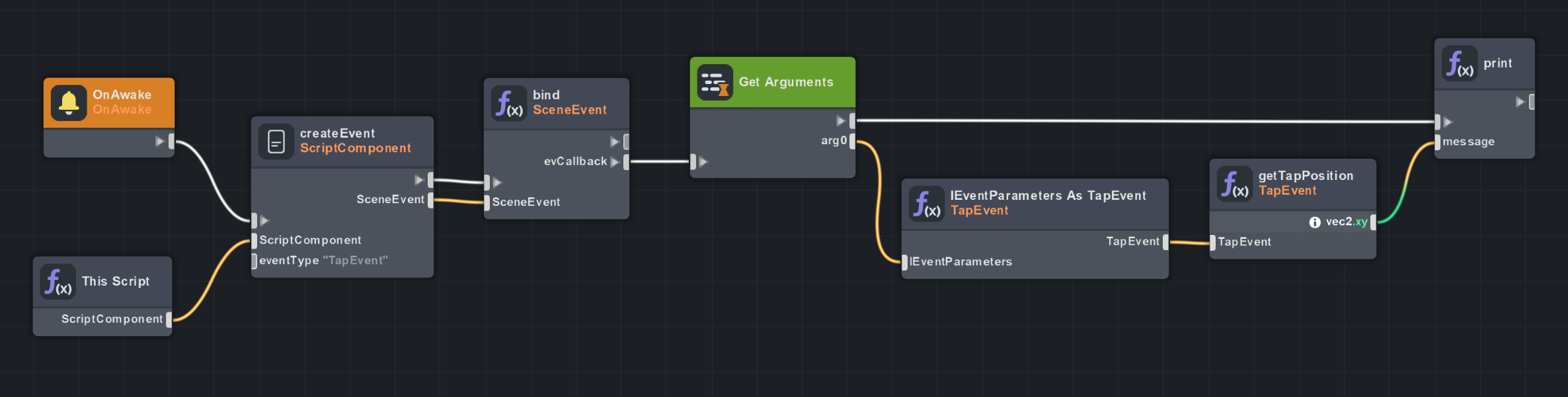
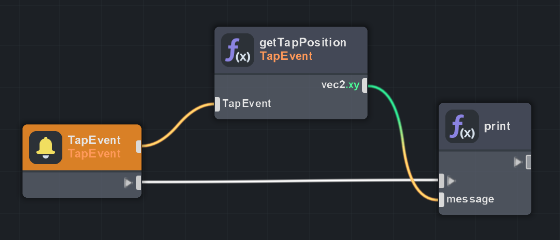
In most cases, use the Event node as a shortcut for binding to events.
Visual Scripting guides
- Visual Scripting Examples: Lens logic made in the Visual Scripting sample project, including how to connect it to Tween, Behavior and more.
- Types of Nodes: the kinds of nodes available in Script Graphs.
- Custom Nodes: extend Script Graphs with your own code.
Related
- Scripting in Lens Studio: scripting Lenses with code.
- Behavior: define Lens logic from dropdowns, without a graph.
- Lens Studio 4.55 Visual Scripting video guide
- VFX Editor Nodes and Material Editor Nodes: the other graph editors' nodes.